
LIAN LI 2025 Digital EXPO Nine New Product Launch Video Highlights

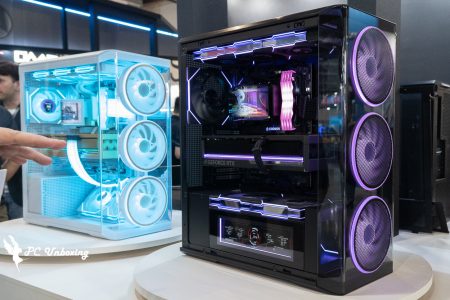
LIAN LI 2025 Digital Expo is showcasing a total of nine products: LANCOOL 217, LANCOOL 207 Digital, LANCOOL 4, O11D MINI V2, RS Series Power Supply, Universal LCD Monitor and Stand, Hydroshift II LCD-C 360R, UNI FAN SL-INF Wireless, PCIE 5.0 Vertical GPU Kit Graphics Card Stand, some are still in the prototype design stage; some will be available soon and MSRP is provided for gamers' reference. -Some of the products are still in the prototype design stage; some will be available soon, and MSRP is provided for your reference.
Black & White with Wood Grain LANCOOL 217 Chassis
The LANCOOL 217 is embellished with woodgrain trim and is preinstalled with a total of 5 fans, with two Ø170 mm diameter and 30 mm thick fans preinstalled at the front.

∆ White LANCOOL 217 housing.

∆ LANCOOL 217 housing in black.

∆ Five lightless fans are pre-installed.

∆ Front fan specification.
The default mounting mode of the front fan distributes airflow evenly between the CPU cooler and GPU, and if you want to focus the airflow on the CPU cooler, the fan position can be easily adjusted through the rail design, allowing you to adjust the direction of fan focus.

∆ Default mode.

∆ CPU Cooling Mode.

∆ Rail design.

∆ Fan mounting position adjustment.
In addition, two 25mm thick 120mm reverse bladed fans are mounted on top of the power supply compartment to provide direct air intake to the graphics card, and one 25mm thick 140mm exhaust fan is mounted at the rear of the chassis.

∆ Powerhouse fan specification.

∆ Rear chassis fan specification.

∆ The power compartment fan can be moved underneath the power compartment to support upright mounting of the graphics card.
The Lancool 217 has two modes of power installation, the standard mode is to install the power supply module with the slots facing the front of the chassis, supporting power supplies up to 220mm in length; the second mode is to install the power supply with the slots facing the right side of the chassis by rotating the power supply by 90 degrees, which is more convenient for cable management and only supports power supplies up to 180mm in length.
For the I/O design, Lancool 217 has dual power buttons for users to place the chassis on the desktop or on the floor. The power buttons are located at the top of the chassis and at the front left side of the chassis, so you can turn on and off the device anywhere.

∆ Power preset installation mode.

∆ The power supply rotates ninety degrees sideways.

∆ On button on the top of the chassis.

∆ The chassis side I/O plus the boot key.
The Lancool 217 will be available in black with dark wood grain and white with light wood grain, with a total of two versions expected to be available in March. Suggested retail price for the black version: US$$119.99 (approx. 3939.69 TWD), and for the white version: $124.99 (approx. 4103.86 TWD).

∆ Lancool 217 Proposed price.
Lightless Fan with Small Screen LANCOOL 207 Digital Case
The LANCOOL 207 Digital is an extension of the LANCOOL 207. It is also a compact mid-tower chassis with four pre-installed fans, two 30mm thick 140mm fans at the front and two 25mm thick 120mm fans on the power compartment, but the pre-installed fans on the LANCOOL 207 Digital are no-light fans.

∆ LANCOOL 207 Digital.

∆ Front fan specification.

∆ Powerhouse fan specification.
At the bottom of the front panel is a small 6" LCD display with a 60Hz refresh rate, 720 x 1600 resolution and 500 nit brightness.
The screen is controlled by L-Connect 3 software, which allows users to customize the display using default themes, such as CPU and GPU usage, temperature, or VRAM usage, as well as uploading videos or images to go along with the default system performance information, or customizing the information displayed.
LANCOOOL 207 Digital has a suggested price of US$$109.99 (approximately NT$3611.36) and is scheduled to be available in March 2025.

∆ Small screen at the bottom of the front panel.

∆ LANCOOL 207 Digital Proposed Price.
Another crazy variation of the LANCOOL 4 modular chassis.
LANCOOL 4 is a new member of the LANCOOL series and still maintains the modularity feature. The top cover and front panel of the chassis are of the same size so that users can interchange them, and it is compatible with ATX and M-ATX backplane mounting. This allows the motherboard to be moved to a lower position and the power supply to be moved to the front of the motherboard for a more versatile modular installation.

∆ LANCOOL 4.

∆ Use the same dimensions for the front panel and top cover.

∆ So it is possible to interchange the mounting of the switches.

∆ Motherboard higher mounting mode with power supply below the motherboard.

∆ Corresponding fan mounting position.

∆ Motherboard lower mounting mode, power supply switch to the right.

∆ Corresponding fan installation planning.
If you want to install with an air-cooled tower, you can install the mesh panel on the front; the glass panel on the top to synchronize the air intake by the front or side fans.

∆ Front mesh high motherboard mounting mode.

∆ Front mesh low motherboard mounting mode.
The LANCOOL 4 also comes with an additional mesh panel that allows two mesh panels to be installed at the same time, allowing users to install up to 11~12 fans when both the top and front are mesh panels.

∆ Dual mesh high motherboard mounting mode.

∆ Dual mesh low motherboard mounting mode.
Finally, the front I/O connector can be mounted on the top depending on the usage scenario. LANCOOL 4 is expected to be released around May.

The ∆ I/O is preset in the front direction.

The ∆ can be changed to a top mount.
Small Pet Upgrade O11D MINI V2 Case
The O11D MINI V2 is an upgraded version of the O11D MINI. It is also a dual-cabin chassis with a compact and modular design and support for ATX motherboards, and is about 2 liters larger than the original version.
Supports ATX motherboards and ATX back-plug motherboards. After installing an ATX motherboard, the top part can support 360 water coolers, but the maximum thickness is limited to 60 mm, so there is no need for an additional bracket this time!
Hydroshift series AIO installation is supported when the chassis is in M-ATX mode. This time, O11D MINI V2 supports ATX size power supply.

∆ O11D MINI V2.

∆ Size Contrast.

∆ Supports ATX backplane installation.

The top-mounted water cooling in ∆ ATX mode limits the mounting thickness to 60 mm.
The bottom fan mounting bracket is tilted 10 degrees. The upward tilt increases air intake from the right side of the bottom to improve GPU cooling performance.
On the right side of the chassis, a mesh filter protrudes from the right side panel in order to support ATX power.

∆ Bottom angled fan mounting bracket.

∆ Power intake filter.
The I/O module features an audio/microphone combo jack, two USB-A and one USB-C type ports, and a power on button. The chassis I/O is pre-installed on the top of the chassis but can be swapped out for bottom mounting, and the O11D MINI V2 is expected to be released in April.

∆ Chassis I/O is preset at the top.

∆ I/O at a glance.

∆ can also be moved to the bottom.
Rotatable RS Series Power Supply Units (PSUs)
The RS Series power supply utilizes a rotatable power cord port that allows it to be installed as a standard power supply or rotated 90° for use.
Users can rotate the power cord port by removing the power filter, and the filter can also be rotated 90° and reinstalled.

∆ RS series power supply.

∆Standard mode: The module cable slots and the AC cable connections are opposite and parallel to each other.

∆ After removing the power supply filter, the AC cable connector can be rotated.

∆ Rotary Mode: The module cable slots are vertically staggered with the AC cable connection.
Another unique design of the RS series power supplies is that the motherboard 24-Pin supply has been moved to the side of the power supply body, making it easier to organize cables.

∆ 24-Pin side exit.
與 EDGE Series Power SupplyLikewise, the RS Series power supply has a detachable hub that provides four USB 2.0 expansion ports for a total output of 2.5A, making it ideal for users with multiple LCD screen devices.
The RS Series power supplies are 80 PLUS Gold certified and are expected to be available at the end of the second quarter in 1200W, 1000W and 850W versions in black and white.

∆ USB 2.0 Expansion HUB.

∆ Three wattages are available.
Universal LCD Screens and Holders
The Lian Li Universal LCD screen is an 8.8-inch rectangular LCD display with a resolution of 1920 × 480 at 60Hz and a maximum brightness of 500 nit. A ring of square, soft LEDs surrounds the screen for extra visual impact.

∆ The Lian Li general-purpose LCD screen.

∆ Screen specification.

∆ Hardware information monitoring.
The highlight of this screen is the flexible mounting bracket, which uses an angle-adjustable metal hinged bracket that can be mounted in either a 120 mm or 140 mm fan aperture using standard fan screws, or magnetically attached to any metal surface.
In addition, the hinge design allows users to freely adjust the viewing angle of the LCD screen, and the mounting method is very flexible, supporting both horizontal and vertical mounting.
The United Universal Screen will be available in black and white along with its installation kit, which is expected to be available around April this year.

∆ Metal hinge bracket.

∆ The angle can be adjusted at will.

∆ Change the angle as required.

∆ Fan locking hole fixing bracket.

The ∆ can be magnetized anywhere, including display cards!
More versatile Hydroshift II LCD-C 360R All-in-One Water Cooler
The Hydroshift II LCD-C 360R is even smaller than its predecessor, with the watercooling manifold reduced by 5mm in thickness, 3mm in length, and 2.5mm in width. These minor adjustments ensure that the watercooler is compatible with more compact chassis.

∆ Hydroshift II LCD-C 360R.

∆ Cold vent size has been reduced a bit for better chassis compatibility.
The water-cooling head features a 2.1" round LCD screen with a 60Hz refresh rate and 500 nit maximum brightness, with a soft ARGB aperture around the edge of the screen and running along the side of the water-cooling head.
The LCD has three types of controls. The first mode is manual and does not require software support for control. The manual mode provides ten preset display effects, and the background or style of the LCD screen can be selected by rotating the outer ring on the top of the water-cooling head to the right, while rotating the outer ring to the left allows you to select the color of the light in the outer ring aperture.
The second mode uses the L-Wireless Wireless Controller, which allows users to configure the LCD and RGB settings through the L-Connect software without the need to connect through a USB cable. However, this mode does not support video playback, so if you want to play a video, you will need to use the third mode, the USB Cable Connection Mode, which connects to the motherboard through a USB 2.0 cable to upload videos and make more in-depth customizations. You can upload videos and make more in-depth customizations.

∆ LCD display specification.
The water cooling tube layout has been redesigned to be adjustable. The sliding fasteners on the side of the cooler can be fixed to the 140mm fan locking holes of the chassis, allowing users to fine-tune the left and right adjustments after installation, thus realizing the perfect way to route the water pipes. The Hydroshift II LCD-C 360R is expected to be available in March this year.

∆ The water-cooling pipe retaining clips can be repositioned.

∆ Available in March, good looking!
Wireless Unlimited Mirror UNI FAN SL-INF Wireless Jumbo Fan
The UNI FAN SL-Infinity Wireless features 3 independently controllable lighting zones. Zone 1, like the original SL-Infinity, is a circular infinity zone in the center of the fan blades, Zone 2 is the fan frame with the outside of the infinity zone on the bezel, and Zone 3 is the inside of the infinity zone on the bezel.
The Infinity Mirror on the side of the fan frame has a double-sided design; one side of the fan has a double-layered cone shape and the other side has a double rectangular shape. Infinity Mirror adopts double-layer design, the inner layer and outer layer can be set with different colors, brightness and lighting effects.

∆ Wireless Infinity Mirror UNI FAN SL-INF Wireless Jumbo Fan.

∆ Lighting Block 1.

∆ Lighting Blocks 2 and 3.
Since the fan is usually only shown on one side at a time, the user is free to choose which side faces the outside of the case, thanks to a receiver that can be connected to either end of the fan.

On the other side of the ∆ fan frame is a rectangular infinity mirror.

The ∆ connector can be connected to the left side.

The ∆ connector can also be connected to the right.
The wireless signal receiver has also been improved. The PWM power supply is now a 4-wire design, which ensures that the motherboard recognizes the fan set as a PWM fan instead of a DC fan, and with L-Connect's MB RPM SYNC mode enabled, the user can control the fan speed directly from the motherboard. If the wireless controller does not receive a signal, the fan will automatically switch to the motherboard PWM mode, which will follow the fan curve set by the BIOS or motherboard software.
The new receivers are compatible with SL-Wireless and TL-Wireless series fans and will be available for free at the official LIAN LI AliExpress store, but shipping will be at your own expense.

With the ∆ wireless fan family, I see the AL series as the next in line.
Tiltable PCIE 5.0 Vertical GPU Kit Graphics Card Upright Bracket
PCIE 5.0 Vertical GPU Kit There are 9 mounting modes for PCIE 5.0 Vertical GPU Kit, each with 3 different heights and 3 angles.

∆ PCIE 5.0 Vertical GPU Kit Displays the card's upright bracket.

∆ Nine installation modes can be changed.

∆ Standard Mode will have enough space on the bottom of the GPU for a standard fan to be installed.
For those who want the graphics card to stand upright but also want to avoid the CPU AIO LCD screen as much as possible, the second mode will minimize the height of the GPU to avoid the graphics card blocking the water-cooling head screen, but I don't know if it will work for graphics card models that have a lot of over-the-shoulder width.

∆ A mode that lowers the height of the graphics card, but closer to the bottom fan.
The third mode raises the GPU height to provide more room for the bottom fan, but obscures more of the watercooling head area.

∆ Graphics card higher mode.
Each of the three height modes can be adjusted 15 degrees forward or backward. The forward tilt is ideal for those who want to maintain the upright, spread-eagle look of the graphics card while ensuring direct heat dissipation from the bottom fan.
Or you can tilt the graphics card back towards the motherboard to give it a more "artifact on display" look. The new bracket will be available in PCIE 4.0 and PCIE 5.0 versions and is expected to be available in April.

∆ 15 degrees forward.

∆ 15 degrees back.

Yun
Drinks with less than full sugar are colored water. Crossing Turbid Creek, full sugar is not a crime!


 繁體中文
繁體中文  English