
28mm Thickened Fan! MONTECH NX400 ARGB Single Tower Air-cooled Unboxing Review

MONTECH's NX400 ARGB single-tower air cooler is the first of its kind to be positioned as an entry-level, affordable quad-tube single-tower air cooler. It uses four Ø6 mm nickel-plated copper tubes in direct contact with 52 cooling fins and the new E28 ARGB fan to dissipate the heat, and with the 28 mm thick fan, which is rare for air coolers, how does the cooling effect look? What is the cooling effect of the 28 mm thick fan?
MONTECH NX400 ARGB Specification:
Intel Feet: LGA 1851 / 1700 / 1200 / 115x
AMD feet: AM5 / AM4
Dimensions: 120.7 x 74 x 156 mm
Weight: 874 g
Number of heat pipes: Ø 6 mm x 4
Copper Base: Copper Base Direct Touch (Flat)
Fan size: 120 x 120 x 28 mm
Maximum RPM: 2000 RPM ± 10%
Maximum airflow: 85.09 CFM
Maximum wind pressure: 3.35 mmH₂O
Fan Power Supply: PWM 4-Pin, 5V 3-Pin ARGB
Includes a disposable cooling cream.
Warranty: one year
MONTECH NX400 ARGB Single Tower Air-cooled Unboxing
At Computex 2025, Montech showcased the NX400 ARGB and NX400 single-tower air coolers, which are the successor to the AIR COOLER 210 and NX400. METAL DT24 PREMIUM The third Montech air-cooled cooler since then is Montech's first single-tower, four-heatpipe air-cooled cooler.
The only difference between the NX400 ARGB and NX400 models is the fan model, the NX400 ARGB is paired with the E28 ARGB, while the NX400 is paired with the E28 PWM. Both models are available in black and white, but only the NX400 ARGB is sold in Taiwan, not the NX400, and the NX400 ARGB will be priced at NT$690 in Taiwan.
The NX400 ARGB is a single tower with four heatpipes and one fan, so I would recommend pairing it with the NX400 ARGB. Intel Core Ultra 200 Non-K Series ModelsOr AMD's low-power 65W model is fine, processors with higher power consumption may not be able to handle it, and the after-sales warranty provides a one-year warranty.

∆ Montech NX400 ARGB.

∆ Paper specifications are printed on the side.

∆ Product line drawings.
The NX400 ARGB Sync is available in black and white, and its dimensions are 120 x 74 x 156 mm, which means the height of the air-cooled cooler inside the chassis is 156 mm, so make sure it's compatible with the chassis you're going to install it in.
The cooling fins are composed of 52 fins, which are optimized in the official website, as well as improving the internal structure of the heatpipe and the ratio of water content to further optimize the thermal conductivity.
The fan is an E28 ARGB fan with a speed of 800 ~ 2000 RPM (PWM) ± 10%, a maximum airflow and pressure of 85.09 CFM and 3.35 mmH₂O, and a thickness of 28 mm. The fan itself uses FDB liquid bearings, which are secured to the tower with wire.
The fan requires a 4-Pin PWM power supply and a 5v 3-Pin ARGB for lighting setup. The fan lighting supports GIGABYTE, ASRock, ASUS, and MSI software for customization.

∆ NX400 ARGB Black and White.

∆ Cooling fins at a glance.

∆Lightless low-profile top cover covers the top of the heat pipe for better visual aesthetics.
The processor contact surface uses four Ø 6 mm nickel-plated copper tubes to directly contact the CPU IHS. Since it is a single-tower design, there is no need to avoid for the memory, and we will also show you the effect of the memory matching installation later.
Nickel-plated surface treatment can be used for a long time, so that the appearance of oxidation of the copper tube is not so unattractive, the direct contact surface of the copper tube from the factory with anti-scratch film, remember to tear off the thermal paste before!

∆ Nickel-plated copper tubes.

∆ Four heat pipes with a diameter of 6 mm.

∆ Protective scratch-resistant film.

∆ Heat pipe direct contact surface.
Accessories include only Intel and AMD grommets, and the disposable thermal paste comes in a sealed package, so you can take it apart and throw it away when you're done with it.

∆ Accessories at a glance.
Installed on a relatively compact ITX motherboard, the MONTECH NX400 ARGB single-tower air-cooled system is actually installed on a relatively compact ITX motherboard to show you a little bit of memory compatibility.

∆When viewed directly from the ITX with a compact layout, the first slot of memory will slightly block the viewing angle.

∆ Viewing angle of the air-cooled tower diffuser side mounting.

∆ Close-up of memory placement.
Then we will show you the lighting effect of MONTECH NX400 ARGB single tower air cooler for your reference.

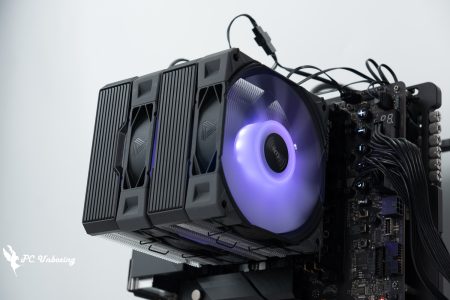
∆ Black version light effect.

∆ Black NX400 ARGB Single tower air-cooled.

∆ White light effect display.

∆ White NX400 ARGB single tower air-cooled lighting effect.
MONTECH NX400 ARGB Single Tower Cooling Performance Measurement

The MONTECH NX400 ARGB single-tower air cooler was installed on the barebones test platform with an AMD Ryzen 7 8700G processor and a GIGABYTE B650I AORUS ULTRA motherboard. During the testing process, the fan slots were set to run at full speed in the motherboard's BIOS, and the test scenario was a closed air-conditioned room in Taipei, Taiwan, with a temperature of 25°C. The test is for reference only, as it is difficult to control the ambient temperature in a normal room. The test was conducted in a closed air-conditioned room in Taipei at 25°C. The ambient temperature in a normal room is difficult to control, so this is for reference only.
We use AIDA64 FPU and Cinebench 2024 multi-core tests to simulate the temperature data under extreme load conditions, and 1080P resolution "Cinebench 2024" to simulate the temperature data under extreme load conditions.Kurokami Dialog: GokuThe _Black Myth: Wukong performance test tool is used to present the game's performance, while the data collection uses HWiNFO64 to collect and record the maximum temperature and power consumption of the CPU Package. The thermal paste is applied in a nine-point pattern, and then a spatula is used to spread the thermal paste evenly.
Testing Platform
Processor: AMD Ryzen 7 8700G (PBO AUTO)
Cooler: MONTECH NX400 ARGB
Motherboard: GIGABYTE B650I AORUS ULTRA (BIOS Version: F34b)
Memory:Kingston FURY Renegade DDR5 RGB 7200 MT/s 16GBx2 CL38-44-44-105 1.45V
Graphics: NVIDIA GeForce RTX 4060 Ti Founders Edition 8GB
Operating System: Windows 11 Professional 24H2
System Drive: Kingston A2000 NVMe PCIe SSD 500GB
Gaming Disk: Intel 670P 2TB M.2 2280 PCIe SSD (Solidigm)
Power supply:LIAN LI SP850
Chassis:Streacom BC1 Mini V1 ITX Open Benchtable
I updated the motherboard's BIOS version to F34b, and used this motherboard's default settings to conduct the test. The remaining settings: XMP_on, fan speed_full, and the test scene is a closed room at 25 °C for actual testing, which is just for reference as the ambient temperature in a normal room is difficult to control.
After an hour of AIDA64 FPU under PBO Auto, the CPU (Tctl/Tdie) maxed out at 76 °C; the CPU Package consumed 87 W, and the CPU temperature was 75 °C max.
The simulation game runs on theKurokami Dialog: GokuIn the _Black Myth: Wukong_ Performance Test Tool round of testing, the maximum CPU Package temperature came in at 74.5 °C; the CPU Package power consumption was 87 W, and the CPU temperature was a maximum of 74 °C. The CPU Package power consumption was 87 W, and the CPU temperature was a maximum of 74 °C. The CPU Package power consumption was 87 W, and the CPU temperature was a maximum of 74 °C.
- AIDA64 FPU_1 hour
- AIDA64 CPU_1 hour
- Black Myth: Wukong 1920 x 1080(FHD)_1 Round
- Cinebench 2024 Multi Core_1 Round
- CPU temperature is measured by the diode in the slot to measure the internal (core) or external (case) temperature, but there is no way to know exactly whether it is the internal or external temperature that is measured, and most monitoring software uses this item to display the CPU temperature.
- CPU (Tctl/Tdie) temperature is the actual maximum temperature of the CPU sensor in the chip.

∆ Thermal performance.

∆ AIDA64 FPU test screenshot.
Conclusion

The NX400 ARGB is MONTECH's first single-tower air-cooled cooler. The product itself is positioned to be more affordable and accessible than previous products, and the price is also suitable for entry-level users who would like to experience an air-cooled cooler to go along with the installation. The single-tower, four-heatpipe specification won't obscure the appearance of the memory heatsinks on the installation, but it is recommended to install the NX400 ARGB before the motherboard is placed in the chassis, which will be more convenient. However, it is recommended that users install the NX400 ARGB before putting the motherboard into the chassis.
The E28 ARGB fan with a thickness of 28 mm is a rare combination for an air-cooled tower, and the sound is not too noisy even at full speed, but it's a pity that there is only a one-time capacity of thermal paste, so you should remember to prepare beforehand if you need to update the thermal paste in the future.
The actual maximum temperature of AMD Ryzen 7 8700G with 8 cores and 16 threads is 80.6°C. Therefore, the author suggests to pair it with the AMD Ryzen 7 8700G. Intel Core Ultra 200 Non-K Series ModelsThis cooler is suitable for gamers who "want to replace the stock cooler" to get a better look or lower noise level.

Yun
Drinks with less than full sugar are colored water. Crossing Turbid Creek, full sugar is not a crime!


 繁體中文
繁體中文  English