
Metallic Reimagined MSI GeForce RTX 4080 SUPER 16G EXPERT Graphics Card Unboxing Performance Review

After three and a half years, the NIVIDA GeForce RTX SUPER series of graphics card models have reappeared in front of gamers“ eyes. The MSI GeForce RTX 4080 SUPER 16G EXPERT has 10240 CUDA cores, 320 Tensor Cores, 80 Ray Tracing Cores, and a Boost frequency of 2610 MHz; in Extreme Performance mode, it can be further increased to 2625 MHz. The Boost frequency is 2610 MHz and can be increased to 2625 MHz in Extreme Performance mode, which is even higher than the RTX 4080”s core specs and frequency, but the proposed price is even cheaper at US$999 (starting at NT$36,490), so whether the new model can revitalize the " 4080" model? Will the new model revitalize the reputation of the "4080" model?
MSI GeForce RTX 4080 SUPER 16G EXPERT For an unboxing of the graphics card, please refer to this unboxing article.
MSI GeForce RTX 4080 SUPER 16G EXPERT Specification:
Display Core: NVIDIA GeForce RTX 4080 SUPER
PCI Express: 4.0 x16
CUDA: 10240
Tensor Core: 320
Ray Tracing Core: 80
GPU clock: Extreme Performance: 2625 MHz (MSI Center) / Boost: 2610 MHz
Memory Specification: 16 GB GDDR6X
Memory Speed: 23 Gbps
Memory Interface: 256-bit
Dimensions: 312 x 141 x 61 mm
Occupied Slot: 3 Slot
Power supply connector: 1x 12V-2×6 16-Pin
Recommended Power Wattage: 850W
DirectX: 12 Ultimate
OpenGL: 4.6
Display output: 1x HDMI 2.1a, 3x DisplayPort 1.4a
Multi-screen output limit: 4
Low Profile MSI GeForce RTX 4080 SUPER 16G EXPERT Unboxing
The look of this graphics card and the unboxing of the accessories can be seen in the earlierThis unboxing articleI'll just take a quick look at the parts that I didn't mention in the previous unboxing.
The MSI GeForce RTX 4080 SUPER 16G EXPERT measures 312 x 141 x 61 mm in length, width, and height, and does not have any RGB lights or strips on the card, which means that there is no lighting when the card is powered on, which makes it suitable for those who prefer to install the card without lighting.
From the looks of it, it looks a bit like the old MSI Radeon RX 5700 / RX 5700 XT EVOKE OC with the same vibe: matte, metallic, understated, etc. The RX 5700 XT EVOKE OC has the same features.
∆ MSI GeForce RTX 4080 SUPER 16G EXPERT measures 312 x 141 x 61 mm in length, width and height.
As you can see from the fan configuration, the MSI GeForce RTX 4080 SUPER 16G EXPERT graphics card is a bit similar to the RTX 4080 Founders Edition design in terms of fan flow planning.
The Ø 11.5 cm fan on the left side of the front side blows directly on the cooling fins above the core and exhausts heat from the rear screen output, while the Ø 11.5 reverse fan on the back side draws cold air from the front side, allowing the cold air to flow through the heat pipes and cooling fins to further enhance heat dissipation.
The graphics card fans all support Smart Stop, which automatically stops the fan when the GPU core temperature falls below 50°C under low load conditions to achieve 0dB(A) silent usage, for the quietest experience in standby or light load usage.

∆ A fan of Ø11.5 cm is located on the front of the graphics card, blowing directly on the cooling fins above the core and exhausting heat from the rear monitor output ports.

On the back panel of the ∆ graphics card, there is a Ø11.5 cm fan with reversed blades, allowing airflow through the entire graphics card cooling module.
There are three DisplayPort (v1.4a) and one HDMI (2.1a) slots on the output side of the monitor, and this direction of the monitor output is also the direction of the cooling airflow, so when the MSI GeForce RTX 4080 SUPER 16G EXPERT card is running at high loads, there will be a warm sensation coming out from this side.

∆ 3x DisplayPort (v1.4a) and 1x HDMI (2.1a).
MSI recommends that this card be used with at least an 850W power supply, or at least 750W. The MSI GeForce RTX 4080 SUPER 16G EXPERT uses a 16-Pin “12V-2×6” power supply slot instead of the old 12VHPWR. However, it is hard to recognize the two versions from the outside, so I had to disassemble the card before I could tell that the card is using the new 12V-2×6.

The ∆ power supply slot uses the new 12V-2×6 from the PCI-SIG organization, and only the security mechanism such as the recess on the pins has been modified, but the appearance has not changed much, so it is still compatible with the 12VHPWR power supply cable.
MSI GeForce RTX 4080 SUPER 16G EXPERT Card Teardown Showcase
The author is going to disassemble this MSI GeForce RTX 4080 SUPER 16G EXPERT graphics card manually, and I would like to remind all gamers that "I don't recommend or promote consumers to disassemble the card by themselves, as it may lead to human failure and loss of warranty", and the author will disassemble it only for display purposes for your reference.
There is no MSI sticker on this card (doesn't mean the market version doesn't have one either), and the whole disassembly process is pretty simple, but the connection between the two fans and the slots is a bit anti-human.

∆ Remove the six screws on the reinforced back plate first and the reinforced back plate can be removed.

The back of the ∆PCB is shown, the fan slot on the back wraps around the front of the PCB for mounting, and is a bit snaggy to remove.

A thermal pad is attached to the back of the ∆ core to help dissipate heat.

∆ The back side is shown, later you need to remove the four pressure grommet screws and the four screws on the side, totaling eight.

∆ Internal cooling module display with nickel-plated heat pipes.

∆ In addition to the 6+8 screws mentioned above, the two screws on the left side of the DP output connector also need to be removed in order to completely dismantle the thermal module and PCB, totaling 16 screws.

∆ Front radiator module removed.

∆ Both fans on the graphics card connect to the slot at this strange angle.
The MSI GeForce RTX 4080 SUPER 16G EXPERT uses the 5 nm Ada Lovelace architecture AD103-400-A1 core with 10240 CUDA Cores (52 shader TFLOPS), 80 SM units, 320 Tensor Cores (836 AI TOPS), 80 Ray Tracing Cores (121 RT TFLOPS). With 10240 CUDA Cores (52 shader TFLOPS), 80 SM units, 320 Tensor Cores (836 AI TOPS), 80 Ray Tracing Cores (121 RT TFLOPS), NVIDIA says the new GeForce RTX SUPER GPUs dedicated AI Tensor cores deliver up to 836 AI TOPS, increasing AI performance in gaming, creation, and daily productivity. A software stack built on RTX GPUs further enhances AI performance.
For multimedia professionals, the RTX 4080 SUPER also features two 8th NVIDIA Encoders (NVENC) and 5th NVIDIA Decoders (NVDEC), which also support AV1 video encoding and decoding.

∆ uses a short PCB layout, but it's not the same as the RTX 4080 Founders Edition, so it shouldn't be possible to share cooling modules.

The ∆NVIDIA RTX 4080 SUPER graphics core (Ada Lovelace architecture AD103-400-A1) is next to a single 2 GB of Micron_GDDR6X graphics memory (VRAM) for a total of 16 GB.

The Die Size of ∆ AD103-400-A1 is 379 mm².

∆ After disassembling the card, you can see that it uses the H++(12V-2×6) 16-Pin power supply slot.

∆Cooling module display.

∆ The electronic components on the graphics card or the graphics card memory are covered with thermal pads.

∆ Use a matte heat shield to help conduct heat through the core.

∆ Cooling fins block display.

∆ Nickel-plated heat pipes.

The number of ∆ heat pipes is six.
Graphics Card Professional Creation and Rendering Test
For professional testing, a total of eight different software programs were used, including OctaneBench 2020.1.5, Indigo Bench, Blender Benchmark, SPECviewperf 2020 v3.1, Superposition 2017 Benchmark, Vray6, Geekbench 6, Cinebench 2024, and many other professional testing software in different fields, Geekbench 6, Cinebench 2024, etc., a number of different fields of professional testing software, including rendering, 3D modeling, 2D graphics, video editing and transcoding, etc., through the professional software built-in benchmark tests for your reference.
The test platform uses Intel Core i9 13900K processor with MSI MEG Z690I UNIFY motherboard and T-FORCE XTREEM DDR5 8000 MT/s 2x 16GB dual-channel memory to test the protagonist of this unboxing, MSI GeForce RTX 4080 SUPER 16G EXPERT. graphics card.
The motherboard BIOS is version 7D29v1G, with XMP 3.0 and Resizable Bar turned on in the BIOS and Game Boots turned on in the processor; the power consumption remains at the motherboard's default PL1/PL2 setting of 288 W, and the graphics card driver version is GeForce Game Ready 551.22 from NVIDIA. To test the scores.
Testing Platform
Processor: Intel Core i9 13900K (MSI Game Boots_on)
Cooler: Valkyrie E360 (full speed)
Water-cooled fan: LIAN LI UNI FAN P28 (full speed)
Motherboard: MSI MEG Z690I UNIFY ( BIOS version: 7D29v1G )
Memory: T-FORCE XTREEM DDR5 8000 MT/s 2x 16 GB
Graphics: MSI GeForce RTX 4080 SUPER 16G EXPERT
Operating System: Windows 11 Professional 22H2
System Drive: Plextor PCIe Gen3 x4 M.2 2280 SSD 512GB
Gaming Disk: Intel 670P 2TB M.2 2280 PCIe SSD (Solidigm)
Power Supply: MONTECH TITAN GOLD 1200W
Graphics driver: GeForce Game Ready 551.22
GPU-Z Check out the specification information of MSI GeForce RTX 4080 SUPER 16G EXPERT graphics card, the 5nm AD103 core has 10240 CUDA cores, the graphics card memory is 256-bit 16384 MB GDDR6X (Micron), and the GPU default clock is 2295 Mhz / Boost 2610 Mhz.
 ∆ GPU-Z.
OctaneBench 2020.1.5 OctaneRender is a benchmark test based on the OctaneRender GPU rendering engine that allows users to compare graphics card rendering performance using the free OctaneBench software. OctaneRender has also added a ray tracing effect in version 2020.1.1, so NVIDIA RTX Series graphics cards can be compared to the performance provided by RTX Series graphics cards in OctaneBench. 2020.1 with RTX acceleration turned on to compare the performance gains offered by RTX-series graphics cards for ray tracing rendering operations, and this time the card scored 987.40 points in the program.
 ∆ OctaneBench 2020.1.5.
Indigo Bench The Indigo 4 rendering engine is a free software that uses the OpenCL architecture to support NVIDIA, AMD and Intel graphics cards and processors for rendering performance testing. The test provides two sample renderings, bedroom and car, and the results are in units of rendering completion per second, so the higher the better. The result for the bedroom project was 26.438 (M samples/s) and the result for the sports car project was 64.704 (M samples/s).
 ∆ Indigo Bench.
blender benchmark launcher 4.0.0 It is a free benchmark software provided by blende, a 3D graphics software. In the benchmark, users can choose whether they want to test the CPU or the GPU, and the test process consists of three scenarios: monster, junkshop, and classroom.
 ∆ blender benchmark launcher 4.0.0.
SPECviewperf 2020 v3.1 Including various professional work area 3D drawing and rendering software, the test software to OpenGL and DirectX API operation 3D graphics performance simulation test, this time to 3840×2160 4K image quality test project contains 3ds Max, CATIA, Creo, Energy, Maya, medical, snx, SolidWorks and other software.
 ∆ SPECviewperf 2020 v3.1.
Superposition 2017 is a benchmark software based on the UNIGINE 2 engine, which is often used in simulators, cross-platform games, VR, and 3D architectural software development, and supports Graphics APIs such as OpenGL 4, Vulkan, and DirectX 12, etc. In the Benchmark test, the Graphics API option uses DirectX and selects 4K and 8K image quality. In the Benchmark test, the Graphics API option uses DirectX and selects 4K and 8K image quality for testing. 23001 AVG FPS points were obtained in the 4K project: 172.04; while 8661 AVG FPS points were obtained in the 8K project: 64.78.
 ∆ Superposition 2017 Benchmark, DirectX, 3840 x 2160 4K.
 ∆ Superposition 2017 Benchmark, DirectX, 7680 x 4320 8K.
V-Ray 6 Benchmark The V-Ray GPU CUDA program can mix CPU and GPU rendering at the same time, and of course it can also be tested separately, while the V-Ray GPU RTX program is compatible with NVIDIA RTX series graphics cards for ray tracing rendering tests. The V-Ray GPU RTX project is compatible with NVIDIA RTX series graphics cards and performs ray tracing rendering tests.
 The graphics card alone rendering in the ∆ V-Ray 6 GPU CUDA project scored 4788 points.
 ∆ The V-Ray GPU RTX item supporting optical tracking graphics cards scored 7016 points.
Geekbench 6 With built-in CPU and GPU benchmark tests, the Geekbench 6 GPU Compute Benchmark program can be used to evaluate the graphics card's performance in professional workloads, such as image processing, rendering, machine learning (ML) and other professional scenarios, and to obtain an overall score for a wide range of tests such as Deep Learning Workloads, Background Blurring, Face Detection, Image Editing, Horizontal Detection, Edge Detection, Gaussian Blurring, Image Composition, Feature Matching, Stereo Matching, Example Physics and more. Blurring, Image Synthesis, Feature Matching, Stereo Matching, Example Physics, and more, and the GPU API can be tested with either OpenCL or Vulkan.
 Score of 262591 in ∆ Geekbench 6 GPU Compute Benchmark OpenCL.
 234600 points in ∆ Geekbench 6 GPU Compute Benchmark Vulkan.
Cinebench 2024 MAXON ONE is Maxon's benchmark software for MAXON ONE software. MAXON ONE includes Cinema 4D, Red Giant Complete, Redshift, ZBrush, Universe, and Forger, and is a powerful tool for creating animation effects, motion design, motion graphics, film-grade portraits, and game art scenes. Each of these software programs fits together to provide a complete visual solution for creators.
Cinebench 2024 uses Cinema 4D's default Redshift rendering engine to test GPU and CPU performance. If multiple graphics cards are used to run Cinebench 2024 tests, the software utilizes multiple cards for the rendering tests at the same time, and Cinebench 2024 performs multiple rendering tests with six times the amount of computation when compared to Cinebench R23. Compared to Cinebench R23, the Cinebench 2024 multi-threaded rendering tests show a six-fold increase in the amount of computation for scenes. This reflects improvements in CPU performance and the higher hardware requirements that multimedia workers must now meet.
 27074 pts were obtained in the GPU entry for ∆Cinebench 2024.
3DMark score test
The following tests were conducted using the 3DMark software released by UL Solutions Taiwan, which is the most important benchmark for graphics card scores in gaming. The following tests were conducted using the GeForce Game Ready 551.22 driver, with XMP 3.0 and the Resizable Bar turned on. XMP 3.0 and Resizable Bar.
3DMark Fire Strike Includes two tests using the DirectX11 GPU API, a physical test and a combined CPU and GPU test for gaming performance at 1080p, Extreme 1440p, and Ultra 2160p, respectively, with a total score/graphics card score of 45,728/59,695 in 1080p resolution, and 2K 1440p image quality. Fire Strike Extreme Obtained total score / graphics card score of 31056 / 33958, requiring higher 4K 2160p image quality Fire Strike Ultra Get total score / card score 17835 / 17315.
 ∆ DirectX11 Fire Strike.
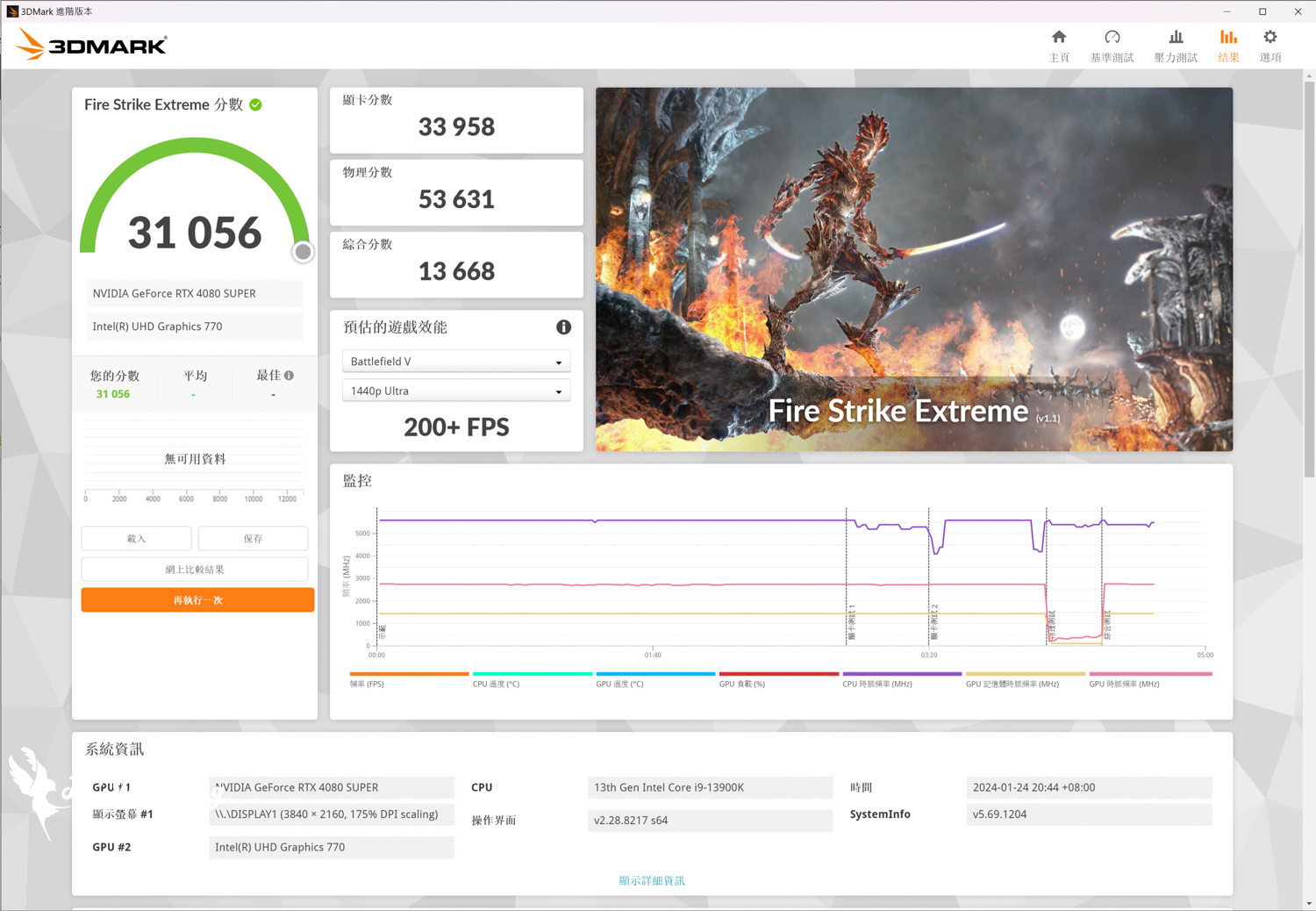 ∆ DirectX11 Fire Strike Extreme.
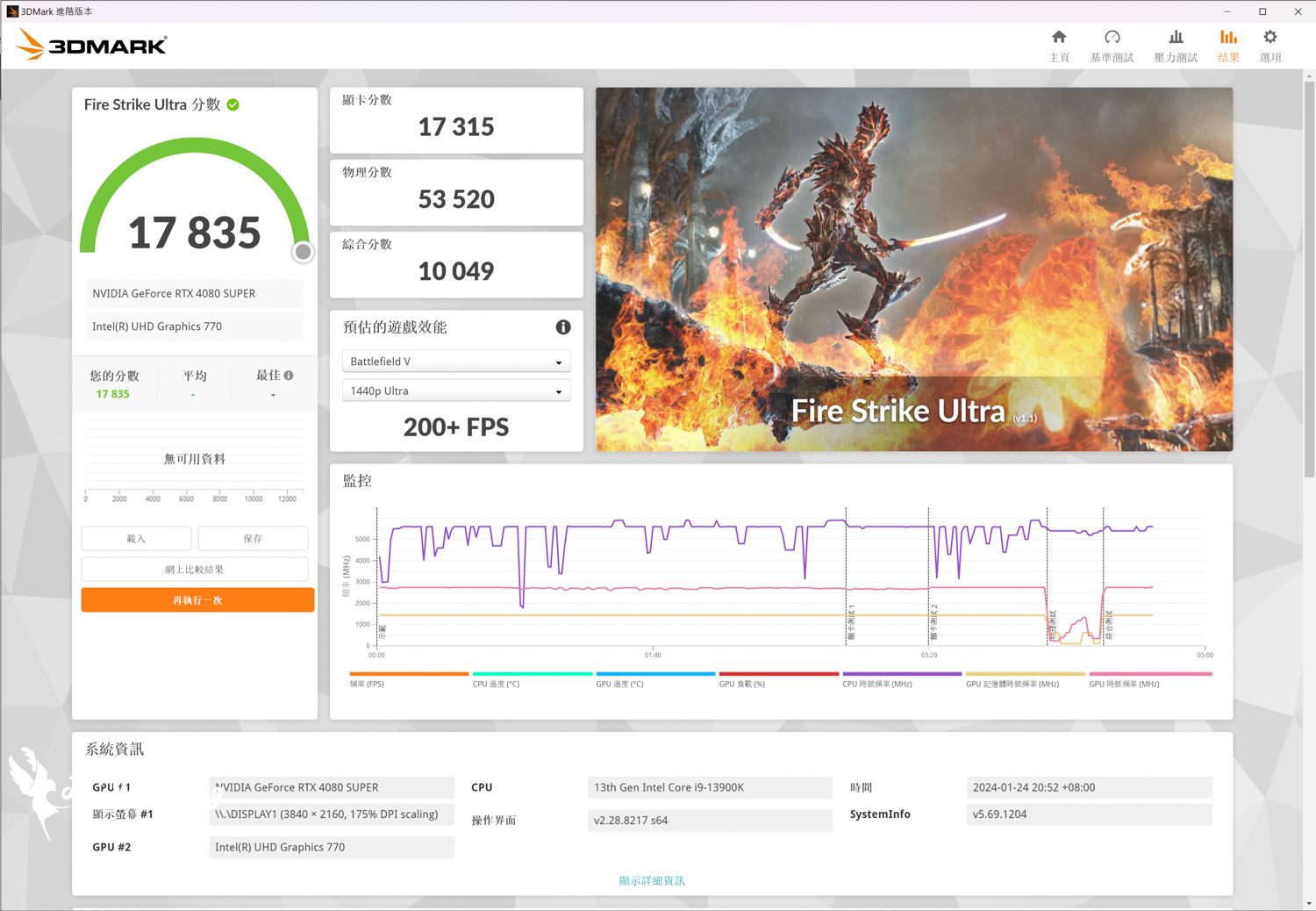 ∆ DirectX11 Fire Strike Ultra.
3DMark Time Spy For the DirectX 12 GPU API, which is also a benchmark test for gaming orientation, the resolution not only provides 2K 1440p, but also 4k 2160p for Time Spy Extreme program to test the gaming performance, and in the test, it is also possible to test the gaming performance of the GPU. Time Spy The program received a total score / card score of 27982 / 28410;Time Spy Extreme The project is total score / graphics card score 13878 / 14107.
 ∆ DirectX 12 Time Spy.
 ∆ DirectX 12 Time Spy Extreme.
Port Royal The test item is DirectX 12 DXR API, adding DirectX Raytracing and DLSS to the 2K quality test, and it is also the first real-time ray tracing benchmark for gamers, scoring 18096 points in the Port Royal test.
 ∆ Port Royal.
Speed Way Developed with the latest DirectX 12 Ultimate API, it uses DirectX Raytracing tier 1.1 real-time raytracing full-area illumination, raytracing reflections, mesh shaders, and other new technologies, and it is the latest raytracing game performance benchmark test for gamers' reference, with a score of 7,348 points in Speed Way.
 ∆ Speed Way.
3DMark DLSS The feature test provides a quick look at the frame rate improvement of NVIDIA's DLSS feature by turning the DLSS setting on and off. Users can choose to run NVIDIA's DLSS feature test with DLSS 3, DLSS 2, or DLSS 1, but only the newest NVIDIA RTX 40 series graphics cards support the DLSS 3 program and offer 1080p, Only the latest NVIDIA RTX 40 series graphics cards support the DLSS 3 program, which offers comparisons at 1080p, 1440p, 4K, and 8K (DLSS 2/DLSS 3 only).
The benchmark test uses the same test procedure as Port Royal to run twice to get the results. 1080p, 1440p and 4K can choose between Quality and Performance DLSS modes, while 8K has an additional Ultra Performance mode, which is used by the author in 2K and 4K image quality. The author used the Ultra Performance mode for 2K and 4K image quality, and the Ultra Performance mode for 8K image quality, and provides a chart of the frame rate (FPS) of the graphics card with DLSS on and off in different image qualities among the three DLSS versions.
 ∆ 3DMark DLSS Function Test: DLSS 1, DLSS 2, DLSS 3_on/off Frame Rate (FPS) graph.
Three FPS-type gaming games to test
Three iconic games have been selected for testing in the FPS gaming category.Battle Attack 2_Overwatch 2, _Rainbow Six: Operation Siege_Tom Clancy's Rainbow Six Siege, and theApex Legends》。
In the three FPS-type e-sports games, in addition to "Tom Clancy's Rainbow Six Siege" has built-in performance test, the other two games are in the shooting range for the collection of frames, APEX due to the preset limit of the game at 144 frames, in order to get a higher frame rate limit to allow the graphics card performance to give full play to its full performance, the author manually Input the program code and change it to test APEX frame rate.
 ∆ Three FPS-type gaming games tested: highest texture effects, 4K 3840×2160 resolution.
Nine AAA Masterpiece Games to Test
To test the AAA genre, which emphasizes on the experience of graphic performance and storytelling, the author chose to play "The Battle of the Birds", which is the first game in the AAA genre.The Hogwarts Legacy_Hogwarts Legacy, TheThe Witcher 3: Wild Hunt_The Witcher 3: Wild Hunt, TheElectric Renegade 2077_Cyberpunk 2077, TheWatch Dogs: Freedom Corps_Watch Dogs: Legion, TheHowl of War 6_Far Cry 6, _war god_God of War, _Avatar: Pandora's Edge_Avatar: Frontiers of Pandora, TheHorizon: Expecting Dawn_Horizon Zero Dawn_, _Horizon Zero Dawn_, _Horizon Zero Dawn_.Assassin's Creed: Viking AgeNine 3A titles, including _Assassin's Creed Valhalla_, were tested in real life.
Considering that most gamers pursue the most beautiful screen performance rather than the highest frame rate performance when playing 3A games, the author also set the built-in "Highest" texture effect option in the AAA type of game test, and the NVIDIA DLSS technology supported by most of the nine games is set to "Quality/Picture Quality" to obtain a certain degree of frame rate improvement while maintaining the screen performance as much as possible. The frame rate is also collected using AVG and 1% Low FPS.
 ∆ Nine AAA-type games tested: highest texture effects, 4K 3840×2160 resolution.
Tested six optical tracking games.
NVIDIA RTX 40 Series graphics cards are equipped with the third-generation RT Core for better ray tracing performance than the previous RTX 30 Series, and six ray-tracing DXR (DirectX Raytracing) games choose theAvatar: Pandora's Edge_Avatar: Frontiers of Pandora, TheThe Hogwarts Legacy_Hogwarts Legacy, TheThe Witcher 3: Wild Hunt_The Witcher 3: Wild Hunt, TheElectric Renegade 2077_Cyberpunk 2077, TheWatch Dogs: Freedom Corps_Watch Dogs: Legion, TheHowl of War 6_Far Cry 6 was tested with the same "Maximum" and DLSS 3 quality modes, AMD FSR Extreme Quality mode, for both the on-screen effects and the light tracking settings.
 Six optical tracking tests in ∆ 4K resolution.
Graphics Card Temperature and Power Consumption Test
The graphics card was set up in an indoor chassis test bed to conduct the temperature and power consumption tests of the graphics card, and the author used the "Grid" test program.Electric Renegade 2077Cyberpunk 2077, Time Spy, and Furmark were used for real-world testing, while HWiFO64 was used to collect and record the maximum temperature GPU temperature, GPU Memory Junction Temperature, and GPU Power. There will be a deviation of 1~3% for software monitoring, the data is for reference only.
Chassis Thermal Test Bench
Processor: AMD Ryzen 9 7900 (PBO Enable)
Cooler: MSI MEG CORELIQUID S360
Motherboard: MSI MEG X670E ACE (BIOS version: 7D69v193[Beta version])
Memory: Kingston FURY Renegade DDR5 RGB 7200 MT/s 16GBx2
Graphics: MSI GeForce RTX 4080 SUPER 16G EXPERT
Graphics: NVIDIA GeForce GTX 1080 Ti Founders Edition 11G (secondary display output)
Operating System: Windows 11 Professional 22H2
System disk: MSI SPATIUM M371 NVMe M.2 1TB
Storage: Toshiba 1TB 3.5-inch hard drive
Storage: Kingston KC3000 PCIe 4.0 NVMe M.2 SSD 2TB
Gaming Disk: CS2140 M.2 2280 NVMe Gen4x4 SSD 1TB
Power Supply: FSP Hydro PTM PRO ATX3.0 (PCIe5.0) 1200W
Case: LIAN LI O11 Dynamic EVO XL
Water-cooled fan: 3x ARCTIC BIONIX P120 ARGB
Rear Fan: 1x ARCTIC BIONIX P120 ARGB
Bottom Fan: 3x MSI MEG SILENT GALE P12
Side Fans: 3x XPG VENTO PRO 120 PWM
Graphics driver: GeForce Game Ready 551.22
 ∆ Graphics card temperature and power consumption test chart.
Graphics Card Naked Platform and Thermal Imager Thermal Observation
In addition, during an additional Furmark test on an upright barebones platform, a FLIR ONE PRO thermal imaging camera was used to observe the heat flow of the MSI GeForce RTX 4080 SUPER 16G EXPERT's thermal module under high load conditions for your reference.
 The temperature of the 16-pin cable that powers the ∆ graphics card is approximately 37.2 °C. The temperature of the 16-pin cable that powers the ∆ graphics card is approximately 37.2 °C.
 Approximately 47.4 °C for the ∆ 16-Pin power supply slot and 26.7 °C for the graphics card housing.
 The highest temperature block on the back of the ∆ graphics card is the back of the core at 40.8 °C. As you can also see from the thermal image, the reverse fan on the right side is indeed doing its job of removing heat.
 As you can see at the ∆ display output connector, the cooling airflow will be discharged from this area, which reduces the problem of air cooling towers dissipating waste heat, but it's not good news for the screen cables.
Conclusion

In the 4K resolution test, MSI GeForce RTX 4080 SUPER 16G EXPERT was able to achieve an average of 199 fps or higher in three high frame rate FPS games, and all of the nine 3A titles were able to run at an average frame rate of 4K 105 fps or higher, even with the graphics settings turned on full blast.
Six 3A games with real-time ray tracing turned on and AI-powered NVIDIA Deep Learning Super Sampling (DLSS) that combines Super Resolution, Frame Generation, and Ray Reconstruction with ray tracing. DLSS combines frame generation and Ray Reconstruction with ray tracing to achieve scores averaging 79+ frames with DLSS/DLSS 3/DLSS 3.5 turned on in the setup.
In other words, the MSI GeForce RTX 4080 SUPER 16G EXPERT scored a total average of 119.1 fps in six ray tracing games and 95 fps in 1% Lows, so if you're upgrading from the RTX 20/30 series to the RTX 40 series with Ada Lovelace architecture, then the RTX 4080 SUPER can really meet the demand for 4K 100 fps games, but a few poorly optimized or high refresh rate displays will be able to meet the demand for 4K 100 fps games. If you are upgrading from RTX 20/30 series graphics cards to Ada Lovelace architecture RTX 40 series graphics cards, and want to use it with 4K 144 Hz high resolution and high refresh rate monitors, then RTX 4080 SUPER is indeed able to meet the demands of 4K 100 fps gaming, but a few less optimized or more demanding 3A optical games still need to be adjusted a bit in order to meet an average of 4K 100 fps performance.
For the temperature performance, I used the O11D EVO XL with a full fan and full speed, and the recent winter in Taiwan is quite cold, so the temperature performance may be similar to the bare platform direct test, the gaming temperature is around 65 °C. The highest power consumption of the card is 321 W, which is almost the same as the RTX 4080 that the author has previously tested, and the wattage of power supply is about the same as the RTX 4080. The power consumption is about the same as the RTX 4080 that I have tested before, and the power supply wattage is 850 W. It is recommended to use it together.
Taiwan's sales channels have also offered the MSI GeForce RTX 4080 SUPER 16G EXPERT for an initial price of NT$38,990, which is about the same as the GAMING X TRIO, but we haven't yet seen the prices of the SUPRIM and the GAMING X TRIO on the first day of launch so we can't directly compare them, so it's up to you to decide whether or not you want to spend the extra $2,000 or so on a model with the same cooling fan channels as the Foundry Edition. As to whether or not to spend more than $2,000 on a model with similar cooling ducts as the Foundry Edition, it is up to the consumers to decide for themselves.

Yun
Drinks with less than full sugar are colored water. Crossing Turbid Creek, full sugar is not a crime!


 繁體中文
繁體中文  English