
Mount Fuji Sealed Land darkFlash Nebula DN360 All-in-One Water Cooling Unboxing Review

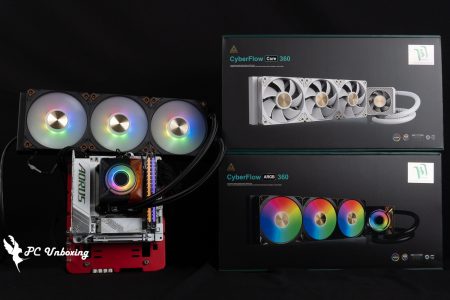
The darkFlash Nebula DN360 (DN 360mm) features a Totem mirror cooler with a cable-free ARGB fan that attracts users' attention both in terms of appearance and ease of installation, and is available in black and white as well as 240mm / 360mm colors. 13900K platform to test the cooling performance of the new water cooler for your reference!
darkFlash Nebula DN360 All-in-one water-cooled specification:
Intel Pin: LGA1700/1200/115x
AMD feet: AM5/AM4/AM3/AM3(+)/AM2/AM2(+)/FM2/FM1
Pump RPM: 2400±10% RPM
Water-cooling head size: 86 x 72 x 59 mm
Water-cooling head contact surface: copper
Water-cooling drain size: 397 x 120 x 27 mm
Water Cooler Material: Aluminum
Water-cooled tube length: 450 mm
Fan size: 120 x 120 x 25 mm
Fan Speed: 800~1800 RPM ± 10% (MAX)
Maximum airflow: 61.7 CFM
Maximum wind pressure: 1.26 mmH₂O
Cooler and Fan Power Supply: Water-cooled Head 3-Pin / Fan PWM 4-Pin
Average fan life: 40,000 hours
Warranty: Water-cooled 3 years / Fan 1 year
darkFlash Nebula DN360 All-in-One Watercooling Unboxed
The first time I saw the Nebula DN-360 all-in-one water cooler was in the COMPUTEX 2023 darkFlash display area, and the degree of completion at that time was already quite high, but I was told that the cooling performance and the appearance were adjusted, so it was not until recently that it was launched.
Unlike last year's demonstration, the front of the DN360 water cooler has been changed from the original darkFlash logo to a totem mirror.
The darkFlash Nebula DN360 supports MSI/GIGABYTE/ASRock/ASUS lighting control software. Simply connect the water-cooled 5V 3-Pin ARGB cable to the motherboard.

∆ Nebula DN-360 All in one 360 mm LIQUID CPU Cooler.

∆ Product features and related specifications.

∆ Compatible with current Intel LGA 1700 and AMD AM5 footprint installations.
This time, the DN Ice Crest 360mm is available in black and white, and the author still chooses the white version for unboxing, not for any reason purely for the superficial insistence of the white army!
The darkFlash Nebula DN360 uses a white color scheme for most of the areas, which is more suitable for white PC installers to plan and match.
In addition to the 360 mm water cooling size, darkFlash has also released a 240 mm version of the DN Nebula 240mm (darkFlash Nebula DN-240) for those with limited chassis space or even more limited budgets.

∆ Cold head, cold pipe, cold exhaust and fan are all whitened!
darkFlash Nebula DN360 has a small feature that is the fan factory have been pre-installed, the user can open the box directly after the water-cooling installation to the chassis, neither lock the fan to the water-cooling rows and do not have to think about how to plan the direction of the cable, this small feature may be for most of the users will only be installed once the user has no attraction, but to the computer installation staff or the author of this frequent disassembly and installation of water-cooling is a very convenient feature. This small feature may not be attractive to most users who will only install the machine once, but for computer installers and people like me who often disassemble and install water coolers, it is a very convenient feature.
However, it should be noted that the Nebula DN360 all-in-one water cooler uses a special series power supply fan for cable optimization, but the motherboard still uses the regular 4-Pin PWM and 5V 3-Pin ARGB with one male and one female connector, so users don't have to worry about the fan needing extra wiring or special controllers, but if a single fan fails, they will need to apply to darkFlash or purchase a special one. However, if a single fan fails to work, it will need to be applied for or purchased from darkFlash, and it is not possible to directly purchase another fan on the market to replace the "single fan".

The ∆ fans have been pre-installed!

∆ Fan installation and water-cooling pipe display.

∆No-wire chain design, using special series connecting wires to achieve one-line power supply and control, to obtain the optimization of the whole line design.
The pre-installed fan of the darkFlash Nebula DN360 is not labeled with a specific model number, and only the specifications of the fan itself are provided on the official website. The regular 120 x 120 x 25 mm ARGB fan has a maximum airflow of 61.7 CFM at a maximum speed of 1800 ± 10% RPM, and the maximum air pressure, which is more relevant to the cooler, is 1.26 mmH2O. The maximum air pressure associated with the cooler is 1.26 mmH2O, which is a shame from the specification point of view.
The fan itself is powered by PWM, and users can adjust the operation status through the motherboard's fan speed curve. If you feel that the fan does not automatically adjust the speed according to the CPU temperature during the process of using the fan, remember to check whether the power supply mode in the BIOS or the board manufacturer's software is PWM Mode.
There are ARGB light beads under the matte semi-transparent fan blades, and by connecting the 5V 3-Pin ARGB (Addressable RGB) cable to the motherboard, you can customize the lighting effect and color of each area of the fan. In addition, the PWM and ARGB cables mentioned earlier provide a male and female serial design, and the three fans are connected to each other in series, so the three fans, you need to connect a PWM and ARGB to use it. The three fans are connected to each other in series, so all three fans only need to be connected to one PWM and one ARGB, which can be said to be the savior of lazy people.

The ∆ 120 x 120 x 25 mm ARGB fan has a maximum airflow and pressure of 61.7 CFM and 1.26 mmH2O.

∆ The three fans only need one PWM and ARGB to complete the power supply, and one male and one female connector is provided to complete the series connection with other equipment, further reducing the trouble of wiring.
The all-white single-wave water cooler has dimensions of 397 x 120 x 27 mm. The length, width and height dimensions are common, but if the chassis has limited mounting space, it is important to pay attention to whether there is a water cooler mounting size restriction marked on the chassis.

∆ All-white single-wave water cooler with dimensions 397 x 120 x 27 mm.

∆The total mounting thickness including the fan is 52 mm. If there is a space constraint on the top of the case, the mounting position may have to be adjusted.
One of the features of the darkFlash Nebula DN360 is the totem mirror cold head, but when it is not powered on, you can only see the reflection of the mirror can not see the pattern, although the author is not too clear about the design concept of the darkFlash, but the author looks like this water-cooled head has a hint of a mountain lake or high mountain plains...
A metallic gray frosted bezel surrounds the internal mirrored head, which is not rotatable due to the change from a single darkFlash logo to a dense arrangement of logo icons, so the head pattern is not oriented in the right direction.

∆ is the mirror reflection state when it is not energized.

The dimensions of the ∆ water cooler are 86 x 72 x 59 mm and the height of the cooler is 59 mm.

The ∆ cooling head is 3-Pin powered and provides one male and one female 5V 3-Pin ARGB connector, which allows users to connect with the fan to synchronize the lighting effect of the whole water-cooling set.
darkFlash Nebula DN360's pump PUMP has a maximum speed of 2400 ±10 % RPM, and is labeled with 3-stage intelligent speed adjustment and a strong flow rate performance of 1.6L/Min (±10 %) in the official website. I have studied a little bit about this so-called "3-stage intelligent speed adjustment", which in fact, is the same as the fan. The so-called "three-stage intelligent speed adjustment function" is actually the same as the fan speed curve function.
Most of the all-in-one water coolers will run the pump directly at full speed under the default Auto condition, and the AIO PUMP slots provided by some motherboards will also run at full speed. The advantage of running at full speed is to ensure that the water cooler is always capable of quickly discharging the heat from the processor; the disadvantage is that the sound of the pump running at full speed is too noisy for some to bear.
Three-stage intelligent speed adjustment function can be based on the CPU temperature to change the water pump PUMP speed, in the performance and sound noise to achieve a compromise, but if you are a temperature-sensitive user or you do not care about the sound of the water pump (after all, the fan what will be louder), then you can also directly in the settings to set to the full speed of the operation can be.

The ∆ darkFlash Nebula DN360 3-stage intelligent RPM adjustment function actually means that the pump has its own RPM curve instead of running directly at full speed.
The water-cooling head and the CPU are in contact with a large copper base, which is not pre-coated with thermal paste and has a protective film on it, so please remember to remove the protective film before applying the thermal paste!

∆ Protective film is preset on the bottom of the water cooler.

∆ Copper base detail shown.
The accessories section provides Intel and AMD grommets, DP5 thermal paste, scrapers, cooling vent mounting screws, etc. The overall quantity is quite compact and clearly labeled in separate bags, which is quite comfortable for people with compulsion to organize.

∆ Accessories at a glance.

∆ DP5 thermal paste and spatula.
darkFlash Nebula DN360 Lighting Effect Showcase
Next, we will show you how the ARGB lights up under Auto conditions by powering up the DN IceSpin 360mm all-in-one water-cooled model.

The ∆ water cooler head totem is displayed with a circle of ARGB aperture next to it to match.

∆ Because it is a totem there is no such thing as a correct orientation, it can be installed however you like.

∆ Fan light effect display.

Close-up of ∆ fan.
darkFlash Nebula DN360 Thermal Performance Measurement

The darkFlash Nebula DN360 all-in-one water cooler was installed on a bare test platform with an Intel Core i9 13900K processor and an MSI MEG Z690I UNIFY motherboard. During the testing process, the PUMP and fan slots of the all-in-one water cooler were set to run at full speed in the motherboard BIOS, and the test scenario was a closed room with the air conditioning running at 23°C. The actual test was conducted in a closed room. The test was conducted in a closed room with 23°C air conditioning for reference only, as it is difficult to control the ambient temperature in a normal room.
We used AIDA64 FPU and Cinebench 2024 multi-core tests to simulate temperature data under extreme load conditions, and we also played Battle Renegade 2077 at 1080P resolution to show how the game ran, while data collection was done using HWiNFO64 to collect and record the maximum temperature and power consumption of the CPU Packge.
Testing Platform
Processor: Intel Core i9 13900K (QS)
Cooler: darkFlash Nebula DN360 (full speed)
Motherboard: MSI MEG Z690I UNIFY ( BIOS version: 7D29v1G )
Memory: T-FORCE XTREEM DDR5 8000 MT/s 2x 16 GB
Display Card: MSI GeForce GTX 1070 Quick Silver 8G OC
Operating System: Windows 11 Professional 22H2
System Drive: Plextor PCIe Gen3 x4 M.2 2280 SSD 512GB
Gaming Disk: Intel 670P 2TB M.2 2280 PCIe SSD (Solidigm)
Power Supply: MONTECH TITAN GOLD 1200W
Graphics driver: GeForce Game Ready 551.23
I would like to add a few things, the first is that I have updated the BIOS version of MSI MEG Z690I UNIFY to version 7D29v1G, the second is that the default PL1 / PL2 of MSI MEG Z690I UNIFY is 288 W. I will use this motherboard's default settings to test the remaining settings: Game Boots_off, XMP_on, water-cooling fan and PUMP_full-speed. The remaining settings are: Game Boots_off, XMP_on, water-cooling fan and PUMP_full speed.
In the load test of daily application and game running, the 13900K is around 129~172 W; the temperature is 67°C at the highest.
In the high-pressure load test program, the 13900K with 226 W power consumption reached a maximum temperature of 74 °C in a round of Cinebench 2024 multi-core program.
The 30-minute long stress test on the AIDA64 FPU project, although the maximum power consumption is a bit lower than that of the Cinebench 2024 project, the temperature is a bit higher than that of the short-term Cinebench 2024, with a maximum of 76 °C, because the water cooling liquid gradually saturates over a long period of time.
- AIDA64 FPU_30 Minute
- AIDA64 CPU_30 Minute
- Cyberpunk 2077 1920 x 1080 (FHD)_5 Minute
- Cinebench 2024 Multi Core_1 Round

∆ Thermal performance.
Conclusion

The darkFlash Nebula DN360 (DN Ice Crest 360mm) is now on the shelves of Taiwan's sales channels, priced at NT$3590 for black / NT$3690 for white, the price positioning still maintains darkFlash's consistent price/performance ratio, but the author has also unboxed and tested the TWISTER DX 360 Ver2 6/RADIANT DC 360 all-in-one watercooler, which is also a darkFlash. 360 Ver2.6/RADIANT DC 360 all-in-one water cooler from the same darkFlash, and from my observation, the DN360 has better cooling performance (but the platform conditions are different, so it is only for reference).
The author personally and privately suggests that darkFlash can slowly develop in a different direction for water-cooling products in the future. If we only keep pondering over the price-performance ratio in this market, we may gradually fail to differentiate ourselves from other products, and the author will look forward to the water-cooling products that darkFlash can make to make people have discussions, and the three-year after-sale warranty provided with the proof of purchase is a bit low, which may greatly reduce consumers' willingness to buy. This may greatly reduce consumers' willingness to buy.

In terms of cooling performance, the darkFlash Nebula DN360 with the current Intel 13/14 th i9 processor should be able to keep the temperature below 85~90 °C in most of the usage scenarios (with the motherboard BIOS optimized and the PL1/PL2 at around 253W), and the price range of the DN360 would be more suitable. Considering that the DN360 price range is more suitable for mainstream or entry-level motherboards to meet this budget range, most of the users under this budget will not be overclocking or manually liberating the PL1/PL2 power limitations, so there is no need to worry about the inability of this water-cooler to suppress the problem, and if you are still worried about it, you can just choose the i5/i7/i9 Non-K series of processors.
The aesthetics of darkFlash Nebula DN360 water cooling head is a matter of opinion, but the cool element is still a little bit more, the water cooling fan has been pre-installed and has a no-wire zipper design, which is a good point for the whole line can save a lot of time and effort, but the fan itself has a weaker air pressure is really a weak point, even at full speed the airflow behind the cooler is smaller, and with its pre-installed direction, I would recommend this water cooling fan to be installed directly on the top of the case. With its pre-installed direction, the author would recommend this water-cooling directly installed on the chassis is more suitable, if you want to get a better cooling performance may be able to consider replacing the fan themselves, but the original fan wiring-free chain design advantage is gone.

Yun
Drinks with less than full sugar are colored water. Crossing Turbid Creek, full sugar is not a crime!


 繁體中文
繁體中文  English