
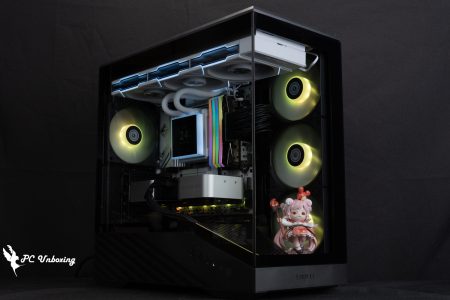
All optimized! MONTECH SKY TWO GX White unboxing review!

The MONTECH SKY TWO GX supports a full E-ATX motherboard mounting space, with three AX140 ARGB fans on the front to provide sufficient airflow and lighting effects, and also supports advanced component mounting to accommodate a 168 mm air cooling tower, a 400 mm long graphics card, 11 fans, and six hard drive mounts, which may not be the most unique, but is certainly the most appropriate one.
MONTECH SKY TWO GX Chassis Specifications.
Size: 460(L) x 215(W) x 500(H) mm
Color: Black, White
Material: steel, tempered glass
Motherboard: E-ATX, ATX, Micro-ATX, Mini-ITX
CPU air cooling: up to 168 mm
Graphics card: 400 mm long
Power supply: 210 mm ATX
Fan mounting positions (front + top + side + power compartment + rear): 140 mm 3+2+0+0+0 pcs, 120 mm 3+3+2+2+2+1 pcs
Water-cooled drain support: 360 / 280 mm above, 360 / 280 mm in front, 120 mm behind
Chassis I/O Ports: USB 10Gbps Type-C, 2x USB 3.0, Mic, Audio
Hard drives and bays: four 2.5-inch, two 3.5-inch, or 2.5-inch (composite)
MONTECH SKY TWO GX chassis appearance introduction
MONTECH unveiled the SKY TWO GX before 2024 COMPUTEX, which was shown at the show last year. This new model is based on the SKY TWO from the end of 2022, but when you actually look at the SKY TWO GX, you'd have to say it's similar? Not really. Not exactly. Well, there's something about it.
The SKY TWO GX measures 460 x 215 x 500 mm in length, width, and height, which is about the same as most mid-tower chassis, and only about 7 or 8 cm more than the original.
There are two colors to choose from, black and white, and of course the author chose the white model, which is $200 more expensive than the black model in Taiwan.

∆ White MONTECH SKY TWO GX case.
Unlike the original single-side air intake configuration, the SKY TWO GX is by default the same as the mainstream front air intake chassis of the past, with a 51% ventilated metal front panel, with mesh holes Ø 1.5 mm in diameter, and each mesh hole spaced 2 mm apart from each other, a setup that has been used for a long time by MONTECH to insulate foreign objects and maintain good ventilation at the same time.
The front panel is equipped with a handle groove underneath, which can be pulled outward to remove dust, but there is no fine dust filter attached, so if your room is prone to small dust (cat hair or gray sand, etc.), you can purchase a magnetic dust filter to add.

∆ Full-area metal mesh front panel.

∆ mesh diameter Ø 1.5 mm.

∆ Magnetic fixing for easy disassembly.
The white SKY TWO GX is equipped with a fully transparent tempered glass that allows for a clear view of the interior details when the power is not turned off, making it ideal for those who like to look at their computer hardware or who want to see the full effect of RGB lighting.
The glass side viewer utilizes a hinged structure with strong magnets and a side handle that allows the viewer to be easily opened for replacement of hardware parts at any time.

∆ Fully transparent tempered glass.

∆ Detachable hinge rotation structure.

The author personally likes this design of the ∆ rotary door.
The mesh side cover next to the bottom-mounted power pod is similar to the original SKY TWO GX, and the use of mesh in this area further increases the cooling effect of the fan on the power pod.
When I unboxed the SKY TWO earlier, I had a discussion with MONTECH, since the area is used for air intake, it means that there will definitely be dust piled up here after a period of time. However, the original SKY TWO is fixed with rivets and can't be disassembled individually, which is not so convenient for cleaning, while the SKY TWO GX is fixed with two screws and can be disassembled independently, which is not a great intention but at least gives a chance to users who have a cleaning problem. It may not be very useful, but at least it gives a chance to the users who have a sense of cleanliness.

∆ Power compartment mesh side panels.

The ∆ is now held in place by two screws and can be removed individually.

∆ After a period of use, it can be disassembled to clean the dust.
The overall structure of the chassis is a common under-mounted power supply structure, with 120 mm fan and water cooler mounts at the rear, seven PCIE slots, reusable baffles, and no crossbar.

∆ A view of the rear structure of the chassis.

∆ A rear dust filter under the power supply prevents dust.
On the back of the motherboard is a steel side panel secured by hand screws, with ventilation holes for the side fans and a magnetic dust filter.

∆ Steel side plate.

∆ The built-in magnetic dust filter reduces the amount of dust entering the interior.
The upper part of the chassis maintains a mesh panel similar to the front panel, but the upper part is secured by hand screws at the rear of the chassis, and the upper part can be installed with a maximum of 280 / 360 mm water cooler and fan mounts.
The I/O ports are located on the top of the SKY TWO GX, from left to right, they are: boot button, HDD/power indicator, reboot button, 2x USB 3.0, headphone jack, microphone jack, USB 10Gbps Type-C, and a white dust plug is included in the package.

∆ Full-integrated mesh holes are provided on the top of the chassis.

The ∆ supports 280 / 360 mm fan and water cooler installations.

∆ Chassis I/O Port.
Installation space at a glance
MONTECH SKY TWO GX comes with three AX140 ARGB fans pre-installed at the front of the chassis to provide sufficient air intake to support GIGABYTE, MSI, ASRock, and ASUS lighting control software, and is powered by a PWM 4-Pin that is uniquely connected to the internal ARGB/PWM HUB.
Three 14 cm ARGB fans are attached to the front of the chassis, unless there is a special reason to replace them, I think this is quite enough, and the actual airflow is quite sufficient, if you want to further enhance the cooling performance of the chassis, you have to start from the direction of the other four fan installations.

The ∆ chassis comes with three 14 cm ARGB fans in the front, which are filled directly on top of the front.
The chassis supports up to E-ATX motherboards, and the official website clearly states that the largest SSI-EEB (330 mm wide) motherboards can be installed, so there is no restriction on the width of E-ATX motherboards in the specification list.
However, it is important to note that because of the overlapping installation space, it is not possible to install a side fan from the SSI-CEB (266 mm wide) onwards, and the space must be used for power cable routing, so it is recommended to install a side fan to increase the cooling performance up to the ATX only.
The CPU air-cooled tower supports a maximum mounting height of 168 mm and the graphics card is compatible with a maximum mounting height of 400 mm.

∆ A view of the chassis interior installation.

∆ Compatible with 330 mm wide SSI-EEB motherboard, 168 mm air cooling, 400 mm graphics card mount.

The water cooling installation space above the ∆ is at least 6 cm up.

∆ Two 120 mm fans can be installed in the power compartment to blow directly on the graphics card to enhance cooling, and there are three vertical cable mounting holes for the graphics card, but only one of the two can be used for the fan and the vertical locking holes.

The internal mounting space of the ∆ front water cooler is reserved for almost 7 cm.
One of the features of the MONTECH SKY TWO GX is the multi-purpose side panel on the side of the motherboard, which can be used to install two 2.5" hard disks as well as a cable cover, and when removed, it becomes a place to install two 12 cm fans.

∆ Multi-function side panel.

∆ Manual switch.

∆ Side panels held in place by latches do not work wonders.

The ∆ can be disassembled into two 12 cm fan mounting positions.
The entire cable space on the back of the chassis features a 2.5 cm cable depth, and the I/O and pre-installed fan-related cables on the top of the chassis are pre-wired, with six PWM and ARGB ports on the fan controller HUB, and the three 14 cm fans on the front already occupy half of the ports, leaving the gamer with three PWMs and 5V 3-Pin ARGBs to expand and install.

∆ A view of the rear of the chassis.

∆ Attach the controller HUB.

∆HUB cables must be connected to the relevant power supply or slot to operate.

∆ Other I/O wire.
The sides of the chassis and the back of the motherboard support two 2.5-inch hard drives totaling four, all of which are mounted towards the cable storage side, and the bottom power compartment supports up to a 210 mm power supply, which allows more space to be used after removing the front composite drive bays.

∆ Side mounting position overview.

∆ Two 2.5" hard disk mounting plates on the back of the motherboard.

∆ Undermounted power pods.

The ∆ Dual Composite Drive Cage holds two 2.5 / 3.5" hard drives in place with hand screws, and can be adjusted for front and rear position or even removed, where the accessory box is tucked away.
The accessories are clearly divided into pockets and labeled with their functions, which are not as convenient as the boxed set but friendly enough. The accessories include: various basic mounting screws, I/O dust plugs, long fan screws x12, water-cooling mounting screws x12, buzzer, I/O adapter cables, disposable cable ties, and devil's-felt cable ties.

∆ Accessories at a glance.

∆Taking into account that some motherboards have different I/O slots than the regular slots, the chassis native unified cable may not be compatible, so a tap cable is included.
MONTECH SKY TWO GX Installation and Lighting Demonstration
Then we will install the MONTECH SKY TWO GX case and show you the lighting effect by powering up the case.

∆ Power on!

∆ Front fan lighting effect.

∆ Full-transparency glass side-by-side display.

∆ Top mount 360 AIO.

∆ Top-mounted water-cooled space display.

∆ Only a single 360 watercooler or 360+240 watercooler installation is recommended. It is not possible to install a 360 mm watercooler in the front and the top at the same time.
Chassis Thermal Performance Test
Then we also tested the cooling performance of the chassis with Intel Core i9 13900K processor and MSI MEG Z690I UNIFY motherboard, during the test process, the BIOS of the motherboard will set the speed of the integrated water-cooling PUMP and fan slots at full speed, the test scene is 24°C air-conditioned operation in a closed room to conduct the actual test, because the ambient temperature is difficult to control so it is only for reference. This is for reference only, as the ambient temperature in a normal room is difficult to control.
The software uses AIDA64 FPU and Furmark 2 individual burn-in tests to simulate the temperature data of the processor and graphics card under high load stress, and Cyberpunk 2077_Electric Renegade 2077 1080p game to run the test scenarios, while the data is collected using HWiFO64 to collect and record the maximum temperature and power consumption.

Testing Platform
Processor: Intel Core i9 13900K (QS)
Radiator:MONTECH HyperFlow ARGB 360(full speed)
Motherboard: MSI MEG Z690I UNIFY ( BIOS version: 7D29v1G )
Memory:T-FORCE XTREEM DDR5 8000 MT/s 2x 16 GB
Display Card: MSI GeForce GTX 1070 Quick Silver 8G OC
Operating System: Windows 11 Professional 22H2
System Drive: Plextor PCIe Gen3 x4 M.2 2280 SSD 512GB
Gaming Disk: Intel 670P 2TB M.2 2280 PCIe SSD (Solidigm)
Power Supply: MONTECH TITAN GOLD 1200W
Graphics driver: GeForce Game Ready 552.22
Case: MONTECH SKY TWO GX
I would like to add a few things, the first is that I have updated the BIOS version of MSI MEG Z690I UNIFY to version 7D29v1G, the second is that the default PL1 / PL2 of MSI MEG Z690I UNIFY is 288 W. I will use the default settings of this motherboard to conduct the test, which means that the average power consumption is limited to 288 W for long time, and the extreme power consumption (for Turbo Boost extreme state) is also 288 W for short time. The power limit (for Turbo Boost limit) is also 288 W. The rest of the settings are: Game Boots_off, XMP_on, water-cooling fan and PUMP_full speed.
In the standalone AIDA64 FPU test, the 13900K was around 212 W; temperatures topped out at 76 °C, while the GTX 1070 graphics card topped out at 69 °C in the Furmark 2 test.
During Cyberpunk 2077, the maximum processor and graphics card temperatures were only 67 °C and 65.7 °C, which is comparable to the barebones platform.
- Play Cyberpunk 2077 1920 x 1080(FHD)_15 Minute
- Graphics Card Standalone Test Furmark 2_30 Minute
- Processor Standalone Test AIDA64 FPU_30 Minute
- CPU Package temperature is recorded by all Digital Temperature Sensors (DTS) in the package as the average of the maximum temperature over 256 milliseconds, and is the HWiNFO64 recommended CPU temperature observation value, which is also used as a benchmark for overheating and downclocking of the processor.

∆ Chassis thermal performance chart.
Conclusion

The MONTECH SKY TWO GX is a very awkward design, most of it is similar to the common under-mounted power supply chassis, but there are some features that are similar to the original SKY TWO, which makes it look familiar and yet unfamiliar at the same time, and most of it looks like it is a further optimization of the shortcomings of the other chassis in the past.
The overall expandability and hardware installation space is quite enough for most consumers, supporting 360 mm water cooling, 168 mm air cooling tower, 400 mm graphics card, full E-ATX motherboard compatibility, up to eleven 12 cm fans and other mounting specifications, except for the odd consumer who has an unusually large number of devices or wants to do a lot of tricks with his or her budget, this chassis can be compatible. 98%.

This chassis comes with three 14 cm fans directly in front to provide sufficient air intake. According to the author's actual installation with the top-mounted water-cooling exhaust, even if the chassis fan is not installed to further enhance the cooling performance, the actual test results are not too different from the bare test platform, assuming that the budget is limited is not necessary to add the fan on, if you want to pursue the ultimate cooling performance and then install the additional fan can be.
There are only two things that are a bit unfortunate about this chassis, the first is that you can only install one 360 mm water cooler at the same time; you can't install two 360 mm water coolers at the same time, but how many people need two 360 water coolers at the same time? The second is that the cable space is still not enough, the author suggests to use a flat cable full modular power supply to install the machine more comfortable, but if it is thrown to a computer store to install the machine, it is not something you have to worry about.

Yun
Drinks with less than full sugar are colored water. Crossing Turbid Creek, full sugar is not a crime!


 繁體中文
繁體中文  English