
Carbon Fiber Textured Mesh Front Panel MONTECH X5, X5M Chassis Unboxing Review

MONTECH X5 and X5M chassis are pre-installed with four ARGB PWM fans with front inlet and rear outlet airflow planning, with carbon fiber transfer texture embellishment of the full-area mesh front panel to bring sufficient cooling performance, the X5 chassis with maximum support for E-ATX (SSI-CEB) motherboards comes with built-in graphics card brackets that can be used, while the X5M, which has a smaller size to support M-ATX motherboards, is expandable with up to five 2.5 or 3.5-inch hard drive mounting locations. The X5M, which is smaller and supports M-ATX motherboards, has up to five 2.5" or 3.5" hard drive mounts that can be expanded. Both cases are in the $1,500 price range and the price difference is only a few dozen dollars, so you can decide which one suits your needs based on the differences.
MONTECH X5 chassis specifications: (red is the difference between the two models)
Dimensions of the chassis body:482(L) x 216(Wide) x 496(height) mm
Available colors: black, white
Chassis Material: Steel, Tempered Glass
Supported motherboard sizes:E-ATX (SSI-CEB), ATXMicro-ATX, Mini-ITX, Micro-ATX, Mini-ITX, Micro-ATX, Mini-ITX
CPU Cooling Support Height: Up to 165 mm
Graphics card support length:410 mm
Power supply support length: ATX 230 mm
Fan Mounting Positions (Top + Front + Power Bay + Rear): 140 mm 2+3+0+0, 120 mm 3+3+2+1 pcs.
Water-cooled drain support: 360 / 280 mm above, 360 / 280 mm in front, 120 mm behind
Chassis I/O Ports: USB 2.0, USB-A 5Gbps, USB Type-C 10Gbps, ARGB Control Key, TRRS Composite Headphone Mic Hole
Hard disk mounting position:One 2.5One 3.5", one 2.5" or 3.5" composite mounting position
MONTECH X5M chassis specifications: (red is the difference between the two models)
Dimensions of the chassis body:468(L) x 215(Wide) x 450(height) mm
Available colors: black, white
Chassis Material: Steel, Tempered Glass
Supported motherboard sizes: Micro-ATX, Mini-ITX
CPU Cooling Support Height: Up to 165 mm
Graphics card support length:405 mm
Power supply support length: ATX 230 mm
Fan Mounting Positions (Top + Front + Power Bay + Rear): 140 mm 2+2+0+0, 120 mm 3+3+2+1 pcs.
Water-cooled drain support: 360 / 280 mm above, 360 / 280 mm in front, 120 mm behind
Chassis I/O Ports: USB 2.0, USB-A 5Gbps, USB Type-C 10Gbps, ARGB Control Key, TRRS Composite Headphone Mic Hole
Hard disk mounting position:Three 2.5One 3.5", one 2.5" or 3.5" composite mounting position
MONTECH X5, X5M Chassis Unboxing
The MONTECH X5 and X5M chassis are the newest models in the MONTECH X series of price-performance chassis. The X5 series of chassis is the successor to the X3 chassis, with a large mesh front panel embellished with a carbon fiber transfer texture for a unique look, and the use of Ø1.5 mm mesh holes with a 2.25 mm pitch to provide a 33% airflow rate. Although the front panel mesh is small enough and removable, the front panel does not have an additional dust filter, so if you are very concerned about dust protection, you may need to install a filter on your own.
The larger X5 chassis includes three 140 mm ARGB fans in the front of the chassis with a maximum speed of 1200 RPM; the smaller X5M chassis includes three 120 mm ARGB fans in the front of the chassis with a maximum speed of 1400 RPM.
X5 chassis because it supports up to E-ATX (SSI-CEB), ATX so the chassis body size is larger at 482 x 216 x 496 mm; the X5M, which only supports M-ATX motherboards, has a maximum length, width and height of 468 x 215 x 450 mm.
Both the X5 and X5M support 280 / 360 mm water cooler mounts on the front, but the X5 is compatible with three 140 mm fan mounts.The X5M is compatible with either two 140 mm fans or three 120 mm fans.

∆ On the left is the X5 in white; on the right is the X5M in black.

∆ Full-area mesh front panel.

∆ The front panel uses a carbon fiber transfer texture.

Three 140 mm fans are included on the front of the ∆X5; three 120 mm fans are included on the front of the X5M.
Both chassis use full-transparency glass side panels, so you can clearly see the internal hardware details without powering on the device. The glass side panels are opened by a toggle at the back, and the side panels are placed on the structural frame of the chassis, so they won't fall off when opened, but it is recommended that the other hand should be added to the bottom of the chassis to avoid any accidents.

∆ Equipped with full-transparency glass.

The ∆X5 has a mesh panel on the lower edge to provide extra air intake for the powerhouse fan; the X5M is just a plain steel panel.

∆ Glass Side View Opening Toggle.

∆ On the back of the motherboard is a sealed steel plate.
The rear of the chassis supports a 120 mm fan and water cooler, but a 120 mm fan is pre-installed at the factory, so if you want to replace it with a different fan, just consider purchasing an additional one. Below that are seven PCIE device mounting positions, with reusable file boards and a no-bar plan.
The bottom of the chassis is equipped with a rear extractable filter that reduces the amount of dust entering the bottom-mounted power supply, which can be extracted for cleaning after a period of time, and the front is a composite hard drive cage mounting position adjustment block, which is secured by hand screws for disassembly and installation, and can be moved forward to get more power cable hiding space, but front water-cooling installation will be limited by this reason, and can be adjusted according to the needs.

∆ A view of the rear of the chassis.

∆ Rear draw down power extraction filter.

∆ A view of the bottom of the chassis.
Both the X5 and X5M are equipped with a magnetic dust filter on top of the chassis to minimize natural dust from entering the chassis, and both chassis support a top-mounted 360 / 280 mm water cooler and fan mount.
The I/O slots on the top of the chassis provide a boot key, ARGB control key, USB 2.0, TRRS composite headphone jack, USB-A 5Gbps, and USB Type-C 10Gbps. Because the I/O ports are located on the top of the chassis, these two chassis are more suitable to be placed at a desktop height for more convenient use.

∆ Magnetic filter on top of the housing.

A 280 / 360 mm fan and water cooler can be installed on top of the ∆.

The ∆ I/O slots provide boot key, ARGB control key, USB 2.0, TRRS composite headphone microphone jack, USB-A 5Gbps, and USB Type-C 10Gbps.
MONTECH X5, X5M chassis core hardware installation space display
MONTECH X5 supports E-ATX (SSI-CEB), ATX, Micro-ATX, and Mini-ITX sized motherboards, and comes with four ARGB PWM fans pre-installed, with three 140 mm intake fans at the front, and one 120 mm exhaust fan at the rear to direct the chassis cooling airflow.
There is a graphics card holder on the side of the chassis that can be used, but basically it should only support cards with three fan lengths, and above the power compartment you can install two 120 mm fans blowing directly on the card, which means that up to nine fans can be installed in the entire chassis.
The air-cooled cooler is compatible up to 165 mm in height and up to 410 mm in length for graphics card mounting, leaving plenty of room for mainstream air-cooled and flagship graphics cards.

The ∆ X5 is pre-installed with three 140 mm fans at the front and one 120 mm fan at the rear.

∆ X5 can be installed with E-ATX (SSI-CEB), ATX, Micro-ATX, Mini-ITX motherboards, 165 mm air-cooled tower coolers, and 410 mm graphics cards.

∆ Upper water cooling installation space.

The ∆ X5 comes with a mounting bracket for the graphics card, leaving space for the water cooler to be installed in the front.

∆ Supports two 120 mm fans mounted above the power compartment.
The smaller X5M is meant to support Micro-ATX and Mini-ITX motherboards, and comes with four ARGB PWM fans pre-installed, all of which are configured with 120 mm size fans.
The X5M chassis does not come with a graphics card holder, but the X5M does come with two 2.5" hard drives on the side, and two 120 mm fans above the power compartment to blow directly on the graphics card, making it possible to install up to nine fans in the entire chassis.
The air-cooled cooler is compatible with a height of 165 mm and a maximum length of 405 mm for graphics card mounting, leaving plenty of room for mainstream air-cooled and flagship graphics cards, which can be mounted at a length of just 5 mm less than the X5.

The ∆ X5M is equipped with four 120 mm fans.

The ∆X5M can accommodate Micro-ATX, Mini-ITX motherboards, 165 mm air-cooled towers, 405 mm graphics cards, and has two 2.5" hard drive mounting positions on the side.
Although the back of the motherboard has a hidden cable space with a devil's felt harness, it contains chassis I/O cables with a series of chassis fan cables and so on here, so that the whole is still relatively unrestrained a bit, and if you are an obsessive-compulsive user it is recommended that you can spend some time organizing.
A 2.5-inch hard drive can be installed on the back of the X5 chassis, and a 3.5-inch drive and a 2.5- or 3.5-inch drive can be installed with the drive cage underneath, for a total of three hard drive mounting positions available.

A view of the back of the ∆ X5 chassis.

A 2.5" hard drive can be mounted behind the ∆ side, next to it is the graphics card holder fixing hand screw, which can be adjusted to the mounting height after loosening.

∆ Chassis I/O cable overview.

The ∆ chassis fan is a series connection, the PWM and ARGB cables are connected at the factory, and can be controlled by installing the cables into the motherboard slots, and there is an extra connector to connect more fans in series.

∆ There is a SATA power supply for the fan in series with the control HUB.
The X5M has a 2.5-inch drive bay on the back of the motherboard, and with the drive bays underneath you can install one 3.5-inch and one 2.5- or 3.5-inch drive, and two 2.5-inch drives on the front of the chassis, making a total of five hard drive mounting positions available on the X5M.

A view of the space on the back of the ∆ X5M chassis.
Both chassis' undermount power compartments support ATX specification with 230 mm long power supply mounts, and for more cable storage you can either remove the front drive bays or move them forward.

∆ Power installation space at a glance.

∆ Accessories supplied with the chassis: disposable harnesses, assorted screws, motherboard brass post socket tool, spare latches, etc.
MONTECH X5 chassis actual installation demonstration
Let's show you the actual installation of the MONTECH X5 chassis.

∆ Hardware display effect when the glass side view is not yet powered on.

∆ Visual display after power-on.

∆ Chassis fan lighting display.

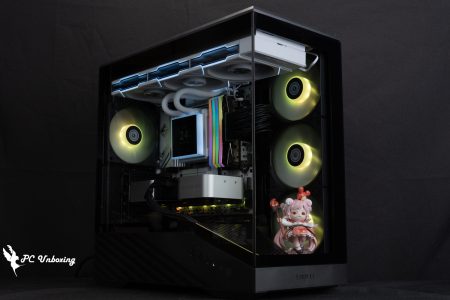
∆ Overall visual presentation.
Chassis Thermal Performance Test

Then we also tested the cooling performance of the chassis, with the Intel Core Ultra 9 285K processor and ASRock Z890 Taichi OCF During the test, the fan slot was set to run at full speed in the motherboard BIOS, and the test scenario was a closed air-conditioned room at 24°C. The ambient temperature of a normal room is difficult to control, so it is for reference only.
The software uses AIDA64 FPU and Furmark 2 to simulate the temperature data of the processor and graphics card under high load stress, Black Myth: Wukong 1080P to run the test scenarios, and HWiFO64 to collect and record the maximum temperature and power consumption.
Testing Platform
Processor:Intel Core Ultra 9 285K QS
Cooler: Valkyrie E360 (full speed)
Thermal paste: Cooler Master MASTERGEL MAKER 40g (thermal conductivity 11W/mK)
Water-cooled fan: LIAN LI UNI FAN P28 (full speed)
Motherboard:ASRock Z890 Taichi OCF ( BIOS version: 3.07 )
Memory:Kingston FURY Renegade DDR5 RGB CUDIMM 8400MT/s 48GB (2x24GB) cl 40-52-52-132 1.45v
Graphics: NVIDIA GeForce RTX 4060 Ti Founders Edition 8GB
Operating System: Windows 11 Professional 24H2
System Drive: Plextor PCIe Gen3 x4 M.2 2280 SSD 512GB
Game Dish:XPG GAMMIX S70 PRO PCIe Gen4 x4 M.2 SSD 4TB
Chassis: MONTECH X5
I would like to add a few things to you, the first one is that the author will be ASRock Z890 Taichi OCF The BIOS version is updated to 3.07 with the remaining settings: XMP_on, all fan slots set to full speed.
In the double-bake test program AIDA64 FPU, the processor package temperature peaked at 84 °C, and the RTX 4060 Ti FE graphics card peaked at 65.1 °C in the Furmark 2 test.
The maximum processor and graphics card temperatures during Black Myth: Wukong gameplay were only 73 °C and 59.6 °C. The maximum temperature was only 1.5 °C and 1.5 °C, respectively.
- Black Myth: Wukong_Black Myth: Wukong_Performance Test Tool 1920 x 1080(FHD)_1 round
- Graphics Test Furmark 2_30 Minute
- Processor Test AIDA64 FPU_30 Minute
- CPU Package temperature is recorded by all Digital Temperature Sensors (DTS) in the package as the average of the maximum temperature over 256 milliseconds, and is the HWiNFO64 recommended CPU temperature observation value, which is also used as a benchmark for overheating and downclocking of the processor.

∆ Chassis thermal performance chart.
Conclusion

This synchronized unboxing of MONTECH's X5 and X5M chassis, a little look at these two chassis price difference of only 40 dollars only in the 1500 yuan this level of distance, and black and white price difference, since there is no price difference in the price of the two models to choose in accordance with the needs of the use of the choice of the two models.
X5 and X5M chassis basically the main differences are as follows, X5 maximum support for E-ATX (SSI-CEB), ATX motherboard installation, so the height of the X5M is a little higher than the X5M; X5M is suitable for height space is limited to place the space with M-ATX, Mini-ITX to install the machine to place.
The X5 comes with three 140 mm fans on the front of the case, while the X5M has three 120 mm fans, so the X5 is better when it comes to front fans. The X5 also comes with a graphics card holder for the three graphics cards, but the X5M has the option of installing more 2.5-inch hard disks, so you can decide which one suits your needs.

Yun
Drinks with less than full sugar are colored water. Crossing Turbid Creek, full sugar is not a crime!


 繁體中文
繁體中文  English