
Free and Cheap LIAN LI A3-mATX Chassis Unboxing Review

The LIAN LI A3-mATX chassis is a compact chassis for renters and students with limited space at an affordable price! Supporting Micro-ATX or Mini-ITX motherboards, 165 mm air-cooled towers, 415 mm graphics cards, 360 mm water-cooling, ten 120 mm fan mounts, and modular ATX/SFX/SFX-L and LIAN LI Edge power mounting brackets that can be mounted either on the side or on the front, the A3-mATX can be freely changed according to the installation needs. The A3-mATX is free to change its internal space configuration according to installation requirements.
LIAN LI A3-mATX Chassis Specifications.
Dimensions: 443 (L) x 194 (W) x 321.5 (H) mm
Color: Black, White
Material: Steel
Motherboard: Micro-ATX, Mini-ITX
CPU air cooling: up to 165 mm
Graphics card: Length 415 mm
Power supply: ATX/SFX/SFX-L (max. 220 mm)
Fan Mounting Positions (Top + Side + Bottom + Rear): 140 mm 0+2+0+0 pcs, 120 mm 3+3+3+1 pcs
Water cooler support: top 360 / 240 mm, side 360 / 280 mm, bottom 240 mm
Chassis I/O Ports: USB 10Gbps Type-C, 2x USB 3.0, Mic, Audio
Hard drives and bays: two 2.5", one 3.5", or 2.5" (composite)
LIAN LI A3-mATX Chassis Unboxing
LIAN LI collaborated with DAN Cases to design, manufacture and sell the new A3-mATX chassis, with a length, width and height of 443 x 194 x 321.5 mm, the overall size of the chassis is closer to the size of the M-ATX compact chassis, and the color is available in black and white, with a price tag of NT$2,000, which is quite affordable.
The front of the chassis is fully sealed, but the rest of the direction is equipped with ventilation holes to enhance internal heat dissipation, the overall appearance of the first glance is quite low-key, very suitable for consumers of lightless PC installation.
The chassis I/O ports are also located underneath the front panel, from left to right, they are: 2x USB 3.0, Boot Key, Mic, Audio, and USB 10Gbps Type-C.

∆ Length, width and height dimensions are 443 x 194 x 321.5 mm.

∆ The front panel of the chassis is in a low-profile style.

∆ 2x USB 3.0, Boot Key, Mic, Audio, USB 10Gbps Type-C.

∆ The top cover must be removed before the front panel can be pushed out.
The most attractive features of the A3-mATX are the two side panels and the top cover of the chassis, all three of which use mesh ventilation panels, focusing the overall design of the chassis on cooling performance and low-profile style, which is the most important feature of a compact chassis.
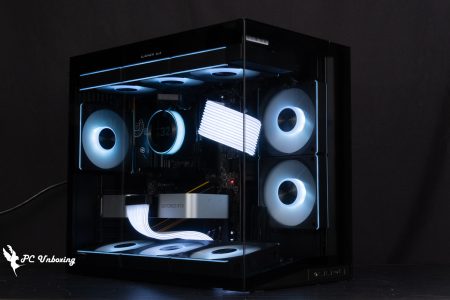
However, if you want to show off the internal hardware, you can also purchase an additional reinforced glass panel on the left side (A3-2X/A3-2W), which allows you to see the internal installed hardware, but only at the relative expense of the chassis side where you can install a fan or water-cooling to enhance the cooling airflow options.

∆ Full mesh side panels.

∆ Where the top cover of the chassis meets the side panels.

∆ The side panel can be opened with the aid of the rear paddle.

∆ There is no dust filter in the side panel but the diameter of the mesh is already very small, the author thinks that additional dust filter may significantly reduce the cooling performance, the side panel is fixed by the latch.
A 120 mm fan and up to four slots for PCIE devices can be mounted on the rear of the chassis, and the top half has power supply extension sockets and the LIAN LI x DAN Cases badge.

∆ The rear of the chassis is shown.

∆ PCIE board mounting position.
The top cover of the chassis is also fully integrated with mesh holes and is secured by two hand screws at the rear.

∆ Chassis top cover view.

∆ Chassis top cover manual fixing screws.
The back panel of the motherboard is also a fully integrated mesh panel, which is intuitively useful because when the power supply is mounted on the side, the power supply can draw cold air directly from the outside to dissipate heat without competing for airflow with the internal waste heat.

∆ Side panel on the back of the motherboard.
The bottom of the chassis is covered with a magnetic dust filter, because the default bracket on the bottom of the chassis can mount a 2.5" or 3.5" hard drive, as well as three 120 mm fans or a 240 mm water cooler, but in fact, it is also possible to mount the fans outside the chassis and install the 360 mm water cooler row inside the chassis so that the bottom of the chassis can be mounted with a 360 mm water cooler, but gamers have to think of other ways of preventing dust. But gamers will have to think of other ways to prevent dust.

∆ Magnetic dust filter at the bottom.

A 2.5 / 3.5 hard drive can be installed on the bottom of the ∆, or a 240 mm / 360 mm (fan mounted) water cooler can be installed.
Core installation space at a glance
After removing all the exterior panels, you can see the mounting space inside the chassis. The A3-mATX boasts a 26.3L chassis that supports Mini ITX and M-ATX motherboards, up to 165 mm air-cooled towers, 415 mm graphics cards, 220 mm ATX/SFX/SFX-L or LIAN LI Edge PSUs, and many more specifications.
The cooling section can accommodate up to ten 120 mm fans or up to 360 / 280 mm water coolers, so there is plenty of room for installation.

∆ Modular internal mounting space.
LIAN LI A3-mATX factory set the power supply mounting bracket on the front panel, you can see two screws and a number of fixing holes next to the bracket to complete the bracket fixing, but because of the compact chassis, the height of the power supply mounting to affect the installation of other equipment space.
For example, if the power supply is installed at a lower level, the top of the chassis will be able to accommodate 360 mm, but the length of the graphics card will be limited. For more details, you can refer to the official website's pictures, and before purchasing, gamers can look at the charts according to the power supply they want to pair with and the direction of the installation to see how to install it according to the charts.
This chassis can accommodate ATX/SFX/SFX-L or LIAN LI Edge PSUs up to 220mm in length, but I personally recommend installing an SFX power supply to maximize the hardware installation space.

The ∆ preset is the front mounted F2 Level mode.

∆ Each power supply mounting pattern (size or location) corresponds to the space available for other hardware installations.

∆ The power supply is secured by a screw and a latch.

∆ To remove the power supply mounting bracket by removing two screws, you can change the mounting height mode or install the power supply.
The mounting bracket on the side of the chassis is also secured by two screws and supports up to three 120 mm fans / two 140 mm fans / 360 or 280 mm water coolers. This part is basically the same as the top cover of the chassis, but only 360 mm water coolers can be mounted on the top; 280 mm water cooler rows are not supported due to their width, and the bracket on the top is not removable either.

∆ Side support 3x 120 mm fans, 2x 140 mm fans, 360 water-cooled / 280 water-cooled mounts.

The ∆ bracket is secured by two screws.

The ∆ can be detached separately for easy installation of the fan and water cooling.
After removing the side brackets and front power bracket, you can see the internal core mounting space, which supports ITX and M-ATX motherboards, as well as up to 165 mm air-cooled towers and 415 mm graphics cards, of course, these mounting specifications are subject to change depending on the power supply and other mounting modes.

∆ Internal hardware installation space.

∆The upper mounting space for power extension cables and CPU power cables can be fixed with grooves.

∆ Power supply mounting offset bracket.

∆ Composite hard disk mounting position.
By default, the right side of the motherboard is equipped with a hard drive mounting plate, which can be used to install two 2.5-inch hard drives, and because of the modular design, it can be swapped with the front power mounting bracket to change the mode according to the usage requirements.
In addition, this HDD mounting plate can also be used to mount the power supply directly with a long pole, but the author personally believes that there is no need to use this mode, because it will make the power supply to change a 90-degree direction of the installation of the cable is more cumbersome and take up more space.

∆ Modular mounting plate for two 2.5" hard drives.

∆ The position can be exchanged with the power supply mounting bracket.

∆ The back of the motherboard does not have any space for wiring, so all wires have to be routed internally.

∆ Chassis I/O cable overview.
The accessory box is fixed to the power supply mounting bracket. The contents of the accessory box include the power supply offset mounting bracket, screw box, magnetic display card support bracket, and so on.
What's more special is the Power Supply Offset Mounting Bracket, an accessory that is used with ATX power supplies to allow for longer card mounting in F2 and F2.5 modes when ATX power is installed on the front.

∆ Accessories at a glance.

∆ ATX PSU offset bracket.

∆ Magnetic display card holder.

∆ Shows that the card holder can be magnetically attached to the base.
LIAN LI SP850 Power Supply Unboxing
Because the installation space inside the LIAN LI A3-mATX is affected by the power supply, the author used the SFX-sized SP850 power supply to install the machine, but this power supply has been out for a long time so I won't go into details.
The SP850 is 80 PLUS Gold Conversion Rate certified, uses Japanese capacitors and fully modular braided cables with OVP/OPP/SCP/UVP/OCP/OTP protection mechanisms.

The ∆ SP850 comes with a five-year warranty.

∆ Full module cable length and number of connectors.

∆ Product Features.

∆ Conversion rate and fan chart with built-in fan smart stop function.
The SP850 measures 100 x 125 x 65.5 mm in length, width, and height, and with its fully modular braided cables, it's perfect for space-constrained ITX or compact chassis, and it's available in black and white.

∆ List of contents.

∆ Power supply specification sheet and module slots.

∆ Length, width and height dimensions are 100 x 125 x 65.5 mm.
The fully modular cables allow you to install cables according to your own needs. What's special is that the SP850 now comes standard with 2x PCIE 8-Pin to 16-Pin cables, which allows you to power high-end NVIDIA RTX 30/40 series graphics cards without having to use the adapter cables that come with the cards or apply for additional cables.

∆ Fully modular braided wire.

∆ Directly attached 16-Pin adapter cable provides 600 W of power capacity.
LIAN LI A3-mATX Practical Installation Demonstration
This time with ITX motherboard, 360 AIO water cooler, SP850 SFX power supply to demonstrate the installation, the overall installation process because of the use of SFX power supply so choose more installation methods, SP850 module cable in this chassis are just right, if the use of ATX power supply may have a longer cable need to organize the problem.
But this time I won't show you the complete installation, because the internal space is a bit crowded and ugly, and the installation tips will be put in the summary tips.

∆ The approximate alignment of the power supply is shown, but I forgot to turn the power supply the other way.

∆ The motherboard graphics card installation is shown.

∆The included graphics card holder is only useful if you have a three-slot thick graphics card, and the author's dual-slot card can't be touched even when the holder is pulled to the highest position.

∆ The water cooler is mounted on the side bracket, and the graphics card lighting is still slightly visible after powering up.
Chassis Thermal Performance Test
Then we also tested the cooling performance of the chassis with Intel Core i9 13900K processor and MSI MEG Z690I UNIFY motherboard, during the test process, the BIOS of the motherboard will set the speed of the integrated water-cooling PUMP and fan slots at full speed, the test scene is 24°C air-conditioned operation in a closed room to conduct the actual test, because the ambient temperature is difficult to control so it is only for reference. This is for reference only, as the ambient temperature in a normal room is difficult to control.
The software uses AIDA64 FPU and Furmark 2 individual burn-in tests to simulate the temperature data of the processor and graphics card under high load stress, and Cyberpunk 2077_Electric Renegade 2077 1080p game to run the test scenarios, while the data is collected using HWiFO64 to collect and record the maximum temperature and power consumption.

Testing Platform
Processor: Intel Core i9 13900K (QS)
Cooler: Valkyrie E360 (full speed)
Water-cooled fan: LIAN LI UNI FAN P28 (full speed)
Motherboard: MSI MEG Z690I UNIFY ( BIOS version: 7D29v1H )
Memory:Kingston FURY Renegade DDR5 RGB 7200 MT/s 16GBx2 (White)
Display Card: MSI GeForce GTX 1070 Quick Silver 8G OC
Operating System: Windows 11 Professional 22H2
System Drive: Plextor PCIe Gen3 x4 M.2 2280 SSD 512GB
Gaming Disk: Intel 670P 2TB M.2 2280 PCIe SSD (Solidigm)
Power Supply: LIAN LI SP850
Graphics Card Driver: GeForce Game Ready 555.99
Chassis: LIAN LI A3-mATX
I would like to add a few things, the first is that I have updated the BIOS version of MSI MEG Z690I UNIFY to version 7D29v1H, the second is that the default PL1 / PL2 of MSI MEG Z690I UNIFY is 288 W. I will use the default settings of this motherboard to conduct the test, which means that the average power consumption is limited to 288 W for long time, and the extreme power consumption (for Turbo Boost extreme state) is also 288 W for short time. The power limit (for Turbo Boost limit) is also 288 W. The rest of the settings are: Game Boots_off, XMP_on, water-cooling fan and PUMP_full speed.
In the separate AIDA64 FPU test, the 13900K was around 211 W; the temperature peaked at 75 °C, while the GTX 1070 graphics card peaked at 69.8 °C in the Furmark 2 test.
During Cyberpunk 2077, the maximum processor and graphics card temperatures were only 64 °C and 65.2 °C, which is comparable to the barebones platform.
- Play Cyberpunk 2077 1920 x 1080(FHD)_15 Minute
- Graphics Card Standalone Test Furmark 2_30 Minute
- Processor Standalone Test AIDA64 FPU_30 Minute
- CPU Package temperature is recorded by all Digital Temperature Sensors (DTS) in the package as the average of the maximum temperature over 256 milliseconds, and is the HWiNFO64 recommended CPU temperature observation value, which is also used as a benchmark for overheating and downclocking of the processor.

∆ Chassis thermal performance chart.
Conclusion
Overall, this chassis is suitable for those who have limited space, limited budget, and are looking for extreme cooling performance. If the hardware components are chosen appropriately, the overall setup process will not be too much of a problem, but the 360 mm water cooler will be placed in a way that will squeeze the water cooler tubes, which is something that I do not like too much.
The LIAN LI A3-mATX is priced at $2,000. Competitors in this price range with similar architectures include the ASUS Prime AP201, FSP CST350, Jonsbo D41/D31 Mesh, coolermaster MASTERBOX NR200P (V2), and so on, each of which has its own advantages and disadvantages when compared to the others. Each chassis has its own advantages and disadvantages, but the A3-mATX is the chassis with the longest graphics card mounting space (MAX 415 mm) among similar chassis, and it is also the only chassis where the power supply mounting bracket is modular and can be adjusted in height, or where the two mounting positions are interchangeable.
However, I don't agree with the part of LIAN LI's official website that states "tool-less disassembly of all external panels and modularized brackets", the external panels are indeed fastened with clasps or hand-rotated screws, but the internal brackets are fastened with screws or have to be disassembled with a screwdriver, so tool-less disassembly doesn't fit the bill (unless the fingernails are very long and hard enough to be used as a screwdriver).
Overall Installation TipsFirst of all, there is a situation that I encountered when installing the top-mounted water cooler, that is, the top-mounted water cooler would get stuck in the memory armor, making the water cooler impossible to install. The memory height of the Kingston FURY Renegade DDR5 RGB that I am using is 44 mm, and the total thickness of the water cooler row (27 mm) and the P28 fan (28 mm) is about 55 mm. However, it may also be related to the slot layout of the ITX motherboard that the author is using, and it may be because the Z690I has the memory slots set higher up, which makes it easier to get the top-mounted water cooling and memory height stuck in a compact case.
Water-cooled side-mounted installation is recommended to suction installation and install fan protection net, to avoid water-cooled pipes or power supply and other wires and with the fan friction to, but whether it is up or side 360 mm integrated water-cooling will have water-cooled pipe bending problem, so if you are worried about this problem consumers recommend that you with the air-cooled tower cooling installation is better.
The author would recommend the following for the overall setup.
- SFX power (more usable space, and the cable length will be just right)
- M-ATX motherboard (some models have the graphics card slot in the second PCIE baffle, so that the water-cooling tubes won't be so crowded with the graphics card)
- Low-height armor memory (to avoid conflict with top-mounted water cooling as much as possible)
- 280/240 mm all-in-one water-cooled or air-cooled radiator (water-cooled tubes are less likely to be squeezed, but 360 mm is the way to go if you're looking for extreme performance).
- P28 fan on a good full (anyway, chassis can not see the RGB, as far as possible to choose the fan can be connected to each other in series will be better wired)

Yun
Drinks with less than full sugar are colored water. Crossing Turbid Creek, full sugar is not a crime!


 繁體中文
繁體中文  English