
Monarch MONTECH KING 45 PRO, KING 15 PRO Chassis Unboxing Review

The Monarch MONTECH KING 45 PRO and KING 15 PRO chassis with 15° rounded industrial-grade curved tempered glass panels come with three angled RX120 PRO reverse bladed fans at the bottom and a single AX120 PRO fan at the rear to take care of the chassis' cooling airflow, for a total of four ARGB fans, and with the fan hub included in the chassis pre-installed, but this time, it's different from other dual-cabin ocean view chassis that use chimney-style cooling ducts. Unlike other dual-compartment seaview chassis, the chassis uses a chimney-style cooling duct, and the width of the chassis has been reduced by 18% compared to the KING 95 series! If you have limited space to place your PC, you can consider the M-ATX (back-plugged) motherboard and the KING 15 PRO, and if you want to use it with an ATX motherboard, there is the KING 45 PRO that can be installed.
MONTECH KING 45 PRO chassis specifications: (differences between the two models are in red)
Chassis body size: 450 (L) x 245 (W) x 462 (high)mm
Available colors: black, white
Chassis Material: Steel, Tempered Glass
Supported motherboard sizes:ATXMicro-ATX, Mini-ITX, Micro-ATX (back-plugged)
CPU Cooling Support Height: 187 mm max.
Graphics card support length: 435 mm
Power supply support length: ATX 180 mm
Fan Mounting Positions (Top+Bottom+Rear): 140 mm 2+2+1 pcs, 120 mm 3+3+1 pcs
Water-cooling support: 360 / 280 mm from above, 120 mm from behind
Chassis I/O Ports: 2x USB-A 5Gbps, USB Type-C 10Gbps, ARGB Control Key, TRRS Composite Headphone Mic Hole
Hard disk mounts: Two 2.5 or 3.5" composite mounts
MONTECH KING 15 PRO chassis specifications: (Differences between the two models are in red)
Chassis body size: 450 (L) x 245 (W) x 423 (high)mm
Available colors: black, white
Chassis Material: Steel, Tempered Glass
Supported motherboard sizes: Micro-ATX, Mini-ITX, Micro-ATX (backplane)
CPU Cooling Support Height: 187 mm max.
Graphics card support length: 435 mm
Power supply support length: ATX 180 mm
Fan Mounting Positions (Top+Bottom+Rear): 140 mm 2+2+1 pcs, 120 mm 3+3+1 pcs
Water-cooling support: 360 / 280 mm from above, 120 mm from behind
Chassis I/O Ports: 2x USB-A 5Gbps, USB Type-C 10Gbps, ARGB Control Key, TRRS Composite Headphone Mic Hole
Hard disk mounts: Two 2.5 or 3.5" composite mounts
MONTECH KING 45 PRO, KING 15 PRO Chassis Unboxing
We have unboxed the Monarch MONTECH KING series in the past, including the very beginning of the Monarch MONTECH KING series. KING 95The company's newest product is a new, more advanced, and more affordable product that maintains the same level of expansion but sacrifices some features in exchange for a price advantage. KING 65 PRO The KING 45 PRO and KING 15 PRO chassis, which have been updated again this year, feature the continuation of the classic panoramic curved glass feature of the KING 95 series, but the curvature of the double-sided glass panels has been changed from 30° to 15°. Looking back, we can see that the KING series is now keeping the progress of one update per year.
The two new KING 45 PRO and KING 15 PRO models are different from the previous KING 45 PRO and KING 15 PRO in terms of architecture. KING 95、KING 65 PRO One of the main differences is in the width of the two new models, as the internal structure is different from the 300 mm (1.5 mm) to the 300 mm (1.5 mm).KING 95、KING 65 PRO) is reduced to 245 mm (KING 45 PRO, KING 15 PRO) to save space.
The KING 45 PRO and KING 15 PRO chassis differ in size only in the height of the chassis due to the different maximum motherboards that can be installed on the chassis, with the larger KING 45 PRO measuring 462 mm in height and the smaller KING 15 PRO measuring 423 mm in height.
The KING 45 PRO, which supports ATX motherboards, is larger at 450 x 245 x 462 mm, while the KING 15 PRO, which supports M-ATX motherboards only, is 450 x 245 x 423 mm, and the two white models are priced at 2990 (KING 45 PRO) and 2890 (KING 15 PRO) respectively. The price of the two white models is 2990 (KING 45 PRO) and 2890 (KING 15 PRO), while the black model is another $100 off each.

Monarch MONTECH black KING 45 PRO and white KING 15 PRO cases.

The two cases are available in black and white, and the difference between the two is in the size of the motherboard support and the height of the case itself.
KING 45 PRO, KING 15 PRO chassis still maintains the front and side double-sided glass panel setup, although it also maintains the curved glass at the interface, but from the original KING 95's 30 ° to the current 15 °, although it is said that it is intended to show a purer side vision, but the author personally believes that it will be with the other curved chassis on the market can not be separated from the difference, the author personally speculated that I personally believe that the 30° glass junction of the previous KING 95 will leave traces when it is heated for bending, which will affect the visual changes.

△ KING 45 PRO, KING 15 PRO The curved glass of the chassis is rounded to 15°.

Close-up of the glass junction.
The chassis I/O slots are located under the front panel, so these two chassis are more suitable for platforms above the desktop height. Both models provide 2x USB-A 5Gbps, USB Type-C 10Gbps, ARGB control keys, TRRS composite headphone and microphone jacks, and the white chassis uses a fully translucent glass, while the black model is a bit matte black with reduced translucency.

△ Dual-color front panel glass view angle.

△ List of chassis I/O ports.

△ The white model is fully transparent glass.

△ The black model has a matte black effect.

△ The glass side panels are secured by means of a latch and are opened with the aid of a groove.
The rear of the chassis can support either a 120 mm fan and water-cooling exhaust or a larger 140 mm fan, but a 120 mm fan is pre-installed at the factory to remove waste heat. The MONTECH KING 45 PRO is equipped with seven PCIE device mounting positions, while the KING 15 PRO has five mounting positions, and is equipped with a reusable file plate and a no crossbar plan. The KING 15 PRO comes with five mounting positions, all with reusable panels and no crossbar plan.
Since the power supply is mounted internally, AC extension cables are placed on the top rear side of the chassis, where the user installs the power supply AC cables for power supply, and there are grooves next to the I/O ports on the rear side of the motherboard that can be used with cable ties to assist with cable routing.

△ KING 15 PRO Rear view of the chassis.

△ KING 45 PRO Rear view of the chassis.

△ PCIE device installation position.

△ Rear fan and cooling exhaust installation position.
The back side of the motherboard is only for power supply air intake, KING 45 PRO, KING 15 PRO two chassis removed the side fan mounting position, this part and the previous unboxing of the HS01 PRO, HS02 PRO Similarly, the dust filter for the fan at the bottom of the chassis also needs to be removed from this side, but the magnetic filter will be caught by the feet after peeling it off, so you still need to tilt the whole chassis slightly to clean it.

△ Steel side plate side.

△ The bottom fan uses a magnetic filter, but it can't be pulled out directly, so you have to lift up the case a little to get it out.
The top of the chassis supports 360 / 280 mm fan and water-cooling exhausts, the whole top cover is fixed by the clamps, and there is a part of the side space for the AC extension cable of the power supply, you have to pay attention to the extension cable will not overlap with the top fan or water-cooling in the actual use.

△ Full-area heat exchanger.

There is no additional dust filter attached to the inside of the △.

△ Support 360 / 280 mm fan and water cooler installation on top of the chassis.

△ Upper power supply mounting bracket.
monarchs montech king 45 pro, king 15 pro Chassis Core Hardware Installation Space
The KING 15 PRO supports Micro-ATX, Mini-ITX sized motherboards, and more recently Micro-ATX (back-plugged) motherboards, while the taller KING 45 PRO additionally supports ATX motherboards.
The air cooler is compatible with a height of 187 mm and a length of up to 435 mm for graphics card mounting, leaving plenty of room for the flagship air cooler and graphics card to be mounted. Because the back of the motherboard is not as deep as a regular dual-cabin chassis, the KING 45 PRO and KING 15 PRO chassis are much taller in terms of air-cooling support than a typical dual-cabin seascape chassis. The KING 45 PRO and KING 15 PRO chassis have a much higher air-cooling support height than common dual-cabin chassis.
The overall installation structure actually looks similar to the HS01 PRO, HS02 PRO The KING 45 PRO and KING 15 PRO are very similar in that they also give up the side fan mounting position for the power supply, but the KING 45 PRO and KING 15 PRO factory-planned air ducts are more purely chimney ducts, with no front fan intake, but rather, the bottom of the chassis draws in the cold air from underneath the bottom, and the back and the top are responsible for removing the internal heat to complete the entire cooling plan.

△ KING 15 PRO chassis supports up to M-ATX and M-ATX (backplane) motherboard installation.

△ KING 45 PRO chassis supports ATX motherboard installation.

△ Compatible with 187 mm high air-cooled towers and 435 mm long graphics cards.

△The top and bottom of the motherboard are planned to be more friendly than the HS series in terms of cable installation.
MONTECH KING 45 PRO and KING 15 PRO chassis are pre-installed with three RX120 PRO fans at the bottom of the chassis with reverse blades for air intake and a single AX120 PRO fan at the back for cooling, totaling four ARGB fans with the fan hub included in the chassis, so all you need to do is to install an all-in-one water cooling system on top of the chassis or to add an upper exhaust to complete the airflow plan. Therefore, the only thing you need to do is to install the one-piece water-cooler upwards, or to add the upper exhaust airflow to complete the airflow plan.
Underneath the power supply mounting position, there is an adjustable graphics card support bracket that can be used with a 30 cm or more triple-fan graphics card, which is secured by hand screws at the rear to minimize the problem of the graphics card becoming skewed due to the weight of the card after being plugged directly into the card for a period of time.

△ The RX120 PRO fan with three reverse blades at the bottom.

Behind the △ is the AX120 PRO fan with positive blades.

△ The card holder is included.

The water-cooling mounting space above the motherboard is shown. The water-cooling mounting bracket is offset and raised so that you don't have to worry about blocking the cable routing holes above the motherboard.
The rear of the motherboard has a cable storage area where you can lift up the hard drive plate to cover the rear cables. The composite mounting plate supports only two 2.5 or 3.5 inch hard drives, and at most two hard drives can be mounted, and the accessory box is wrapped with adhesive wire to bind it in place.

△ Hidden space on the back.

△ The composite drive bay can only hold a maximum of two 2.5 or 3.5-inch hard drives, and the entire bay is secured with hand screws.

△ Turn it over to see the space for mounting the back panel of the heatsink or the space for using the slot of the back panel.

△ Accessories list, on the left is the ATX power to SFX-L/SFX power mounting plate.
Monarch MONTECH KING 45 PRO, KING 15 PRO chassis power supply mounting location and HS01 PRO, HS02 PRO Similarly, the overall mounting idea is similar but only supports a maximum length of 180 mm, so some longer 1600W class power supplies may need to pay attention to the length.

△ Power supply mounting block.

△ The included ARGB HUB hub can also install two more PWM and one 5V 3-Pin ARGB devices.

The included ARGB HUB hub requires a SATA power supply and provides PWM and a 5V 3-Pin ARGB connector to the motherboard slot for fan speed and lighting settings through the motherboard.

△ Chassis I/O port cable list.
KING 15 PRO Actual chassis installation
Let's show you the actual installation of the Monarch MONTECH KING 15 PRO chassis.

△ KING 15 PRO chassis actual installation.

△ Motherboard 24-Pin cables can be installed directly from the side exit holes.

The processor power cables can be routed through the angled cable routing holes, so you don't have to worry about being blocked by the water cooling at this angle.

△ The bottom fan is mounted at an angle of hectare, featuring a better cooling effect on the graphics card.

△ However, in my own personal opinion, the advantage of this bottom fan inclination is that more airflow can be distributed to the processor cooler, and not all of it will be blocked by the graphics card.

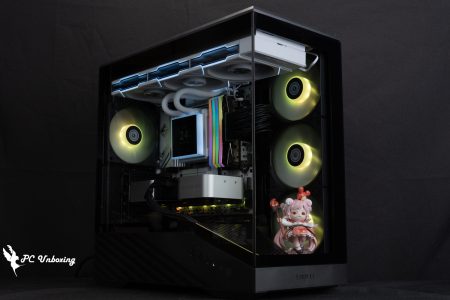
△ The whole chassis lighting effect is shown.

△ Hidden light bar on the front panel, same as KING 95.

△ I think you can put a scene on this side of the glass, but I didn't think of that when I took the picture.
Chassis Thermal Performance Test

Then we also tested the cooling performance of the chassis with AMD Ryzen 5 8400F processor and GIGABYTE B650I AORUS ULTRA (rev. 1.0) motherboard, during the test process, we set the speed of the fan slots in the BIOS of the motherboard to run at full speed, and the test scene was a closed air-conditioned room at 25°C for the actual test, because it is difficult to control the ambient temperature of a normal room, so it is just for reference. The actual test was conducted in a closed air-conditioned room at 25°C. The ambient temperature of a normal room is difficult to control, so it is only for reference.
The software uses AIDA64 FPU and Furmark 2 to simulate the temperature data of the processor and graphics card under high load stress, Black Myth: Wukong 1080P to run the test scenarios, and HWiFO64 to collect and record the maximum temperature and power consumption.
Testing Platform
Processor: AMD Ryzen 5 8400F
Cooler: AMD Wraith Prism (full speed)
Thermal paste: Cooler Master Ice Fusion V2 (thermal conductivity 5W/m-k)
Motherboard: GIGABYTE B650I AORUS ULTRA (BIOS version: F35)
Memory:Kingston FURY Renegade DDR5 RGB 7200 MT/s 16GBx2 cl38-44-44-105 1.45v
Graphics: NVIDIA GeForce RTX 4060 Ti Founders Edition 8GB
Operating System: Windows 11 Professional 24H2
System Drive: Kingston A2000 NVMe PCIe SSD 500GB
Gaming Disk: Intel 670P 2TB M.2 2280 PCIe SSD (Solidigm)
Power supply:MONTECH CENTURY II 850W
Chassis: MONTECH KING 15 PRO
I would like to add a few things, the first one is that I have updated the BIOS version of GIGABYTE B650I AORUS ULTRA to F35 version, and the rest of the settings: XMP_on, and all the fan slots are set to full speed.
In the AIDA64 FPU test, the AMD Ryzen 5 8400F temperature peaked at 95.1°C, and the RTX 4060 Ti FE card peaked at 65.2°C in the Furmark 2 test. The sudden high temperature in the FPU can only be speculated to be due to the stress test algorithm, after confirming that the Phantom heatsink and thermal paste are installed. Higher temperatures and a weak heatsink?
The maximum processor and graphics card temperatures during Black Myth: Wukong games are only 70.8 °C and 56.7 °C. The maximum temperature for the processor and graphics card are only 70.8 °C and 56.7 °C.
- Black Myth: Wukong_Black Myth: Wukong_Performance Test Tool 1920 x 1080(FHD)_1 round
- Graphics Test Furmark 2_30 Minute
- Processor Test AIDA64 FPU_30 Minute
- CPU temperature is measured by the diode in the slot to measure the internal (core) or external (case) temperature, but there is no way to know exactly whether it is the internal or external temperature that is measured, and most monitoring software uses this item to display the CPU temperature.
- CPU (Tctl/Tdie) temperature is the actual maximum temperature of the CPU sensor in the chip.

△ Chassis thermal performance chart.

△ Screenshot of the double-bake test.
Conclusion

As a rule, Monarch MONTECH intends to update its KING series of chassis once a year, and this year's KING 45 PRO and KING 15 PRO chassis do not differ much from each other, with the biggest difference being the height of the chassis itself and the KING 45 PRO's support for ATX motherboards, so you can choose either one of the two based on the motherboard you want to use and whether or not there are any limitations on the height of space to be used. If you want to choose between the two models, you can do so according to the motherboard and the height limitations of the space you are using.
Both chassis come with three RX120 PROs on the bottom and one AX120 PRO on the back, for a total of four ARGB fans to be used with the included ARGB fan hub, which provides sufficient cooling airflow even without the additional fans, and the top bracket can be used to install up to 360/280 fans and water cooling if you want to enhance the internal cooling effect of the case.

After unboxing the KING 45 PRO and KING 15 PRO chassis, you can clearly feel that the chassis has retained the same features as the KING 45 PRO and KING 15 PRO chassis. KING 95 There are some external features, but the internal structure is similar to that of the HS01 PRO, HS02 PRO Similarly, after some further optimization, the installation experience and convenience of the two new chassis is honestly much better than the two HS series chassis, for example, the power mounting bracket has been renewed, the beveled cable routing holes on the top of the motherboard, and the removal of the decorative plate on the bottom edge of the motherboard and the simplification of the number of cable coverings have simplified the overall installation experience a great deal.

Yun
Drinks with less than full sugar are colored water. Crossing Turbid Creek, full sugar is not a crime!

 繁體中文
繁體中文  English