
AMD DDR5 6000 or 8000? AMD AM5 Ryzen Platform AIDA64 Bandwidth and Latency Analysis

When it comes to choosing DDR5 memory, the AMD AM5 platform has always been plagued with a question: Is high frequency really useful, or is low CL value the key? This is especially true for discussions such as "DDR5-6000 CL30 is the best sweet spot" and "is DDR5 8000 worth buying", but most of the results come from gaming tests or sensory sharing, and there is a lack of data analyzing the memory system from a purely memory system point of view. In this article, we will not conduct any gaming or productivity tests, but only use AIDA64 memory tests to actually compare the performance of the DDR5-6000 CL26 and the DDR5-8000 CL36 in the AMD Ryzen 9 9950X3D The "Read/Write Bandwidth, Replication Performance and Actual Latency Performance" on the platform focuses on analyzing the relationship between frequency increase and latency change. Through this testing method, several core questions can be answered more clearly: Is 6000 MT/s still the best Sweet Spot choice for AMD DDR5? Will the increase in bandwidth brought about by high-bandwidth DDR5 memory be reversed by the synchronization mechanism and latency? If you are in the process of selecting DDR5 memory for the AMD Ryzen platform, this article will give you an answer from a purely data-based perspective that is not influenced by marketing jargon.
AMD DDR5 Architecture Explained: Why is DDR5-6000 considered Sweet Spot?
AMD AM5 platform is based on the UCLK memory controller frequency, and MCLK memory equivalent frequency, the ratio of the two frequencies to determine the mode of operation UCLK = MCLK or UCLK = MCLK/2, the Chinese side called what split frequency, different frequency, same frequency, the author does not care about what the language, I just talk about UCLK = MCLK (or UCLK 1:1) this way, the X870 for example, AM5 currently under 6000 MT/s usually UCLK = MCLK; 6200 MT/s up usually UCLK = MCLK; 6200 MT/s up usually UCLK = MCLK; AM5 currently below 6000 MT/s usually UCLK = MCLK. In the case of X870, if UCLK Mode is kept Auto, AM5 is usually UCLK=MCLK below 6000 MT/s; and UCLK=MCLK/2 from 6200 MT/s onwards.
As for the AMD Sweet Spot Sweet Spot, we all choose DDR5 6000 MT/s reason is because this UCLK Mode will be kept at UCLK=MCLK (UCLK 1:1), then as for the AMD Sweet Spot Sweet Spot in AIDA64 is really DDR5 6000 MT/s?
And how does the AMD platform check if it is UCLK=MCLK or UCLK=MCLK/2 in the system? First, use a newer version of CPU-Z, then click on the Memory page to see the ratio of Mem Controller Freq. to DRAM Frequency.

△ The AMD AM5 platform is used for this test.

△ UCLK=MCLK mode, Mem Controller Freq. and DRAM Frequency will be the same frequency, the former Mem Controller Freq. frequency = the latter DRAM Frequency, that is UCLK=MCLK, in this picture 3004.1 = 3004.1 ( 6000 MT/s).

△ UCLK=MCLK/2 mode, Mem Controller Freq. and DRAM Frequency will be ½:1, the former Mem Controller Freq. frequency x2=the latter DRAM Frequency, that is UCLK=MCLK/2, for this picture 2003.4 x2= 4006.7 (8000 MT/s).
Test platform and memory setup: DDR5-6000 CL26 vs DDR5-8000 CL36
This memory test "does not enable the motherboard's memory score optimization settings" or manual overclocking adjustments, so as to present the performance of directly applying the memory profile, there will be no motherboard factors interfering with the results of the components, and the motherboard's UCLK Mode is maintained automatically to allow the motherboard to adjust itself, and of course, will not be used by shutting down the core or the use of a thin overclocking version of the system to obtain the best results. Instead, the test is conducted purely on a normal Win11 system with the full default processor, which is more in line with the direct usage scenario.
This article does not include games or professional rendering software because there are hundreds of games and professional software that everyone can play, so the author cannot test each and every one of them, or use one game or software to represent all of them. Therefore, it is recommended that you look at the commonly-used software to see if there are any changes in memory bandwidth performance or latency, and then refer to it with the performance of this article.
I'm ready this time. Origin code vortex DDR5 48 GB (24 GBx2) The memory module was tested, the specification of the module is written in the SPD HUB as DDR5-6000 CL26 (XMP 3.0, AMD EXPO 1 Profile) and in the AMD EXPO 2 Profile as DDR5-8000 CL36, with "two different profile specifications" built in, the detailed memory specification is as follows, the same set of The detailed memory specifications are as follows, two profiles for the same module is very suitable for this theme.
Previously in theIntel & AMD Dual-Platform DDR5 Memory Performance Measurements - High Frequency, Low CL ValueIn the article, although I have prepared four different Profile specifications of Giga G.SKILL Trident Z5 Royal halberd memory for testing, but because the DDR5 8000 uses non-binary 3GB cells, and the other three sets of cells used are different, which will result in different performance, so this time I use the "same set of memory" to avoid this situation, but the manufacturer may use different batches of cells to produce the test results may be different, which may result in different performance. However, the performance may be different due to the different batches of chips used in the manufacturer's production. The results of this test only represent the hardware and platforms in the author's hands and the results are very different from the conventional logic, so consume them rationally.
The built-in memory overclocking profiles are listed below:
- ddr5-6000 mt/s cl26-36-36-76 1.45v
- ddr5-8000 mt/s cl36-47-47-108 1.45v

△ DDR5 Profile view.
AIDA64 Test Results: DDR5-6000 and DDR5-8000 Bandwidth and Latency Differences

This test software uses AIDA64 Cache & Memory Benchmark It is mainly used to test the performance of processor caches and RAM. The read/write/copy bandwidth performance score represents the rate of transfer between CPU and memory, which means the efficiency of data throughput (the higher the score, the better), and the time delay score of accessing data indicates the responsiveness of the memory system.
AIDA64 also only once on the direct cut-off, and did not test many times to take what the best results, to the author to run once is how much is how much, the score has a substantial change that is the software end of the problem (yes, I am talking about AIDA64).
Testing Platform
Processor:AMD Ryzen 9 9950X3D
Cooler: LIAN LI GA II Trinity SL-INF 360 (full speed)
Thermal paste: Cooler Master MASTERGEL MAKER 40g (thermal conductivity 11W/mK)
Motherboard:ASRock X870E Taichi OCF (BIOS version: 1.03 )
Memory:Origin code vortex DDR5 48 GB (24 GBx2)
Graphics: NVIDIA GeForce RTX 4060 Ti Founders Edition 8GB
Operating System: Windows 11 Professional 24H2
System disk: Kingston NV3 2TB
Power supply:FSP Hydro PTM PRO ATX3.0 (PCIe5.0) 1200W
Case: STREACOM BC1 Benchtable V2
In the test, the latency score is not better due to the lower CL value of the 6000 CL26 Profile, and the memory bandwidth performance is also better than the DDR5-8000 CL36, so in conclusion, in the author's hands, the DDR5-8000 CL36 has a better performance. AMD Ryzen 9 9950X3D 與 ASRock X870E Taichi OCF platforms, are DDR5-8000 CL36 better.
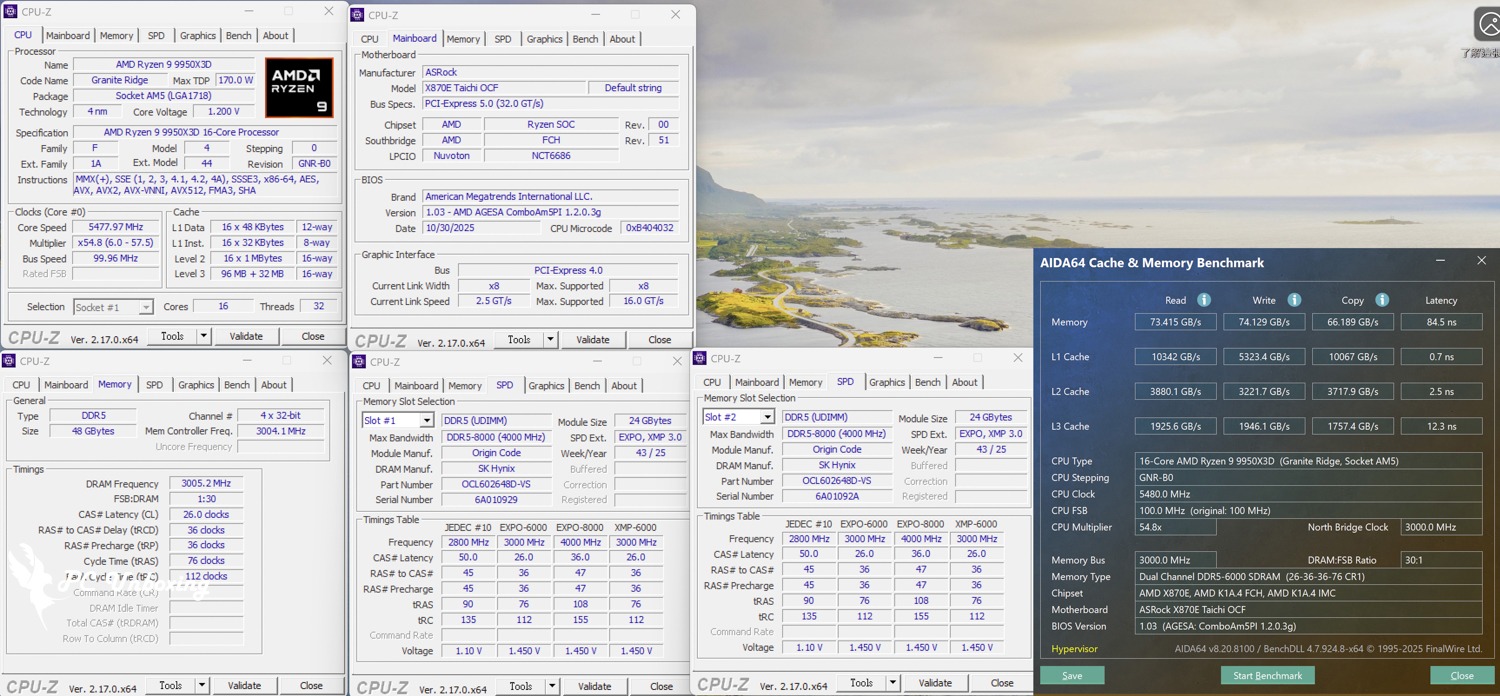
△ EXPO Profile 1: DDR5-6000 MT/s CL26-36-36-76 1.45V_AMD platform test results.

△ EXPO Profile 2: 8000 MT/s CL36-47-47-108 1.45V_AMD platform test results.
AMD Ryzen DDR5 Best Frequency Analysis: 6000 or 8000 More Worthwhile?

According to the AIDA64 bandwidth and latency test, which is a favorite among Taiwanese gamers, the DDR5-8000 CL36 is better than the DDR5-6000 CL26 in all aspects for the Ryzen platform, and the DDR5 8000 MT/s doesn't have worse bandwidth or latency due to the UCLK Mode which operates with UCLK=MCLK/2. In terms of AIDA64 alone, DDR5 6000 is not the best sweet spot for latency or bandwidth performance.
As for the price, the price of these two major modules is usually around the same level, so for the author, I would still go for the 8000 MT/s specification. This time, the author used the same set of modules to conduct the actual test, so there is no problem of the difference in body quality or particles between different sets of modules.
The result is a big break from the past logic, some people will surely say what is the game test? As I said earlier, "There will be no games or professional rendering software tested in this article because there are hundreds of games and professional software that everyone plays, so it is impossible for the author to test each and every one of them, or to use one game or software to represent all of them, so I suggest that you see for yourself if the commonly used software changes due to the performance of the memory bandwidth or the latency performance. Therefore, we suggest you to check whether your favorite software will change due to the memory bandwidth performance or latency performance, and then refer to the performance of this article."

Yun
Drinks with less than full sugar are colored water. Crossing Turbid Creek, full sugar is not a crime!


 繁體中文
繁體中文  English
  日本語
日本語  한국어
한국어