
GIGABYTE 技嘉主機板 AMD PBO 怎麼開?AM5 BIOS 設定教學+效能實測

本篇文章將會教導大家如何在 GIGABYTE 技嘉 AMD AM5 主機板上,開啟 AMD PBO(Precision Boost Overdrive) 處理器簡易超頻功能的完整教學,讓大家可以免費且方便的獲得更多處理器性能。
GIGABYTE 技嘉主機板 AMD PBO 開啟教學(BIOS 設定步驟)
首先在開機過程中看到技嘉標誌後,按下鍵盤上的 Del 進入 BIOS。
進入 BIOS 之後,點選右上角 ADVANCED MODE 進入進階模式,在 Tweaker 分頁中找到 Advanced CPU Setting,通常 Advanced CPU Setting 選項前面會特別用小點標示,以筆者主機板來說是藍色方塊標示。
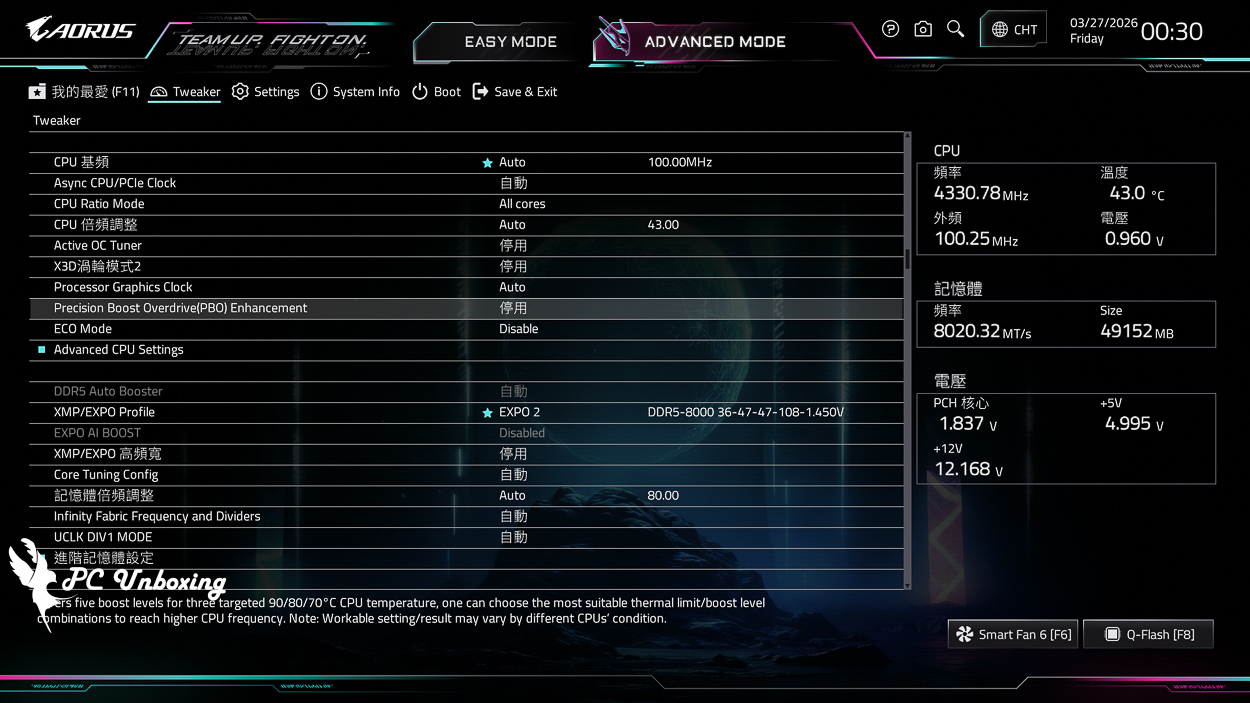
△ 進入 BIOS 找到 Advanced CPU Setting。
在 Advanced CPU Setting 之中找到 Precision Boost Overdrive,Precision Boost Overdrive 也會有小點標示,Precision Boost Overdrive 的簡稱就是 PBO。
進去後將 PBO 設定為 Enabled(啟用),接著按下 F10 儲存後離開。

△ 找到 Precision Boost Overdrive 選項點進去。

△ 預設會是 AUTO,手動選擇將 AMD PBO(Precision Boost Overdrive) 調整為 Enabled(啟用)就可以了。

△ 儲存後並離開。
AMD PBO 開啟後效能提升實測(Cinebench 跑分比較)

本次使用 GIGABYTE X870E AORUS XTREME X3D AI TOP 的主機板來進行性能測試,搭配 16 核心 32 執行緒的 AMD Ryzen 9 9950X3D 處理器,並且將主機板 BIOS 更新至 F7a 版本,記憶體則是使用 Origin code vortex DDR5 48 GB (24 GBx2) 雙通道記憶體套組,搭建裸測平台並將記憶體開啟 Profile 設定檔,來對比手動開啟 AMD PBO(Precision Boost Overdrive) 之後的性能提升幅度。
Testing Platform
Processor:AMD Ryzen 9 9950X3D (PBO activated)
Cooler: LIAN LI GA II Trinity SL-INF 360 (full speed)
Water-cooled fans: 3x LIAN LI P28 (full speed)
Thermal paste: Cooler Master MASTERGEL MAKER 40g (thermal conductivity 11W/mK)
Motherboard:GIGABYTE X870E AORUS XTREME X3D AI TOP (BIOS 版本:F7a)
Memory:Origin code vortex DDR5 48 GB (24 GBx2) 8000 MT/s CL36-47-47-108 1.45V
Graphics: NVIDIA GeForce RTX 4060 Ti Founders Edition 8GB
Operating System: Windows 11 Professional 24H2
Power supply:FSP Hydro PTM PRO ATX3.0 (PCIe5.0) 1200W
Case: STREACOM BC1 Benchtable V2
by Maxon Cinebench An industry-standard benchmarking software, Cinebench 2026 tests GPU and CPU performance using Maxon's powerful Redshift rendering engine.
The new version of Cinebench 2026 adds a test for evaluating the performance of SMT-enabled CPU cores, which means that it is now possible to test: GPU, processor full-core, processor single-core, and processor single-thread performance.
Based on the latest Cinema 4D 2026 and Redshift code, and using the updated Clang V19 compiler, the benchmarking accuracy of contemporary and next-generation processors has been improved to test whether the equipment is stable under high loads, whether the thermal solutions of the desktop or laptop are sufficient to cope with the demands of long-term operation in order to maximize the potential of the CPU, and whether the machine is capable of handling demanding 3D tasks. and whether the machine is capable of handling demanding 3D tasks.
在預設情況下 AMD PBO(Precision Boost Overdrive) 選項會是 AUTO,在 Cinebench 2026 中處理器全核心/執行緒 CPU (Multiple Threads) 中得分為 9973 pts,在 CPU (Single Core) 處理器單核心項目中得分為 752 pts。
而依照上述步驟將 PBO 設定為 Enabled(啟用)後,在 Cinebench 2026 中處理器全核心/執行緒 CPU (Multiple Threads) 中得分為 10274 pts,在 CPU (Single Core) 處理器單核心項目中得分為 763 pts。
在簡單設定一個項目之後,多核心性能獲得 3% 的提升;單核心性能則獲得 1.4% 的提升。

△ 預設 PBO 性能。

△ 開啟 AMD PBO(Precision Boost Overdrive) 之後的性能。

Yun
Drinks with less than full sugar are colored water. Crossing Turbid Creek, full sugar is not a crime!


 繁體中文
繁體中文  English
  日本語
日本語  한국어
한국어