
GIGABYTE DDR5 Memory Simple Overclocking Tutorial / DDR5 Free Press!

GIGABYTE's DDR5 XMP Booster feature for DDR5 memory allows gamers to simply overclock their memory from the original XMP Profile frequency to a higher frequency for more PC performance for free when platform conditions allow! Users of JEDEC frequency memory can also kick-start your memory overclocking journey with another DDR5 Auto Booster feature.
Testing Platform
Processor: Intel Core i9-14900K
Radiator:AORUS WATERFORCE II 360 ICE(full speed)
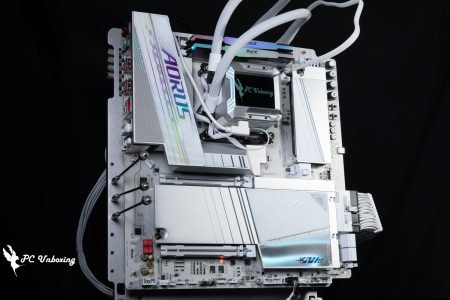
Motherboard:GIGABYTE Z790 AORUS PRO X ( BIOS version: F5f )
Memory:G.SKILL Trident Z5 RGB DDR5-7200 48GB (2x24GB)
Display Card: MSI GeForce GTX 1070 Quick Silver 8G OC
Operating System: Windows 11 Professional 22H2
System Drive: WD BLUE 3D NAND SATA M.2 2280 SSD 500GB
Power Supply: MONTECH TITAN GOLD 1200W
Graphics driver: GeForce Game Ready 552.22
Case: STREACOM BC1 Benchtable V2
Cheap JEDEC Frequency Bare Bars Can Be Supercharged, Introducing DDR5 XMP Booster Features in Action
Some consumers may choose the so-called "bare strips" to install their computers due to lack of budget, etc. These bare strips, which directly expose the PCB and memory particles without heat sinks, mostly do not have Intel XMP (Extreme Memory Profile) and AMD EXPO (EXTended Profiles for Overclocking) key overclocking parameters programmed in the SPD HUB, which means that these bare strips will operate at the JEDEC frequency. Most of these bare sticks do not have Intel XMP (Extreme Memory Profile) and AMD EXPO (EXTended Profiles for Overclocking) key overclocking parameters burned into the SPD HUB, which means that these bare sticks will operate at JEDEC frequencies. Currently (2024 Q2), the frequencies of the bare sticks sold on the market are DDR5 4800 & 5600 MT/s, but there may be more JEDEC frequency memories to choose from in the future.
Can't these barebones be overclocked? The DDR5 Auto Booster function on the GIGABYTE motherboard allows the memory to further increase the frequency at the JEDEC frequency. For the G.SKILL Trident Z5 RGB DDR5-7200 48GB (2x24GB) memory that I am using, the default JEDEC frequency will be DDR5 5600 MT/s when the XMP Profile is not turned on. The default JEDEC frequency is DDR5 5600 MT/s without opening XMP Profile.
After entering the BIOS, activate the DDR5 Auto Booster function in the lower left corner of the EASY MODE and press F10 to save and exit, then it can be easily and simply pull up from 5600 MT/s to 5800 MT/s.

∆ Enter the BIOS and you will see the DDR5 Auto Booster function at the bottom left corner.

∆ By manually selecting Activate, you can further increase the frequency of the bare bars.
utilization AIDA64 Cache & Memory Benchmark To test the read/write performance of the Trident Z5 RGB, we entered the system at the default JEDEC frequency of DDR5 5600 MT/s, and the test results were 84888 MB/s read/write and 75190 MB/s write, with a latency of 89.5 ns.
After turning on DDR5 Auto Booster, the frequency was increased to 5800 MT/s, and the test results were 87,892 MB/s and 77,609 MB/s for read and write, with a latency of 86.1 ns. Both the read and write performance were slightly enhanced and the latency was lowered, which is a free and small enhancement for JEDEC frequency memory.
If users want to further increase the performance, they can also use the following High Bandwidth and Low Latency functions after turning on DDR5 Auto Booster to squeeze more performance out of the memory! In addition, DDR5 Auto Booster can only be enabled at JEDEC frequencies, if XMP / EXPO or other overclocking settings are already enabled, DDR5 Auto Booster cannot be enabled.

∆ G.SKILL Trident Z5 RGB DDR5-7200 48GB (2x24GB) memory tested at 5600 MT/s JEDEC without XMP on.

∆Enables DDR5 Auto Booster function at JEDEC frequency to increase frequency to DDR5 5800 MT/s with a small increase in performance.
Move your pinky to tighten the High Bandwidth & Low Latency feature.
Under the Extreme Memory Profile (X.M.P.) in the lower left corner of EASY MODE, there are two options, High Bandwidth and Low Latency, which allow users to further boost the memory performance under four usage scenarios: JEDEC Frequency / XMP / DDR5 Auto Booster / DDR5 XMP Booster. Under the JEDEC frequency / XMP / DDR5 Auto Booster / DDR5 XMP Booster, there are two options to further boost the memory performance.

∆ High Bandwidth.

∆ Low Latency.
First, open the XMP Profile of G.SKILL Trident Z5 RGB DDR5-7200 and run it once. AIDA64 Cache & Memory Benchmark The test results were 103,950 MB/s read/write and 89,844 MB/s write/read with 72.5 ns latency.

∆ Turn on the X.M.P. for testing.

∆ purely opens the read/write performance of the X.M.P.
Then add the High Bandwidth setting to X.M.P. and do the same again. AIDA64 Cache & Memory Benchmark The test results were 104,200 MB/s and 100,350 MB/s for read and write, with a latency of 73.1 ns. The read performance was slightly enhanced, while the write performance was much enhanced, but the latency was slightly increased.

∆ X.M.P. plus High Bandwidth test scores.
Then go back to BIOS, turn off High Bandwidth and enable Low Latency setting, let X.M.P. Profile with Low Latency to do a test, the test result is read/write 112420 MB/s and 97679 MB/s, the latency is 63.2 ns, compared to X.M.P. Profile, the result has increased and the latency has been reduced to 63.2 ns, but the increase in write performance is not as high as High Bandwidth. Compared to the X.M.P. Profile, all the results have increased and the latency has been reduced to 63.2 ns, but the increase in write performance is not as high as that of High Bandwidth.

∆ X.M.P. plus Low Latency test scores.
After testing the performance of High Bandwidth and Low Latency with XMP, we will use X.M.P. Profile and turn on High Bandwidth and Low Latency at the same time, so that you can see the effect of dual-booting.
With both High Bandwidth and Low Latency turned on at the same time, the test results were 112590 MB/s and 106270 MB/s for reading and writing, with a latency of 63.3 ns. The reading and writing performance was better than High Bandwidth or Low Latency alone, and the latency was almost the same as in Low Latency mode. The read and write performance is better than High Bandwidth or Low Latency alone, and the latency performance is almost the same as Low Latency mode.

∆ X.M.P. plus Low Latency and High Bandwidth are dual-enabled.

∆ X.M.P. with Low Latency and High Bandwidth.
DDR5 XMP Booster Introduced and Tested!
The DDR5 XMP Booster option on GIGABYTE motherboards has several DDR5 XMP Booster parameters that can be directly applied depending on the brand of the memory cell and the capacity of the single cell. Gamers can understand that this is GIGABYTE's own X.M.P. Profile stored on the motherboards, but whether or not it can be applied and stabilized depends on the quality of the CPU memory controller (IMC [Integrated Memory Controller]) on the platform being used. However, whether or not it can be applied and used stably still depends on the quality of the CPU memory controller (IMC [Integrated Memory Controller]) on the platform used, BIOS version, motherboard design, memory particles and control, etc. Not all platforms with DDR5 XMP Booster labeled 8266 can be applied directly without any problem.
In order to use the DDR5 XMP Booster function, it must be activated at the JEDEC frequency (i.e., the memory's own X.M.P. Profile cannot be opened), and if the memory's SPD HUB's burned-in X.M.P. Profile is opened, the DDR5 XMP Booster option cannot be selected.
The next step is to confirm what capacity of DDR5 memory you have in your hands and what kind of chips you have. For example, the G.SKILL Trident Z5 RGB DDR5-7200 48GB (2x24GB) that the author is testing today is a single 24GB, but most of you should know exactly what capacity of memory you have in your hands, right?
As for the chips used in the memory, how do I know? The quickest way is to click on the SPD information in the lower right part of the BIOS, and you will be able to see both the memory module capacity and the MFG ID (the brand of the chips used), which will tell you that I will be looking for the Hynix 24 GB parameter in the DDR5 XMP Booster option to apply later on.

The ∆DDR5 XMP Booster is equipped with parameters that can be applied to different single-bar capacities from three cell manufacturers, Micron / Hynix / Samsung.

∆ After looking at all the options, the current highest frequency is a Hynix cell with a single capacity of 24 GB that can apply 8266 MT/s CL 40-54-54-132 1.45V.
The author then used the Hynix 24 GB parameters to apply further overclocking, and finally succeeded in passing with the DDR5 8000 MT/s 40-48-48-128 1.4V setting. AIDA64 Cache & Memory Benchmark Tested and successfully overclocked from 7200 MT/s to 8000 MT/s for free.
I also tried to use this set of parameters with the High Bandwidth or Low Latency function to try to boot up, but unfortunately they could not pass the self-test program of the motherboard, but if you are using the Z790 AORUS TACHYON X motherboard today (I would like to play with it to see the European...), or IMC better processor should be able to go further. It should be possible to go even further.

∆ DDR5 XMP Booster:8000 MT/s 40-48-48-128 1.4V Successfully overclocked.

The ∆ memory overclocking limit ultimately depends on the nature of the platform itself.
Summary & Insights

This time, GIGABYTE tested DDR5 Auto Booster, DDR5 XMP Booster, High Bandwidth, and Low Latency with GIGABYTE motherboards to let gamers see how effective they are in real life, and then we'll move on to the summary.
- If you are purchasing a higher cost JEDEC frequency barebones and don't want to spend time testing it all the time but still want to get a free performance boost, you can use the DDR5 Auto Booster feature to have the motherboard automatically deploy it for you.
- If you're a gamer willing to take the time to test, you can use the DDR5 XMP Booster with High Bandwidth and Low Latency to overclock, but remember that the DDR5 XMP Booster selects parameters based on the memory's own cell and capacity specifications.
- The best case scenario for both High Bandwidth and Low Latency is to turn on both, but if both are unstable then turn on Low Latency only, if it still doesn't turn on then turn on High Bandwidth only or just use DDR5 XMP Booster.

While it's great that GIGABYTE offers free overclocking and performance enhancement for these memories, allowing users who are willing to spend the time to further enhance (squeeze) the platform's performance, it's an old adage that the overclocking capability and stability of memory depends on the quality of the CPU's memory controller (IMC), BIOS version, motherboard design, memory particles and controls, etc. So even though the DDR5 XMP Booster and the motherboard's own QVL are labeled, the motherboard's own QVL will be affected by the memory particles and controls. However, as the old saying goes, the overclocking capability and stability of memory depends on the quality of the CPU IMC (Integrated Memory Controller) on the platform, the BIOS version, the motherboard design, the memory particles and the control, and so on. Therefore, even if the DDR5 XMP Booster and the QVL of the motherboard itself are both labeled 8266 MT/s, it doesn't mean that everyone's platforms can be overclocked directly and used in a stable way, and it is ultimately dependent on the player's own luck, such as the author's luck this time around was just ordinary, the 4DIMM For example, the author's luck this time is ordinary, and the 4DIMM motherboard can overclock to 8000 MT/s, which is in the middle of the range.
In the future, GIGABYTE is looking forward to adding more DDR5 XMP Booster parameters for users to play with, but this will definitely consume a lot of time and effort to test. In addition, the author would also like to suggest that it would be better for the user experience if the BIOS can record the last selected DDR5 XMP Booster parameter and automatically jump to the last selected parameter after entering the BIOS and selecting the DDR5 XMP Booster. It would be better for user experience if the BIOS can record the last selected DDR5 XMP Booster parameter and automatically jump to the last selected parameter after entering the BIOS and selecting DDR5 XMP Booster, after all, there are a lot of parameters, and sometimes when you get lost in the reboot for a few seconds, you may forget which parameter you just selected when the overclocking failure occurs.

Yun
Drinks with less than full sugar are colored water. Crossing Turbid Creek, full sugar is not a crime!
Related articles
GIGABYTE motherboards open Intel XMP/AMD EXPO memory one-click overclocking complete tutorials

My Eagle Academy Introducing GIGABYTE PerfDrive, the automatic overclocking technology for GIGABYTE motherboards.

 繁體中文
繁體中文  English