
T-FORCE XTREEM DDR5 8000 MT/s 2x16GB Memory Unboxing Review
TEAMGROUP T-FORCE, the gaming sub-brand of T-FORCE, launched the overclocking memory model XTREEM DDR5 last year, targeting overclocking gamers with 7600, 8000, and 8200 MT/s frequencies, and supporting Intel XMP 3.0 (Extreme Memory Profile) one-click overclocking certification. But what about the platform compatibility with such high frequency and size?
T-FORCE XTREEM DDR5 8000 MT/s 2x16GB memory specification:
Capacity: 32GB (2x 16GB)
Speed: DDR5 8000 MT/s
Chronology: CL38-48-48-84
Voltage: 1.45V
Specification: 288-Pin DDR5 UDIMM
Dimensions: 134.5 x 48.8 x 8.2 mm
Overclocking Support: Intel XMP 3.0 Certified (Extreme Memory Profile)
Warranty: Lifetime Warranty
Sedentary Volcanic T-FORCE XTREEM DDR5 8000 MT/s Memory Unboxing
What I remember most about the T-FORCE XTREEM series is the XTREEM ARGB DDR4. At that time, when DDR4 was still popular, the unique shape of the XTREEM ARGB DDR4 was quite appealing, and I really wanted to buy a set of XTREEM ARGB DDR4 at that time, but I couldn't afford to install it, so I just gave up.
TEAMGROUP had a physical display of the new generation successors, XTREEM DDR5 and XTREEM ARGB DDR5, at Computex Taipei last year, and since then the first to appear on the market is today's protagonist, the XTREEM DDR5; it seems that the XTREEM ARGB DDR5 is still a ways off.
XTREEM DDR5 is available in not only the traditional 2x 16GB capacity, but also 2x 24GB non-binary capacity, and the highest 8200 MT/s is only available in 2x 24GB, so after checking with T-FORCE Lab, it seems that the non-binary capacity is better for overclocking.

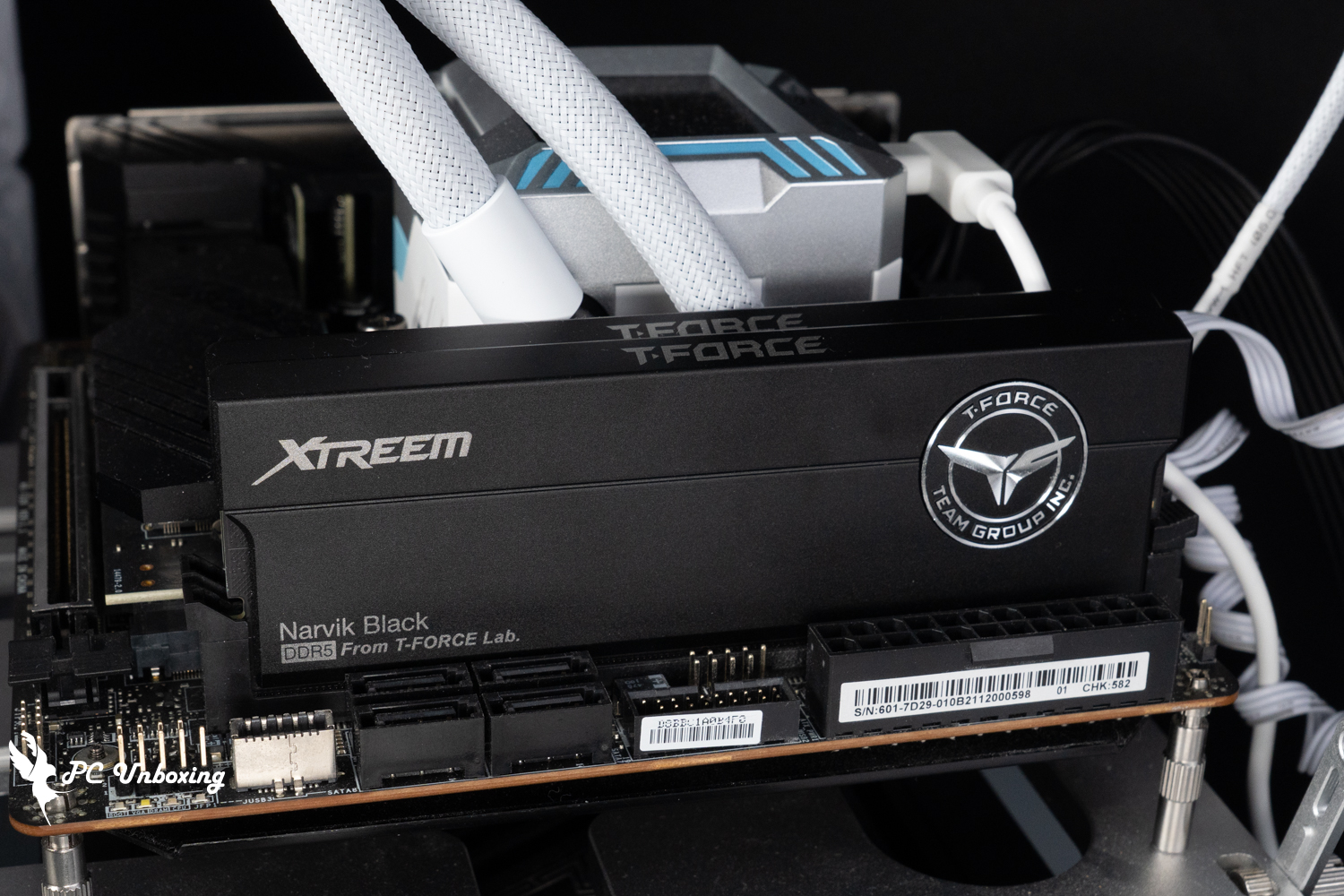
∆ T-FORCE XTREEM DDR5 8000 MT/s 2x 16GB memory.

∆ Language labels.
T-FORCE XTREEM DDR5 is a light-less memory, which means that it does not have RGB lighting effect. The length, width, and height dimensions of T-FORCE XTREEM DDR5 are 134.5 x 48.8 x 8.2 mm, which is higher than other memories at 48.8 mm than many RGB memories, which may not be so friendly to some downdraft coolers or low-tower air-cooling, and may also be an issue for some cases that do not have enough space for upper water-cooling. Some chassis that are not high enough for top-mounted water cooling may also need to pay attention to this issue.
On the front, there is only the laser-engraved XTREEM lettering, and on the right half, there is a large TFORCE CNC emblem, which represents its prestigious status and its origins from T-FORCE Lab.

∆ Glossless sandblasted aluminum fins with a black basalt design.

∆ T-FORCE badge.

∆The cooling fins are grooved to increase the cooling surface area, but the relative height increases a little.

∆ T-FORCE XTREEM DDR5 8000 MT/s 2x 16GB (FFXD516G8000HC38DBK) using single-sided die (1R x8) layout.
T-FORCE has indicated in the official website that the memory uses a 2mm thick heatsink and uses an anodized surface on the sandblasted aluminum heatsink to make the heatsink acid-resistant, corrosion-resistant, rust-resistant, and non-electrically conductive, and that the actual texture comes out but the downside is that it's easy to leave white scratches.

∆ 2 mm thick heat sink.

∆The heat sink is disassembled "after the test", but it is not recommended that consumers disassemble the heat sink by themselves as it may cause damage and loss of warranty.

The ∆ PMIC area has a dedicated thermal pad installation area, but the author tore it so I cleared it out.

Close up of the ∆ heat sink.
After removing the heatsink, let's take a look at the internal materials of XTREEM DDR5. The memory chips are Hynix SK Hynix A-Die (H5CG48AGBD) chips, while the PMIC and SPD HUB are too small to be photographed clearly even after the author's camera has been shooting for a long time, so I have no choice but to give up.

∆ Hynix SK Hynix A-Die (H5CG48AGBD) particles.

∆ SPD HUB with PMIC.
AMD Platform Memory Performance Test
First of all, we will use AMD Ryzen 7000 platform which supports DDR5 memory to see how the memory performs on AMD platform. We use AMD Ryzen 9 7900 processor and MSI MEG X670E ACE motherboard to test the T-FORCE XTREEM DDR5 8000 MT/s 2x 16GB memory, the motherboard is updated to 7D69v1D5 (Beta version). BIOS was updated to version 7D69v1D5 (Beta version) for testing.
Testing Platform
Processor: AMD Ryzen 9 7900 (PBO AUTO)
Cooler: AMD Wraith Prism
Motherboard: MSI MEG X670E ACE (BIOS version: 7D69v1D5 [Beta version])
Memory: T-FORCE XTREEM DDR5 8000 MT/s 2x 16GB
Display Card: MSI GeForce GTX 1070 Quick Silver 8G OC
Operating System: Windows 11 Professional 23H2
System Drive: Kingston A2000 NVMe PCIe SSD 500GB
Power Supply: FSP Hydro PTM PRO ATX3.0 (PCIe5.0) 1200W
Case: STREACOM BC1 Benchtable V2
Graphics driver: GeForce Game Ready 551.23
In the BIOS of MSI MEG X670E ACE motherboard, you can see two XMP Profile profiles built into this set of memory. If you want to get the most powerful performance, you can directly choose XMP Profile 1 profile 8000 CL 38-48-48-84 1.45V, but if your platform has a poorer branding, you can choose XMP Profile 2 DDR5 6000 CL 38 for spare parts. Profile 2 DDR5 6000 CL 38 for backup.
∆ Two XMP Profile profiles are built-in for use.

∆ JEDEC frequency is DDR5-5600.

∆ XMP Profile 1: DDR5-8000 CL38-48-48-84 1.45V.

∆ XMP Profile 2: DDR5-6000 CL38-38-38-78 1.28V.
Again. CPU-Z Check out the information about the AMD Ryzen 9 7900 and MSI MEG X670E ACE platforms. The SPD page shows that the T-FORCE XTREEM DDR5 utilizes SK Hynix memory chips and supports the latest Intel XMP 3.0 one-click overclocking technology.

∆ AMD platform CPU-Z.
follow AIDA64 Cache & Memory Benchmark To test the read/write performance of T-FORCE XTREEM DDR5, I don't know why it only shows DDR5-5200 in AIDA64 but 5600 MT/s in BIOS and CPU-Z when tested at JEDEC frequency.
The JEDEC frequency test read/write performance was 62224 MB/s and 67365 MB/s with a latency of 85.2 ns.
With XMP Profile 2 on, the DDR5-6000 delivers read and write performance of 74549 MB/s and 76676 MB/s with 68.3 ns latency.
After turning on XMP Profile 1 DDR5-8000, the read/write performance can be further increased, the test result is 86801 MB/s and 87235 MB/s, with a latency of 64.5 ns. I am quite surprised to see AMD platform can boot up with 8000 MT/s, but I can't overclock it to the higher DDR5 8200 anymore.

∆ JEDEC default frequency test result.

∆ XMP Profile 2 DDR5-6000 test results.

∆ XMP Profile 1 DDR5-8000 test results.
And then through AIDA64 System Memory Tested for memory pressure stability with memory XMP 3.0 Profile 1 parameter DDR5-8000 CL38-48-48-84 1.45V, and the temperature of the SPD Hub was 63.8°C at the highest after 10 minutes of testing.
It is important to note that this X670E ACE was tested on the STREACOM BC1 Benchtable V2 barebones platform, and there is no additional fan in the memory to assist with cooling, but most users will have an exhaust fan installed above the chassis to dissipate the heat, so this is just a reference for temperature testing.

∆ AIDA64 system memory temperature test, SPD Hub up to 63.8 °C.
Intel Platform Memory Performance Test

Next, the T-FORCE XTREEM DDR5 8000 MT/s 2x 16GB was tested on an Intel Core i9-13900K test platform with DDR5 memory and XMP 3.0 support, using an MSI MEG Z690I UNIFY and updating the BIOS to the 7D29v1G version.
Testing Platform
Processor: Intel Core i9 13900K (QS)
Cooler: Valkyrie E360 (full speed)
Water-cooled fan: LIAN LI UNI FAN P28 (full speed)
Motherboard: MSI MEG Z690I UNIFY ( BIOS version: 7D29v1G )
Memory: T-FORCE XTREEM DDR5 8000 MT/s 2x 16 GB
Graphics: MSI GeForce GTX 970 GAMING 4G Golden Edition
Operating System: Windows 11 Professional 22H2
System Drive: Plextor PCIe Gen3 x4 M.2 2280 SSD 512GB
Gaming Disk: Intel 670P 2TB M.2 2280 PCIe SSD (Solidigm)
Power Supply: MONTECH TITAN GOLD 1200W
Graphics driver: GeForce Game Ready 551.23
By the same token CPU-Z View Intel Core i9 13900K test platform.

∆ Intel platform CPU-Z.
Also use AIDA64 Cache & Memory Benchmark To test the read/write performance of T-FORCE XTREEM DDR5, with XMP Profile 1 DDR5-8000 turned on, the test results were 122400 MB/s read/write and 104020 MB/s write, with a latency of 57.6 ns.
The author also manually overclocked to 8200, 8266, and 8400 MT/s. The higher frequency of 8533 MT/s was able to boot up, but the score stability was not good.

∆ AIDA 64 cache and memory test items, read speed, write speed test charts.

∆ AIDA 64 cache and memory test project latency performance.

∆ Test result screenshot.

∆ Overclocked up to 8400 MT/s.
Conclusion

In 2024, the production frequency of DDR5 memory will gradually increase to 8600 MT/s, and many memory brands are already producing 8000 MT/s or more, including TEAMGROUP, the current T-FORCE XTREEM DDR5 8000 MT/s 2x16GB, which is a T1 high-frequency DDR5 8000 MT/s and 6000 MT/s Intel XMP 3.0 Profile (Extreme Memory Profile) can be used. MT/s and 6000 MT/s Intel XMP 3.0 Profile (Extreme Memory Profile) can be used.

However, the relative XTREEM DDR5 has a maximum of 8200 MT/s and 8000 MT/s, how many platforms can use it stably is another matter, for example, in the author's previous article, "The XTREEM DDR5 DDR5".14th Generation Flagship Intel Core i7-14700K and MSI MEG Z790 ACE MAX Unboxing ReviewIn the unboxing article, T-FORCE XTREEM DDR5 8000 MT/s 2x 24GB was used for testing, and the XMP Profile 8000 MT/s could not pass the self-test and had to be downclocked to DDR5 7600 MT/s for use.
This time, it is paired with the MSI MEG Z690I UNIFY, which has better memory overclocking performance. This 2DIMM ITX motherboard is more compatible with high-frequency memory, and is able to boot up at 8000 MT/s and even overclock to 8400 MT/s. Of course, we cannot rule out the possibility that the performance of different processors and BIOSes can be optimized to be different, but if you want to ensure that this kind of high-frequency memory can be used directly, it is still more recommended to use it together with a 2DIMM motherboard. However, if you want to ensure that this high-frequency memory can be used directly on the machine, it is still recommended to use it together with a 2DIMM motherboard, such as the MSI MEG Z690I UNIFY, MEG Z690 UNIFY-X, and GIGABYTE Z790 AORUS TACHYON X motherboards, or a better choice.
However, I am still surprised that the AMD Ryzen 9 7900 and MSI MEG X670E ACE platforms are able to use A-XMP to directly light up the machine. I was going to say that manually overclocking the system to 7200 MT/s would be about right, but it seems that the BIOS optimization is still quite fast.

Yun
Drinks with less than full sugar are colored water. Crossing Turbid Creek, full sugar is not a crime!


 繁體中文
繁體中文  English