
The fan also comes with a 1.6" LCD screen! LIAN LI UNI FAN TL LCD, TL Jumbo Fan unboxing!
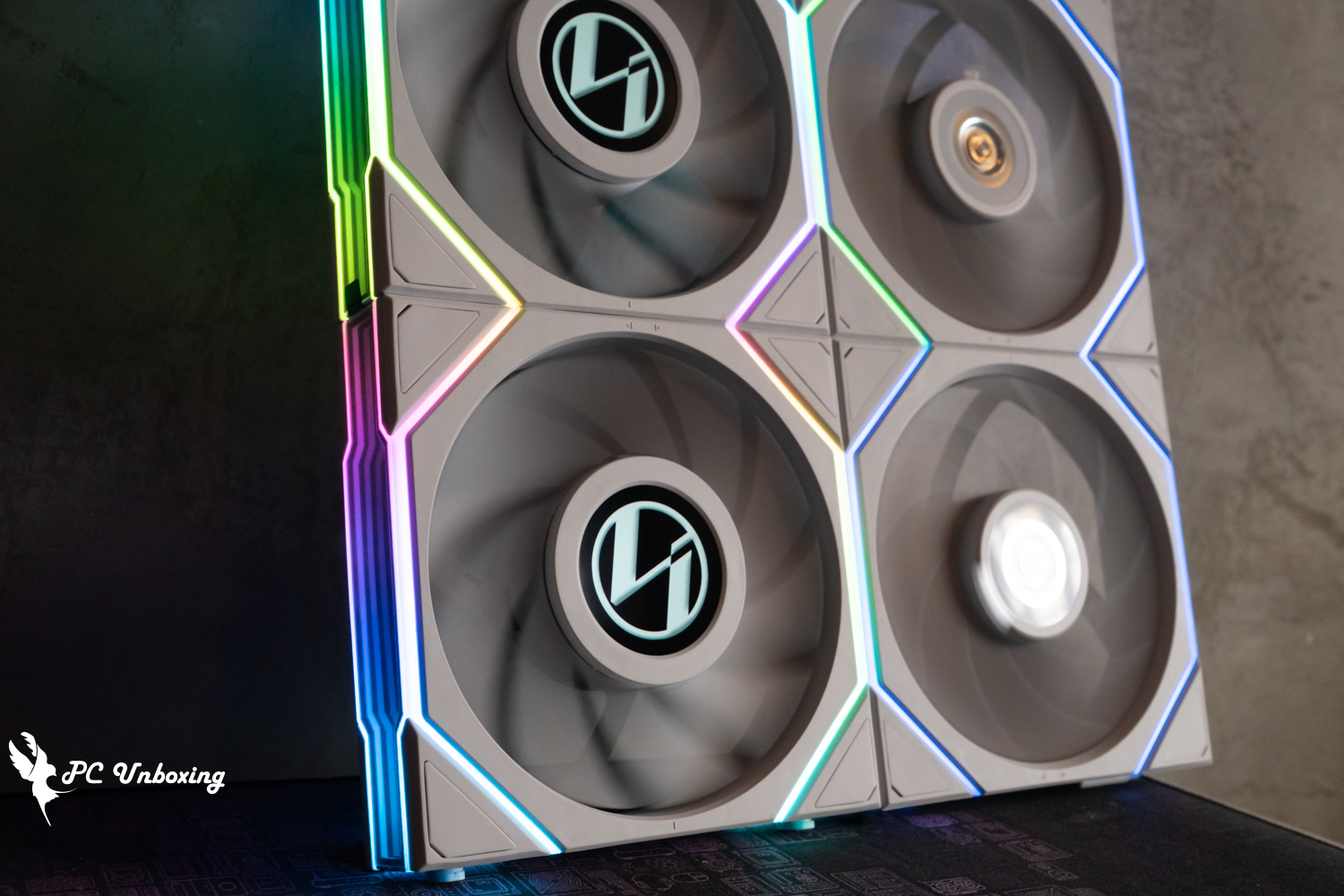
Over the past few months, we have been unboxing many of the new mass-produced products that LIAN LI has been showcasing at COMPUTEX 2023. Today, we are unboxing the LIAN LI UNI FAN TL Series FAN, which is available in a total of 24 packages, including a wide variety of different forms for consumers to choose from, but the most distinctive feature of the UNI FAN TL Series is the TL LCD, which has a 1.6" LCD screen at the center of the fan axis with a resolution of 400 x 400 and supports GIF, MP4, JPG and PNG files. The most distinctive feature is the TL LCD, which has a 1.6" LCD screen with a resolution of 400 x 400 at the center of the fan's shaft, and supports GIF, MP4, JPG, and PNG file formats for a customizable display. There are still a lot of cool features and costs to consider, and the more expensive price and higher power consumption is another aspect of this fan to think about.
LIAN LI UNI FAN TL LCD 120 Reverse Blade Reverse Spec:
Color: Black, White
Material: Nylon/PBT
Fan size: 124 X 120 X 28mm
Rated voltage: DC 12V
Maximum fan speed: 1900 RPM
Maximum fan airflow: 54.3 CFM
Fan pressure: 2.83 mmH₂O
Maximum fan noise level: 31 dBA
Fan Bearing: Fluidized Bearing (FDB)
Warranty: 3 years
LIAN LI UNI FAN TL 120 Positive specification:
Color: Black, White
Material: Nylon/PBT
Fan size: 124 X 120 X 28mm
Rated voltage: DC 12V
Maximum fan speed: 2600 RPM
Maximum fan airflow: 90.1 CFM
Fan pressure: 3.97 mmH₂O
Maximum fan noise level: 33 dBA
Fan Bearing: Fluidized Bearing (FDB)
Warranty: 3 years
LIAN LI UNI FAN TL 140 Reverse Blade Reverse Specification:
Color: Black, White
Material: Nylon/PBT
Fan size: 144 X 120 X 28mm
Rated voltage: DC 12V
Maximum fan speed: 1800 RPM
Maximum Fan Capacity: 101.6 CFM
Fan pressure: 2.27 mmH₂O
Maximum fan noise level: 31 dBA
Fan Bearing: Fluidized Bearing (FDB)
Warranty: 3 years
LIAN LI UNI FAN TL 120 Positive Blade 3-Pack Fan Unboxing
This time for all gamers to bring three models of LIAN LI UNI FAN TL Series FAN unboxing, after all, this time the TL series fan really too many models the author can not all unboxing, so according to the demand to bring three different models unboxing to show you the difference.
There are three TL LCD 120 Reverse Blade single packs, one set of TL 120 Forward Blade triple packs and three TL 140 Reverse Blade single packs, totaling nine TL series block fans in the box.

∆ This time, I have prepared nine TL series building block fans for unboxing.

∆ There are three models in total this time: 12RTLLCD1W, 12TL3W, and 14RTL1W.
The first one is a set of TL 120 Forward Blade Triple Pack (UNI FAN TL 120 White Triple Pack). It is recommended to buy at least one set of Triple Pack no matter how many UNI FAN TL series block fans you buy, because UNI FAN TL is using a new special interface this time, and the single pack does not provide the adapter cables for PWM 4-Pin and 5v 3- Pin ARGB, so it is important to buy at least one Triple Pack version. The UNI FAN TL uses a new special interface and does not provide PWM 4-Pin and 5v 3-Pin ARGB adapters in the single package, so it is important to buy at least one Triple Pack version.
The UNI FAN TL series is available in 24 different packaging models based on: Black/White, 120/140, Single Pack/Triple Pack, Forward Blade/Reverse Blade, and No Screen/LCD, so think about how you want your chassis airflow to be planned before you buy the UNI FAN TL series fan you need.

∆ UNI FAN TL 120 White Triple Pack.

∆ Product features are printed on the side of the box.

∆ Product Specification Sheet.

All ∆ UNI FAN TL series are 4 mm wider and 28 mm thicker.
The 3-pack comes with more and more complete contents, including three UNI FAN TL 120 White fan bodies, side light bar protector, extension cables, power supply cables, three sets of short screws, and a controller kit.

∆ UNI FAN TL 120 White Triple Pack List of contents.
The LIAN LI UNI FAN TL Series FAN has been updated again with a new interface, this time the new UNI FAN Controller Cable uses a 7-Pin connector to connect to the dedicated UNI FAN TL Series Controller.
The three-pack comes with one UNI FAN Controller Cable, one Extension Cable, and one Power Adapter Cable. The Controller Cable and the Fan Extension Cable are packaged together in a zip lock bag, and the SATA Power Adapter Cable is packaged with the Controller. The SATA direct power cable is packaged with the controller.

On the back of the ∆ is the UNI FAN Controller Cable for connecting the fan to the controller, and on the front is the Extension Cable for expanding multiple TL fans.

∆ Fan extension cables are used to extend fans on fans that are already connected to the controller. For example, if the top three fans are already connected to the controller, one of the fans at the rear of the chassis can be connected to the top fan using a fan extension cable to dramatically minimize wiring problems.

∆ has updated the fan power supply interface again and again.
UNI FAN TL Series Controller Contents of the controller box: Controller body, Power Adapter Cable (SATA direct power cable), magnet backing.
This time, due to the higher power consumption of UNI FAN TL LCD, there are more restrictions on the use of controllers. Each controller supports a maximum of 7 TL LCD fans, and a maximum of 3 TL LCD fans can be connected to each port (a total of 4 ports).
Each controller supports up to 16 TL and TL LCD installations (up to 7 TL LCDs per controller). To connect 8 to 12 TL LCD fans, you will need to connect 2 controllers at the same time, and note that the L-Connect 3 software does not support more than 13 TL LCD fans.

∆ Controller box package contents.

∆ There are four ports that support up to 7 TL LCD fans per controller or up to 16 TL and TL LCD installations, and port 1 does not support TL LCD fan connections.

∆ Supports up to 10 TL fans or 3 TL LCD fans per port.

The ∆ controller cable is non-removable.
Just like the LIAN LI UNI FAN TL Series FAN mentioned earlier, this time, because of the LCD monitor, the power consumption of each fan itself is higher than previous models, so the main power supply of the controller is also changed from the previous SATA to PCIe 6-Pin, therefore, if you want to use the UNI FAN TL Series FAN, you need to consider whether the PCIe cable is sufficient or not. Therefore, if you want to use UNI FAN TL series fans, you need to consider whether the power supply PCIe cable is sufficient.
There are additional PWM 4-Pin, 5V 3-Pin ARGB, and USB 2.0 cables on the controller to connect with the expansion slots on the motherboard to achieve the synchronization setting. What's special is that this time, the amount of USB 2.0 data transmission is larger, so it will be a test to see if the motherboard slot is sufficient. If your motherboard does not have enough USB 2.0 slots, or if you have already connected to other devices (such as Galahad II LCD 360 If you are using an all-in-one water-cooling system, we recommend you to purchase a USB 2.0 1-to-3 Hub (Type A Male Port) to connect to the USB Poart on the rear I/O side of the motherboard to get more USB 2.0 expansion capability.

∆ Recently more and more controllers are switching to PCIe 6-Pin.

∆ PWM, ARGB, USB 2.0.

∆ Power Adapter Cable (SATA Direct Power Cable) When using 10 fans in series and the setting is set to Constant White, it is recommended to use this cable to connect the SATA power supply to the last fan for additional auxiliary power.
The dimensions of the TL 120 fan are 124x120x28 mm. The wide side of the TL series fan (on both sides of the light bar) is 4 mm wider than the regular 120 mm fan, while the thickness is 28 mm; the regular is 25 mm.
The UNI FAN TL fan blades are made of LCP, the same material as the P28, and the distance between the end of the TL 120's fan blades and the fan frame is only 0.65 mm, which is a closer distance for better cooling performance optimization.

The ∆ UNI FAN TL 120 uses LCP fan blades as well as FDB bearings.

∆ Backward display.

∆ Smaller spacing between the fan leaf and the border.

The ∆ fan thickness is 28 mm.
Although the LIAN LI UNI FAN TL Series FAN is 28 mm thick, it is compatible with the conventional 25 mm long screws by means of a sunken locking hole, which is a standard design seen in recent generations of UNI FANs.

∆ Locking hole masks dramatically increase appearance integrity.

The ∆ sunken locking holes make the TL FAN compatible with normal long screws, so there is no need to buy special screws.
The flat metal contact points on the side are used when the TL FANs are connected to each other, and the small oval-shaped latches on the side are rotatable and can be removed if compatibility problems are encountered when installing on the water-cooling manifold.

∆ Metal contact for serial connection.

∆ Removable latches.

∆ Fixed marking in the middle of the fan.

∆ Seamless rail joining completes the fan crosstie.
The other side of the LIAN LI UNI FAN TL Series FAN has a latch groove and a protective cover next to the latch groove to protect the metal contact pins, which must be pushed out to install the controller connecting wires to the TL fan.

∆ The controller connection is protected by a protective cover.

∆ The controller connection pins are different from the length of the other side, which is responsible for connecting the controller.
The LIAN LI UNI FAN TL Series FAN is also equipped with infinite reflector RGB light bar on the side, similar to the style of SL-Infinity, but users who are perfectionist may need to use the protection sticker in the accessories to stick the side of the fan to prevent scratches and damages to the mirror of the fan.

∆ Mirrored light bar on the side.

∆ Mirror protector.

∆ A shallow infinite reflection can be seen even before the power is turned on.
LIAN LI UNI FAN TL 140 Reverse Blade Reverse Blade Single Packaged Fan Unboxing
This time, all the 14 cm size of LIAN LI UNI FAN TL Series FAN are only available in single fan package SKU, that is to say, no matter how you want to use the TL Series 140 mm FAN, you have to pair it with the TL Series 120 mm FAN in 3-pack package to install the fan, because only the 3-pack package has the controller. Personally, I think this sales strategy depends on how the consumers think, because the number of people who will buy 140 mm fans is very small, and it is not worthwhile to open more SKUs for the sake of a small number of customers in terms of cost.

∆ LIAN LI UNI FAN TL 140 Reverse Blade.

∆ In terms of specifications, the reverse blades are still somewhat different from the forward ones.
With the O11 Dynamic series of double-sided glass chassis popularity, the appearance of gamers on the reverse blade fan demand has increased dramatically, in order to comply with the market demand for the appearance of the LIAN LI UNI FAN TL Series FAN in the first wave of the first wave of the launch of the Reverse Blade models, but the reverse blade (Reverse Blade) in terms of air pressure and air volume specifications are "usually" a little weaker than the forward blade, so if the cooling performance-oriented gamers would be more recommended to choose the forward blade to the fan. However, the Reverse Blade (Reverse Blade) is "usually" weaker than the Forward Blade in terms of wind pressure and air volume specifications, so if you are a cooling performance oriented player, it is more recommended to choose the Forward Blade to use.

∆ TL 140 Reverse Blade Reverse Blade Single pack contents.

∆ Reverse blade.

∆ The frame side of the reverse impeller is the intake side.

The ∆ cable is only available as an extension cable to connect to the controller, so it must be used with a 12 cm 3-pack controller.
LIAN LI UNI FAN TL LCD 120 Reverse Blade Reverse Blade Single Packaged Fan Unboxing
The most important thing about the TL Series is the launch of the “TL LCD” model, which is quite unique. Nowadays, various all-in-one water-cooling brands basically add a small LCD screen in their flagships or high-end models so that users can customize the display screen on the water-cooling head, and gradually many brands or customization shops have introduced special small screens for different chassis models, which can be used for hardware information monitoring, etc. It can be said that after RGB/ARGB, the next popular appearance trend in the PC DIY market is "small screen". Gradually, there are also many brands or customization shops launching dedicated small screens for different chassis models, which can be used for hardware information monitoring, etc. It can be said that after RGB/ARGB, the next popular appearance trend in the PC DIY market is the "small screen" thing.

∆ LIAN LI UNI FAN TL LCD 120 Reverse Blade.

∆ Schematic diagram of the external effect.

∆ Specification Chart.
The LIAN LI UNI FAN TL LCD is the world's first PC fan with an LCD screen, which can be customized through the L-Connect 3 software to set the display or hardware monitoring information as desired.
The 1.6" LCD screen has display specifications and features such as 400 x 400 resolution, 500 (TYP) nits brightness, SRGB-24-bit Full Color, IPS Type Display, and so on, but with more display functionality comes higher power consumption, which is why the controller needs to use PCIe power cables.

∆ LIAN LI UNI FAN TL LCD 120 Reverse Blade Single pack contents.

The ∆ TL LCD is also available with forward and reverse fan blades.

∆ 1.6" LCD screen, 400 x 400 resolution, 500 (TYP) nits brightness, SRGB-24-bit Full Color, IPS Type Display.

∆ At the fan frame.
After hearing that the LIAN LI UNI FAN TL Series FAN will be available in both LCD and non-monitor versions, I was curious to know if the two versions of the fan can be connected and shared?
After personally consulting with LIAN LI staff, it was confirmed that the two versions of the fan can not be spliced and shared, although the two versions can share the "same controller", but because of the different design of the metal contacts connected, so can not share the connection cable can only be used in their own dedicated cable, and can not be mixed and spliced, but can be connected to their respective cables installed in the same controller (different ports).

The metal contacts of the ∆ TL series are designed differently, so that they can be used with the same controller, but cannot share wires or be mixed and spliced with each other.

∆ The left side is the LCD version; the right side is the no-screen version, you can see that the design is different for the different positions of the metal contacts.
The single-package TL LCD 120 Reverse Blade comes with the controller cable only; there are no extension cables for the fan and fan extension.

The ∆ TL LCD is packaged in a single package with included cables.
LIAN LI UNI FAN TL Series FAN Lighting Effect Showcase
Then we will have nine LIAN LI UNI FAN TL Series FAN on hand to show you their respective lighting effects.

∆ Demonstration of the lighting effects of the screenless versions of the TL 120 and TL 140 Reverse Blade.

∆ The ARGB light tones are well connected after each fan is spliced.

∆ 45° angle of view.

∆ The author must say that I personally like the connectivity of the light bar this time.

∆ There is also no visible barrier between the light bars after splicing.

∆ is labeled with a side infinity mirror that is larger than the UNI FAN SL-INF 30%.

∆ Each UNI FAN TL fan has 26 LED beads.

∆ Even the back has light bars!
LIAN LI UNI FAN TL LCD Series FAN If you want to configure the display of the LCD small screen, you must use LIAN LI's own L-Connect 3 software to do so.
The L-Connect 3 software allows you to set the fan speed mode, or you can choose to set your own fan speed curve, and the ARGB light bar on the side of the fan has various modes to choose from or customize the color, but you need to be careful to make sure that the version of the computer you are using is up to date to support the TL LCD Series FAN.

∆Multiple fan modes are available by default.

∆ can also customize the fan speed curve.

∆ After turning on the "Start/Stop" at the bottom, you can set the smart stop, the fan will stop by itself under a certain temperature.

∆ Light Mode allows you to set the side bar lighting effect.

∆ Various preset modes can be applied, and you can also customize the color, speed, brightness, and direction.

∆ LCD Screen is to set the LCD display screen and the default setting is the LIAN LI logo.

∆ Support JPG/PNG, GIF, MP4, Sensor, Animation.

The ∆ Sensor can set hardware monitoring information: CPU temperature, GPU temperature, CPU utilization, GPU utilization, fan speed.

∆ Each Sensor can be set to a different shape, and each fan can be set separately for different monitoring information or shapes.

∆ Animation can be applied to preset animations.

∆ You can set single or multiple TL LCD fan displays.

∆ Entering the settings will bring up the notes on usage.
Putting the two LIAN LI UNI FAN TL Series FANs together to show the difference.

∆ Comparison of screened and unscreened versions.

∆ Close-up of the fan shaft.

The ∆ LIAN LI UNI FAN TL LCD is preset with the LIAN LI logo.

∆ Hardware information monitoring.

∆ You can set up different monitoring information and modeling.

∆ Personally, I like this look better.

∆ can also apply the default string animation in the software.

∆ MP4 or GIF files can be uploaded and set by yourself.

∆ Putting in some terrier images also works well, but the display screen is compressed and stretched.

∆ is also good for better quality pictures or video files, this clip is extracted from Alpha Alpha's real life highlights.

∆ shows the effect drawn in.
TL LCD small screen display real photo
More TL LCD fan demonstrations can be seen in this video presentation.
Summary & Insights

The LIAN LI UNI FAN TL Series FAN has the same impact as the SL-Infinity series in terms of appearance, whether it's the design of the light bar, the display effect or the small 1.6" LCD screen, all of them are very nice.
But with good looks comes cost: price and power supply, and with a three-pack this TL LCD is a lot more expensive than the previous series: the screen-less version of the TL is also a little more expensive by a couple hundred bucks, and it's up to the consumer's pocket whether or not they're willing to spend that kind of money to buy a fan that's a step up from the one that looks so much better.
Controllers require additional PCIe power supply, this part is relatively a test of which hardware devices users use, the main key is whether the power supply has more PCIe cables, if you use RTX 40/30 series graphics cards and directly powered by 12VHPWR cables, and other devices do not use PCIe power supply then it's a good solution, but most consumers still use PCIe power supply for graphics cards, most power supplies only give two PCIe cables. However, most of the consumers still use PCIe power supply for their graphics cards, and most of the power supplies only provide two PCIe cables, only a few high end high wattage power supplies provide three or more PCIe cables, therefore, you should make sure to check this part of the power supply when purchasing a LIAN LI UNI FAN TL Series FAN.
The TL LCD does have the ability to customize the display, and the detail and brightness of the display is quite adequate, and the ability to customize some of the options is quite free, but the uploaded GIF, JPG / PNG, MP4 will be compressed and stretched, resulting in the display ratio being a little strange. In addition, I also hope that LIAN LI will add the function of recording and uploading pictures to the TL LCD after the future update, which will be more convenient for users to customize.

Yun
Drinks with less than full sugar are colored water. Crossing Turbid Creek, full sugar is not a crime!
Related articles
 繁體中文
繁體中文  English