
Extreme Minimalist Aesthetics NZXT N9 X870E Motherboard Unboxing Review

The NZXT N9 X870E motherboard features 20+2+1-phase 110A SPS power supply, 8-layer PCB, two fans in VRM heatsinks, and other specifications, bringing AMD Ryzen 9000 series processors a high specification choice of motherboards in all-white motherboards, and the expansion section features four M.2 SSD expansion slots, WiFi-7 wireless, USB4.5GbE wired LAN, and one NZXT RGB LED slot, two NZXT 8-PIN RGB fan connector slots, allowing gamers to directly connect NZXT to their PCs, The expansion section features four M.2 SSD expansion slots, WiFi-7 wireless network, USB4, 5GbE wired network, as well as one NZXT RGB LED slot and two NZXT 8-PIN RGB fan connector slots, allowing gamers to directly connect NZXT's chassis, integrated water cooling, and fans to the N9 X870E motherboard to create a pure NZXT PC!
NZXT N9 X870E Motherboard Specifications.
Size: ATX 30.5 x 24.4 cm
Processor Support: AMD Ryzen 9000 / 8000 / 7000
Processor Pin: AM5 LGA1718
CPU power supply phase: 20+2+1 phases
Chipset: AMD X870E
Memory: 4x DDR5 DIMM slots, 8200(O.C.) MT/s, up to 256 GB (single slot supports 64 GB capacity)
Memory Certification: AMD EXPO (EXtended Profiles for Overclocking), Intel XMP (Extreme Memory Profile)
Display output: 2X USB4 Type-C (8K 30Hz, supports USB PD 3.0 15W fast charging)
Expansion Slot: PCIe 5.0 x16, PCIe 3.0 x16 (x2 bandwidth only)
Storage Slots: 4x SATA 6Gb/s, M2_1 2280 PCIe Gen5 x4, M2_2 2280 PCIe Gen4 x4, M2_3 2280 PCIe Gen4 x4, M2_4 2280 PCIe Gen4 x4
Wireless: 802.11be 2×2 Wi-Fi 7, Bluetooth 5.4
Audio: Realtek ALC4082
USB Ports (Front Expansion): 1x USB 20Gbps Type-C, 2x USB 5Gbps (supports front four USB 5Gbps Type-A ports), 2x USB 2.0 (supports front four USB 2.0 ports)
USB Ports (Rear I/O): 2x USB4 Type-C (40Gbps), 5x USB 10Gbps Type-A, 3x USB 5Gbps Type-A, 2x USB 2.0
RGB: 2x ARGB 5V 3-Pin, 1x NZXT RGB
FAN: 1x 4-Pin CPU Fan, 1x 4-Pin AIO PUMP, 3x 4-Pin SYS_FAN
NZXT N9 X870E Motherboard Unboxing!
In the past, NZXT started its motherboard product line from Intel Z370 era, and I have the impression that the AMD chipset started from B550, this new generation of NZXT motherboards also breaks the naming rules again, in the past, there are only two levels, N5 and N7, which correspond to the price-performance model and the main model respectively, and the only difference in my impression is that the heat sinks are a bit like the ASRock Lite series concept, but due to the fact that NZXT motherboards have always been good looking, I personally don't agree with the N5 approach. The only difference is that the heatsinks are a bit like ASRock's Lite series concept, but since NZXT motherboards have always been very nice looking, I personally don't really agree with the N5 approach, because I definitely buy NZXT motherboards for their looks!
This time the new N9 is no different than the introduction of a higher level of product positioning, which is also reflected in the product materials and price, the current sales channels in Taiwan NZXT N9 X870E priced at $ 21,990, and at the same time the launch of two models of black and white, frankly speaking, a lot of increase than the previous generation, but we will continue to tell you where the upgrades are.

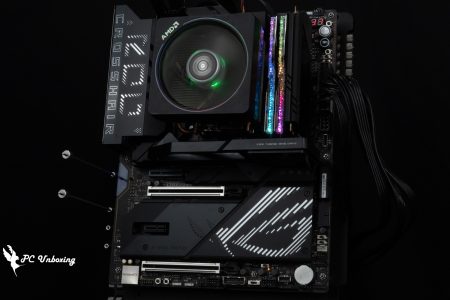
∆ NZXT N9 X870E motherboard.

∆ Main Motherboard Key Features.

∆ Motherboard Rear I/O.

∆ Motherboard Core Features.
The NZXT N9 X870E still comes in an ATX version, measuring 30.5 cm x 24.4 cm, and the overall look and feel of the N9 X870E is not as youthful as that of the previous N5 and N7 series, but rather a bit more formal.

∆ ATX size.

∆ Equipped with large area metal heat sink armor.

∆ There is no reinforced back plate on the back.
The 20+2+1-phase power supply block on the motherboard is equipped with a VRM aluminum heatsink to help dissipate heat, and RGB light strips for decorative effects after power is applied.
The X870E still uses the AM5 LGA 1718 socket to support AMD Ryzen 9000 / 8000 / 7000 processors, and because it retains the same heatsink grommets and hole spacing as AM4, gamers can install it directly along the AM4 heatsink grommet set.

∆ Silver-white thermal armor is the main color with whitened PCB.

∆ There is a heat sink in the power supply area of the main board.

∆ AM5 LGA 1718 pin.
Let's take a look at the expansion and power supply slots on the NZXT N9 X870E motherboard. On the upper left side of the motherboard, there are dual 8-Pin ATX_12V power supply slots for the processor.
On the top right corner of the motherboard, there are CPU_FAN 4-Pin fan power supply slot and AIO_PUMP water pump power supply slot, where you can install the water cooling head PUMP power supply and water cooling exhaust fan cable when installing all-in-one water cooling.
On the upper right corner, there is one NZXT 8-PIN and one NZXT RGB slot for NZXT's own devices. The NZXT 8-PIN on the left can be used to connect to newer all-in-one fans such as the F360 RGB Core, while the NZXT RGB slot on the right can be used with the earlier F120 RGB DUO series fans.

∆ The ATX_12V Dual 8-Pin processor power supply slot on the upper left corner of the motherboard.

∆ CPU_FAN 4-Pin, AIO_PUMP, NZXT 8-Pin, NZXT RGB.
The quad-slot DDR5 DIMM single snap memory slot supports ECC Un-buffered DIMM/non-ECC Un-buffered DIMM memory, and the maximum expansion capacity of the four slots is a total of 256 GB, which means that the capacity of a single slot is capped at 64 GB.
The memory overclocking QVL compatibility list features dual-channel memory modules that can pass the compatibility stress test at a maximum frequency of 8200 MT/s when used with Ryzen 9000 series processors, reminding you once again to choose the memory model you want to install based on the motherboard memory QVL compatibility report.
The NZXT N9 X870E also supports AMD EXPO (EXTended Profiles for Overclocking) and Intel XMP 3.0 (Extreme Memory Profile) memory one-click overclocking technology.
For the 2 DIMMs dual-channel memory kits that are often purchased in today's orders, it is recommended to prioritize the installation in slots A2 and B2 (the second and fourth slots counting from the left). By installing the two memories in these two slots, the memory will be able to operate more easily and at a higher frequency.

∆ 4x Un-buffered DIMM DDR5 memory slots, supports up to 256 GB capacity expansion, and up to 8200 MT/s (O.C.) with QVL on both modules.
On the right side of the motherboard, there is a DeBug light for debugging, a boot button, a reboot button, a 24-pin power supply slot for the motherboard, a front USB 20Gbps Type-C slot, a USB 5Gbps slot (supports two front USB 5Gbps Type-A ports), and four SATA 6Gb/s. The motherboard also has a USB 5Gbps slot (supports two front USB 5Gbps Type-A ports), and a SATA 6Gb/s slot.
The debugging light code display allows users to quickly check what parts of the motherboard are causing problems during the self-testing process, and users can refer to the motherboard manual for debugging actions.

∆ DeBug light code display DeBug light, boot button, restart button, 24-Pin power supply slot on the motherboard, a front USB 20Gbps Type-C slot, NZXT is one of the few brands that puts decorative armor in this location.

∆ The main board self-test debug code schematic.

∆ One USB 5Gbps slot (supports two front USB 5Gbps Type-A mounting ports), four SATA 6Gb/s.
The bottom row contains the front panel slot (PANEL1), the dedicated debug device expansion slot (UART1), the Clear CMOS jumper slot, one USB 5Gbps slot (supporting two front USB 5Gbps Type-A ports), the EZ Debug lamp area, the NZXT 8-PIN, three SYS_FAN fan slots, two USB 2.0 slots (supporting four front USB 2.0 ports), two 5V 3-Pin ARGBs, and the front audio jack slots. USB 2.0 slots (supports four front USB 2.0 ports), two 5V 3-Pin ARGB, front audio jack slot.

∆ Front Panel Slot (PANEL1), Dedicated Debug Device Expansion Slot (UART1), Clear CMOS Patch Slot, One USB 5Gbps Slot (Supports two front USB 5Gbps Type-A ports), EZ Debug Lamp Area, NZXT 8-PIN, Three SYS_FAN Fan Power Slots.

Demonstration of the ∆ EZ DeBug lamp number.

∆ Two USB 2.0 slots (supports four front USB 2.0 ports), two 5V 3-Pin ARGB, front audio jack slot.
The motherboard PCIE slots provide a total of two x16 length slots. The first slot, PCIEX16_1, provides a full PCIE 5.0 x16 bandwidth for installing a single device such as a discrete graphics card and uses a metal material to reinforce the physical strength of the slot itself, but it's a shame that there's no PC DIY-associated quick-release buttons to facilitate the removal of the graphics card.
However, the second PCIEX16_2 slot only provides PCIE 3.0 x2 bandwidth, and it is recommended to use the second slot for expanding devices that do not require bandwidth, such as sound cards or live capture cards.

∆PCIEX16_1 metal-reinforced slot is PCIE 5.0 x16 bandwidth recommended for installing a discrete graphics card here, and the black PCIEX16_2 is PCIE 3.0 x2 bandwidth can be used for installing a capture card and other devices.
The NZXT N9 X870E motherboard comes with a passive, large-area aluminum M.2 thermal armor, and you can see the four M.2 SSD expansion slots on the motherboard. The first M2_1 slot underneath the processor is the only PCIe Gen5 x4 expansion slot on the motherboard, and is equipped with a taller heat sink to help dissipate the heat from the PCIe Gen5 x4 SSDs. and is equipped with a taller heatsink to help cool the PCIe Gen5 x4 SSD.
The following three M.2 slots (M2_2, M2_3, M2_4) are PCIe Gen4 x4 bandwidth only, and all M.2 SSD expansion slots only support M.2 2280-length SSD expansion.
It's a shame that the bottom three slots are only equipped with single-sided thermal pads, which is a bit awkward if you're a heat-obsessed person who wants to expand a dual-sided granular SSD.
While the graphics card slot doesn't have a quick release button, the M.2 SSD side has a quick release clasp that secures and releases the M.2 SSD depending on the angle of closure.

∆Specialized passive heatsink for M.2 PCIe Gen5 x4 SSDs.

∆ Each slot is equipped with a thermal pad on the front to direct waste heat to a metal heat sink.

∆ One PCIe Gen5 x4 expansion slot (processor direct path), and the following three PCIe Gen4 x4 expansion slots (chipset path), all support 2280-length installations only.

∆ The blue one is the M.2 fixing snap, you can play with it when installing the device, it feels quite fun.
The rear I/O of the motherboard provides a clear CMOS data button, BIOS Flashback button, Wi-Fi 7-antenna port, five USB 10Gbps Type-A, three USB 5Gbps Type-A, two USB 2.0 Type-A, two USB4 (Type-C), and RJ-45 5GB LAN wired network port, Optical S/PDIF digital audio output, two audio ports.
Two USB4 (Type-C) support processors with built-in graphics card display outputs, the slots allow users to have additional display output slots available through the internal display, up to 8K 30 Hz resolution, and USB PD 3.0 15W fast charging support.

∆ Rear I/O at a glance.

Demonstration of ∆WiFi-7 antenna installation.
Additional accessories include: four SATA cables (2x 90°, 2x 180°), WiFi antenna kit, and two NZXT 8-PIN splitter cables.
There are two NZXT 8-PIN slots on the motherboard, but if your NZXT mainframe is more commonly used with early NZXT fans and requires more NZXT RGB slots than NZXT 8-PIN slots for expansion, you can use the included NZXT 8-PIN splitter cables to convert to NZXT RGB and PWM expansion.

∆ Accessories at a glance.

∆ Each adapter cable converts the NZXT 8-PIN to one each of NZXT RGB and PWM, allowing it to be paired with more previous NZXT fans.
NZXT N9 X870E Motherboard Power Supply Material / 20+2+1 Phase Power Supply, 8 Layer PCB
The NZXT N9 X870E motherboard is powered by a 20+2+1-phase Dr. MOS SPS (Smart Power Stage), with a 20-phase 110A SPS for CPU VCORE Phases, a 2-phase 110A SPS for SOC Phases (memory overclocking related), and a 1-phase SOC Phase for VDD MISC Phases. VDD MISC Phases.

∆ The bare PCB of the motherboard is shown.

The ∆ motherboard VRM and PCH aluminum heatsinks, the VRM heatsink near the rear I/O side is equipped with two fans to help dissipate the heat.

∆ 20+2+1 phase Dr. MOS SPS (Smart Power Stage) supply.

The ∆ 20+2 phase 110A SPS chip is the Renesas R2209004, using the same chip as Taiji.

∆ Renesas RAA220075R0 75A DrMOS.

∆ Renesas RAA228228 PWM Controller.

∆ Renesas RAA229621 PWM controller chip.

∆ ITE IT8857FN USB Type-C PD 3.0 controller.

∆ NXP LPC5528 microcontroller.

∆ Nuvoton NCT6796D Super I/O environmental control chip.

∆ Nuvoton NCT5585D Super I/O environmental control chip.

∆The mainboard battery is CR2032, and two PCH chips make up the X870E chipset.
BIOS Function Setting Menu
After the motherboard has passed the self-checking program, press the F2 or DEL button to enter the BIOS, where gamers can make adjustments to the voltage, frequency, and other parameters.

∆ Main menu sub-page.

∆Overclocking Tools tab, the upper half of which can be configured for basic processor overclocking functions and DDR5 memory related settings.

∆ Memory timing setting.

∆ Memory setting.

∆ Overclocking voltage setting.

∆ Advanced menu.

∆ Advanced menu CPU settings.

The Re-Size BAR is here in the ∆ Advanced Menu PCI Settings.

∆ Built-in device settings.

∆ Storage device setting.

∆ Power Management.

∆ USB Settings.

∆Reliable setting related.

∆ AMD CBS.

∆ AMD PBS.

∆ AMD overclocking related.

∆Tools paging.

∆ Hardware monitoring.

∆ Startup options.

∆Security Interface.
NZXT CAM Monitor, RGB Full-Featured Integration Software
NZXT CAM includes hardware monitoring, system specification view, lighting effect settings, etc., and a wide range of functions are all integrated in the software. The NZXT N9 motherboard is equipped with NZXT 8-PIN and NZXT RGB slots that can be used to connect to other NZXT products including fans, fan hubs, and integrated water coolers, etc., which can be synchronized with the NZXT CAM. The motherboard lighting can be synchronized by NZXT CAM.

∆Computer hardware and information monitoring allows you to quickly observe each PC's usage information.

∆ System specifications at a glance.

∆ NZXT RGB lighting effect setting.

∆ Motherboard light effect setting.

∆ Fan/water-cooled slot speed monitoring and setting.

∆ Recognizes the water cooling alone for speed setting.
NZXT N9 X870E Motherboard Lighting Effect Showcase
The biggest difference between this generation of NZXT N9 series motherboards and the previous one is that NZXT has added light bars on the motherboards this time, which can be configured by users through the NZXT CAM software.

∆ NZXT N9 X870E motherboard lighting.

∆ Close-up of the motherboard lighting.
NZXT N9 X870E Motherboard Performance Testing

The NZXT N9 X870E motherboard is tested with a 16-core, 32-thread motherboard. AMD Ryzen 9 9950X3D The motherboard BIOS was updated to version 3.20 and the XPG LANCER RGB DDR5 8000MT/s 2X 24GB dual-channel memory kit was used to build the barebones platform and open the XMP profile for the memory.
Also manually set AMD PBO to Enabled, and manually enable Zen5 Gaming Optimizations and TDP to 105W in the BIOS.
Testing Platform
Processor:AMD Ryzen 9 9950X3D (PBO activated)
Radiator:NZXT Kraken Elite 360 RGB(full speed)
Thermal paste: Water-cooled pre-coated thermal paste
Motherboard: NZXT N9 X870E (BIOS version: 3.20)
Memory: XPG LANCER RGB DDR5 8000MT/s 2X 24GB CL 40-48-48-128 1.45V
Graphics: NVIDIA GeForce RTX 4060 Ti Founders Edition 8GB
Operating System: Windows 11 Professional 24H2
Power supply:MONTECH TITAN PLA 1000W
Case: STREACOM BC1 Benchtable V2
Graphics driver: GeForce Game Ready 572.83
firstly CPU-Z View this testbed hardware information.AMD Ryzen 9 9950X3D The processor has 16 cores and 32 threads, the series name is Granite Ridge using TSMC's 4nm FinFET process, and the motherboard is the NZXT N9 X870E supporting PCI-E 5.0 lanes with BIOS version 3.20.
Also ran CPU-Z internal tests Version 19.01.64(beta)The results are provided for your reference.

∆ CPU-Z information at a glance and Version 19.01.64(beta) built-in test score results.
AIDA64 Cache & Memory Benchmark It is mainly used to test the performance of processor caches and RAM. The read/write/copy bandwidth performance score represents the rate of transfer between CPU and memory, which means the efficiency of data throughput (the higher the score, the better), and the time delay score of accessing data indicates the responsiveness of the memory system.
Tested on this motherboard with Memory XMP open, read speeds were 78.5 GB/s, write speeds were 82.3 GB/s, copy speeds were 69.5 GB/s, and latency was 77.8 ns.

∆ AIDA64 cache and memory test.
new version Cinebench 2024 MAXON ONE is Maxon's benchmark software for MAXON ONE software. MAXON ONE includes Cinema 4D, Red Giant Complete, Redshift, ZBrush, Universe, and Forger, and is a powerful tool for creating animation effects, motion design, motion graphics, film-grade portraits, and game art scenes. Each of these software programs fits together to provide a complete visual solution for creators.
Cinebench 2024 uses Cinema 4D's default Redshift rendering engine to test GPU and CPU performance. If multiple graphics cards are used to run Cinebench 2024 tests, the software utilizes multiple cards for the rendering tests at the same time, and Cinebench 2024 performs multiple rendering tests with six times the amount of computation when compared to Cinebench R23. Compared to Cinebench R23, the Cinebench 2024 multi-threaded rendering tests show a six-fold increase in the amount of computation for scenes. This reflects improvements in CPU performance and the higher hardware requirements that multimedia workers must now meet.

∆ Cinebench 2024.
V-Ray 6 Benchmark V-Ray Engine Test Software is an image rendering program developed by Chaos Group. The free Benchmark examines the rendering speeds of the CPU and GPU on the V-Ray Engine, which tests the rendering performance of the processor.

∆ V-Ray 6 Benchmark.
Corona Benchmark is a free test software based on the Corona 10 rendering core that evaluates the performance of a system by using Corona 10 rendered scenes to measure the rendering speed of the system in terms of rays per second (rays/s). More rays per second means faster rendering, and the scores are linearly scaled. For example, a system with 6 million rays per second will have twice the rendering speed and performance of a system with 3 million rays per second.

∆ Corona Benchmark.
Geekbench 6 CPU Benchmark can be used to test CPU and memory performance, including data compression, image processing, machine learning, optical tracking, and many other daily use and professional productivity tests.

∆ Geekbench 6_ CPU Benchmark.
CrystalMark Retro 1.0.2 It is a comprehensive benchmark software that measures CPU, HDD, 2D graphics (GDI) and 3D graphics (OpenGL) performance. Developed by hiyohiyo and koinec, the authors of CrystalDiskMark and CrystalDiskInfo, the results are individual scores and not in any common units.

∆ CrystalMark Retro 1.0.2.
OCCT CPU BENCHMARK CONFIGURATION Single thread and Multiple threads will be tested using AVX and SSE instruction sets respectively.

∆ OCCT CPU BENCHMARK CONFIGURATION.
Next up, the 3DMark series, one of the most benchmarks for gaming scores, was used to compare the theoretical results of the same graphics platform with different processors through a series of tests with different picture quality and different GPU APIs.
3DMark CPU Profile This test will measure the performance of MAX, 16, 8, 4, 2 and 1 threads respectively, while the performance of 16 threads and above is more for 3D rendering or audio/video professional work, most of the mainstream DirectX 12 games can refer to the score of 8 threads, while the score of 4 and 2 threads are related to the old games developed with DirectX 9.

∆ 3DMark CPU Profile.
In addition, the author has also used the commonly used game performance simulation test 3DMark Fire Strike、3D Mark Time SpyThe two programs are Fire Strike, which represents the 1080p quality DirectX11 GPU API situational game simulation test, and Time Spy, which represents the 1440p quality DirectX 12 GPU API situational game simulation test.

∆ 3DMark Fire Strike.

∆ 3DMark Time Spy.
Conclusion

In the actual test, the NZXT N9 X870E motherboard, with AMD PBO manually set to Enabled in the BIOS and Zen5 Gaming Optimizations and TDP to 105W enabled, was tested through the motherboard's own automatic overclocking function, and the performance was improved by 6.57 % in the 3DMark CPU Profile. MAX Threaded performance increased by 6.57 %.
This time, the product line has been upgraded again. In addition to better specifications for the power supply and PCB materials, this generation has also added RGB light strips on the rear I/O armor, and some of the M.2 covers that were criticized by the previous generation of the N7 B650E have also been improved on the new motherboard, with large-area metal fins on all the M.2 heatsinks to ensure better heat dissipation of all the M.2 SSDs. All M.2 heatsinks are made of large-area metal, which ensures that all M.2 SSD solid state drives are cooled and have a longer lifespan.
In the past, NZXT has been cooperating with ASrock to develop NZXT N7 and N5 motherboards. This time, the NZXT N9 X870E, judging from the BIOS interface and the materials used, we can see that this motherboard and the X870E Nova WiFi have almost the same power supply and expansion specifications, which is indeed a step up in product positioning compared to the previous Steel Legend series. This is a real step up from the previous Steel Legend series.

The intention of NZXT's continuous updating of its motherboard product line is also very clear, that is, to create a complete NZXT ecosystem. The N9 X870E motherboard is equipped with a NZXT RGB LED slot and two new NZXT 8-PIN RGB fan connector slots, which allow NZXT's fans to connect to the N9 motherboard with the chassis, integrated water cooling, and fans all in one. NZXT fans can directly connect the chassis, all-in-one water cooling, and fans to the N9 motherboard and control them through NZXT CAM software to create a complete RGB ecosystem, and this time also unboxed the Intel platform's N9 Z890 The motherboard is for your reference.
After-sales warranty part of the NZXT official website is marked three-year warranty, but the Taiwan agent of the sales channel rules is a five-year warranty for new, discontinued, then is directly upgraded, and do not need to be like other board manufacturers need to register on the Internet within one month of the purchase period to extend the warranty, Taiwan NZXT motherboards as long as you leave the proof of purchase to prove that can be.

Yun
Drinks with less than full sugar are colored water. Crossing Turbid Creek, full sugar is not a crime!


 繁體中文
繁體中文  English