
LIAN LI Hydroshift II LCD-C All-in-One Water Cooled, Vector V100 Chassis Unboxing Review

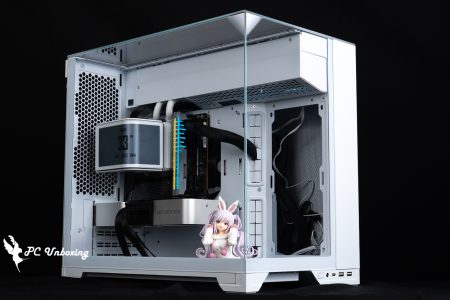
This unboxing took place in LIAN LI 2025 Digital Expo The Hydroshift II LCD-C 360R all-in-one water-cooled, Vector V100 chassis was announced in March of this year. The Hydroshift II LCD-C 360R water-cooled chassis comes with a 2.1-inch round LCD display, side-mounted water-cooling tubes with hidden cables, and three multi-functional control modes: offline, wireless, and USB wired, all in an affordable price/performance ratio. The Vector V100 features a pillar-less, double-sided glass design with a 270-degree internal display window, a beveled power compartment with a built-in hidden display platform where users can place figurines or scenery, and a 26-pillar ARGB light bar pre-installed on the side to enhance the overall visual ambiance.
Round Small Display LIAN LI Hydroshift II LCD-C Top Mount All-in-One Water Cooler Out of the Box

The new Hydroshift II LCD-C all-in-one water cooler comes in three versions each with two colors, the first version is the HYDROSHIFT II LCD-C 360TL with UNI FAN TL Wireless fan, only this version comes with the L-Wireless controller, and the second version is the one that is unboxed today. The second version is the HYDROSHIFT II LCD-C 360CL, which comes with UNI FAN CL Wireless fan (no L-Wireless controller included), and the third version is the HYDROSHIFT II LCD-C 360N, which doesn't come with a fan, so you can add your own fan model to match.
LIAN LI Hydroshift II LCD-C 360R (HYDROSHIFT II LCD-C 360CL) All-in-one water-cooled specification:
Intel Legs: LGA 1851 / 1700
AMD feet: AM5 / AM4
Pump Maximum RPM: 2500 ± 10% RPM
Water-cooling head size: 69 x 87 x 87 mm
Water-cooling head contact surface: copper
Cold head power supply: PWM 4-Pin, USB 2.0 9-Pin
Size of water-cooling manifold: 400 x 122 x 24 mm (including water-cooling pipe space is 400 x 139 x 24 mm)
Water Cooler Material: Aluminum Alloy
Water-cooled tube length: 450/475 mm
Using Fan: LIAN LI UNI FAN CL Wireless
Fan size: 124 x 120 x 28 mm
Maximum fan speed: 2200 RPM
Maximum Fan Capacity: 72.7 CFM
Maximum fan pressure: 3 mmH₂O
Fan Power Supply: PWM 4-Pin
Heat dissipating cream included: one extra tube included in the kit
Warranty: 6-year depreciation indemnity leakage warranty
LIAN LI launched the first generation of Hydroshift LCD AIO series products last year, focusing on water-cooled tubes with side-wound handles optimized for top-mounted water-cooling installations, the innovative idea had a burst of discussion at the time and was immediately copied by other brands/homage (the red eyes of Gongshuo turned out to be the eyes of the Blood Wheel), and will we then see the P start of the plagiarist also using similar concepts? Will we see similar concepts used by copycats at the beginning of P?
I was interested in the first generation of this new concept but unfortunately the first generation "had" to be used with software, while the second generation of the Hydroshift II LCD-C all-in-one water cooler also uses side-mounted piping and hidden cables, presenting a simple and minimalist appearance of the result of the installation of water cooling tubes are not exposed, and furthermore provides three control modes such as offline, wireless, and advanced USB wired connection can be used, I am very interested in the offline mode (without software) to set up the lighting effects. The author is very interested in the offline mode (no software required) for lighting settings, after all, the less software, the better.

∆ The second generation of the Hydroshift II LCD-C 360R.

∆ Paper specification reference.

∆ Product Features.

38 mm Large-imperller Pump is used in ∆Pump PUMP.
LIAN LI Hydroshift II LCD-C all-in-one water cooling system emphasizes on minimalist aesthetics. The main design of side-mounted water cooling tubes is to fix the water cooling tubes along the edges of the water cooler rows, which greatly reduces the exposed area of the water cooling tubes in order to minimize the visual clutter inside the chassis, and the PWM and USB connecting cables required for the water cooler head are directly hidden in the water cooling tubes' braided sleeves, which are also collected on the side of the radiator, giving an "almost wireless and hidden water tubes" visual appearance. It also hides the PWM and USB connection cables on the side of the radiator to create a visual appearance of "almost wireless and hidden water pipes".
This series of water-cooling is mainly planned for the current mainstream "chassis top-mounted water-cooling installation", with the fan and water-cooling pipe routing already installed at the factory, and a six-year liquid leakage indemnity program is provided for the after-sales warranty.

∆ White LIAN LI Hydroshift II LCD-C 360R (HYDROSHIFT II LCD-C 360CL) All-in-one water cooling.

∆ Mainly top-mounted water cooling optimization.

∆ Warranty policy as indicated on the official website.
The water-cooling head measures 69 x 87 x 87 mm in height and Ø 87 mm in length and width, with a 2.1-inch (5.3 cm) IPS LCD screen in the center of the circle. The small screen has display specifications such as 480×480 resolution, 500 nit brightness, and a 60Hz refresh rate.
The outer acrylic ring is a rotary adjustment switch, which can be used to adjust the lighting effect or display background when using offline mode.

∆ Water-cooled header display.

∆ The cold head is covered with a scratch-resistant protective film.

∆ Copper bottom contact surface.
The water-cooling tubes are wrapped around the side and fixed by three pre-set brackets, the three brackets are fixed with screw holes on the side of the cold plate, players can adjust the bracket position according to different chassis or even remove it to adjust the water-cooling tubes.

∆ Water-cooled pipe routing demonstration.

∆ Cold pipe down exit bracket.

∆ The two left side brackets are the side fixing brackets and all three brackets are fixed by screws.
The HYDROSHIFT II LCD-C 360CL is equipped with the UNI FAN CL Wireless fan, but it is not equipped with the L-Wireless controller, so if you buy the water cooling system alone, you only need to connect the two PWMs to supply the power to the PUMP and the fan. If you want to use the L-CONNECT 3 software to unlock the fully customized functions, you can connect the USB 2.0 9-Pin cable to the motherboard slot. If you want to use the L-CONNECT 3 software to unlock the fully customizable functions, you can connect the USB 2.0 9-Pin cable to the motherboard slot, and if you want to use it in offline mode, you can also remove the USB 2.0 cable if necessary.

∆ HYDROSHIFT II LCD-C 360CL version water-cooled installation of the required cables at a glance.

The Hub area can be seen after removing the ∆ trim cover.

∆ USB 2.0 cable removal procedure.
The size of the water cooler is 400 x 122 x 24 mm, the official web site boasts that it is 3 mm thinner, 3 mm shorter and 2.5 mm narrower than its predecessor, which reduces the space after installation. However, including the space for the side water cooling tubes, the overall water cooler plus fan is 400 x 139 x 52 mm, which means that there are still some requirements for the top water cooling area, and it is recommended to find a case that has a 140 mm fan installed. It is recommended to use a chassis that supports 140 mm fan mounting.
The three mounting brackets at the water-cooling tubes have screw holes at the top, which can be used to fine-tune the 140 mm fan mounting holes and to secure the brackets during installation.

∆Single-wave water cooling, the overall size of the water cooling is 400 x 139 mm, it is recommended to have 140 mm space above the chassis to support the native 140 mm space.

∆ Dimensions of the water-cooled drain block used.

The ∆ HYDROSHIFT II LCD-C 360CL is paired with a UNI FAN CL Wireless fan.
Accessories include two grommet screw base sets, brass post screwdriver, thermal paste and spatula, cooler screws, water-cooling hose clamps, and aesthetically pleasing cover for the bracket.

∆Accessories are divided.

∆ Intel Retainer Set.

∆ AMD fastener set.

∆ Thermal paste and spatula, cooling screws, water-cooling hose clamps, aesthetic cover for the bracket.
LIAN LI Hydroshift II LCD-C all-in-one water cooler uses a common bracket for the water cooling head, so there is no need to touch the bracket on the water cooling head side of the dual-platform installation, you only need to install the base bracket on the motherboard side, then slide the water cooling head into the groove on the base bracket, and then lock the nut on the bracket to secure the water cooling head.
Installation steps are recommended to install the motherboard end mounting base bracket on top of the motherboard after the processor is installed, then lock the motherboard inside the chassis, install the relevant power supply cables after adjusting the water cooling tubes on the water cooling rows, and slide and lock the water cooling header into place, and it is recommended that the memory be installed after the water cooling header is installed.

∆ Attach the motherboard end mounting base bracket to the top of the motherboard and apply thermal paste.

∆After the cold pipe and power supply cable are ready, then lock the cold plate, finally slide the water-cooling head in and lock the nuts on all sides, and slide the upper and lower latches to the left side of the grooves to make it complete.
Adjustment of the water cooling tubes should be confirmed before installing the water cooler on the chassis. The official website provides three installation scenarios for gamers' reference, excluding the default scenario, the other two adjustments are basically fine-tuning the position of the bracket or removing the vertical bracket to allow the water cooling tubes to have more room for movement or storage, which is mainly based on the water-cooled chassis mounting space and the motherboard position to make a choice, and the author has chosen to directly remove the vertical bracket and shift the water cooling tubes a little to the left (the right side has memory and fan slots, and it is more comfortable to go to the left side. For the LI Vector V100 chassis, I chose to remove the vertical bracket and move the water-cooling tubes a little bit to the left (there are memory and fan slots on the right side of the chassis, so it's more comfortable to move to the left side of the chassis).

∆ Adjustment of water-cooling pipe and bracket 2.

∆ Water-cooling pipe and bracket adjustment case 3, directly remove the vertical bracket.

∆ LIAN LI Hydroshift II LCD-C all-in-one water-cooling installation demonstration. The author's motherboard is a memory overclocking board and the memory slots are very close to the water-cooling, so the memory installation area is relatively harsh, so the water-cooling tubes are slightly shifted to the left.

∆ After locking the four bracket nuts, it can be used with the bracket aesthetic cover to beautify the visual effect.
Three modes at once LIAN LI Hydroshift II LCD-C All-in-one water-cooled lighting effect display
Then we will show you the lighting effect of Hydroshift II LCD-C 360R(HYDROSHIFT II LCD-C 360CL), just connect the two PWM power supply slots and then the fan and the water-cooling head will have the lighting effect, there is no need to connect the 5V 3-Pin ARGB and so on.

∆ Fan light effect display.

The acrylic outer ring of the ∆ cooler is also surrounded by lighting effects.
As I mentioned earlier, I don't want to use it with software, so I use it in offline mode without the USB 2.0 9-Pin cable. By rotating the transparent ring, I can easily control the background of the display on the small screen and the lighting effects of the ring and the fan. Rotate the ring clockwise to switch the background theme of the display, and rotate the ring counterclockwise to adjust the lighting effects or colors.

∆ Built-in sensors track real-time coolant temperature and pump speed.

∆ Snowflake background.

∆ Shattered Ripple Background.

∆ fluctuating background.

∆ Sea level background.

∆ Gradual sunset background.

∆ Vintage Gradient Background.

∆ Pixel background.

∆ Suspended square background.

∆ Tonal background.

∆ Eye glow background.

∆ Rainbow outer ring background.

∆ Pure outer circle background.
Rotate clockwise to adjust the color or mode of the light effect.

∆ Red.

∆ Color of Understanding.

∆ Yellow.

∆ Blue.

∆ Rainbow colors.

∆ is defaulted to pure white.
Minimalist 270-degree display of the LIAN LI Vector V100 chassis unboxing

The Vector V100 chassis has a column-free front and side glass design, with four 12 cm pre-installed ARGB tandem fans, three on the side (reverse impellers) and one on the rear (forward impeller), and comes with a model display space for scenery!
LIAN LI Vector V100 Chassis Specifications.
Size: 446(L) x 235.5(W) x 484.6(H) mm
Color: Black, White
Material: steel, tempered glass, plastic
Motherboards: E-ATX (width <246 mm), ATX, Micro-ATX, Mini-ITX, ATX (back plug), Micro-ATX (back plug)
CPU air cooling: up to 178 mm
Display card: 420 mm
Power supply: ATX 220 mm
Fan Mounting Positions (Top + Side + Rear + Power Compartment): 140 mm 2+0+1+0 pcs, 120 mm 3+3+1+2 pcs
Water-cooled drain support: 360 / 280 mm from above
Chassis I/O Ports: 2x USB-A 5Gbps, USB Type-C 10Gbps, TRRS Composite Headphone Microphone Hole
Hard drives and bays: one 2.5-inch, one 3.5-inch
The LIAN LI Vector V100 chassis measures 446 x 235.5 x 484.6 mm and utilizes two 4 mm reinforced glass panels with beveled ARGB light bars for 270° accessibility to hardware displays. It supports E-ATX, ATX, Micro-ATX, Mini-ITX, and the growing selection of ATX (backplane) and Micro-ATX (backplane) motherboards with a width of up to 246 mm. E-ATX, ATX, Micro-ATX, Mini-ITX, and now the growing selection of ATX and Micro-ATX motherboards.
The air cooler is compatible with up to 178 mm in height and up to 420 mm in length for graphics card mounting. Three ARGB tandem reverse fan blades are pre-installed on the side of the chassis to provide air intake, in addition to the nine fans that can be mounted on the top of the chassis, on the power supply compartment, and at the rear, while the water cooling section allows for the mounting of a 280 / 360 mm water cooler exhaust on the top of the chassis.
The power compartment has a hidden section near the front panel that becomes a model placement platform when the panel is removed, and the chassis I/O ports offer 2x USB-A 5Gbps, USB Type-C 10Gbps, and a TRRS composite headphone microphone jack.

∆ Supports E-ATX (width <246 mm), ATX, Micro-ATX, Mini-ITX, ATX (Rear), Micro-ATX (Rear) motherboards, 420 mm graphics cards and top-mounted 360 mm water coolers, or 178 mm air-cooled tower coolers.

∆ ARGB light bar and chassis I/O port.

∆ 270 degree display and model placement platform.
The rear of the chassis supports 140 / 120 mm fan mounting, as well as seven PCIE mounting positions for graphics cards and expansion devices, and a removable filter underneath the bottom-mounted power supply for use with the chassis.

∆ A view of the rear of the chassis.

The ∆ steel side panels have mesh panels for the side fans to provide ample air intake surface.

∆ With wire fixing grooves and devil's felt harnesses to aid in thread alignment.
LIAN LI Hydroshift II LCD-C All-in-One Water-cooled, Vector V100 Chassis Cooling Performance Measurement

This time, LIAN LI Hydroshift II LCD-C 360R all-in-one water cooling is installed in the Vector V100 chassis with the Intel Core Ultra 9 285K Processor and ASRock Z890 Taichi OCF During the test, all fan slots were set to run at full speed in the motherboard BIOS and software, only memory profile 1 was turned on and the rest was left at default, no additional processor overclocking was performed, and the test scenario was a closed air-conditioned room in Taipei, Taiwan, at 25°C. This is for reference only, as it is difficult to control the ambient temperature in a normal room.
We used AIDA64 FPU testing to simulate temperature data under extreme load conditions, and HWiNFO64 to collect and record the maximum temperature and power consumption of the CPU package.
Testing Platform
Processor:Intel Core Ultra 9 285K QS
Cooler: Hydroshift II LCD-C 360R (HYDROSHIFT II LCD-C 360CL)
Thermal Balm: Water Cooling with Thermal Balm
Motherboard:ASRock Z890 Taichi OCF ( BIOS version: 2.26 AT08)
Memory:Kingston FURY Renegade DDR5 RGB CUDIMM 8400MT/s 48GB (2x24GB) CL40-52-52-132 1.45V
Graphics: NVIDIA GeForce RTX 4080 Founders Edition
Operating System: Windows 11 Professional 24H2
Case: LIAN LI Vector V100
Graphics driver: GeForce Game Ready 572.83
I updated the BIOS version of my motherboard to version 2.26 AT08 and tested it with the default settings of this motherboard, the remaining setting: XMP_on.
After fifteen minutes of AIDA64 FPU, the maximum CPU Package temperature came to 86 °C; the CPU package power consumption was 247 W, and the CPU temperature was a maximum of 79.5 °C. The CPU Package temperature was a maximum of 79.5 °C, and the CPU package power consumption was 247 W.
- AIDA64 FPU_15 Minute
- CPU temperature is measured by the diode in the slot to measure the internal (core) or external (case) temperature, but there is no way to know exactly whether it is the internal or external temperature that is measured, and most monitoring software uses this item to display the CPU temperature.
- CPU Package temperature is recorded by all Digital Temperature Sensors (DTS) in the package as the average of the maximum temperature over 256 milliseconds, and is the HWiNFO64 recommended CPU temperature observation value, which is also used as a benchmark for overheating and downclocking of the processor.

∆ Thermal performance.
Conclusion

This unboxing took place in LIAN LI 2025 Digital Expo The Hydroshift II LCD-C 360R (HYDROSHIFT II LCD-C 360CL), which features the Hydroshift II LCD-C all-in-one watercooler and Vector V100 chassis, and the Hydroshift II LCD-C 360R (HYDROSHIFT II LCD-C 360CL), which is based on the concept of visual simplicity, is a new watercooling option for chassis top mounting through the use of side-mounted piping and hidden wiring. This generation utilizes a round 2.1" IPS LCD screen with three control modes for customizing lighting or displaying information via offline, wireless and advanced USB wired connections.
After actual installation, this water cooler is "more suitable" for chassis with plenty of space for top-mounted water cooling, although this water cooler can be adjusted by adjusting the bracket and water cooling tubes to get more adjustable space, it will be more comfortable to install it if there is plenty of space above the chassis, and there is also a suggestion for the installation steps to be in order, it is recommended to read the manual first before installing it to get a more efficient installation. The new rail mounting bracket is quite interesting and logical, and I look forward to more new concepts to be realized on the product in the future!

The Vector V100 chassis is a mid-tower chassis that emphasizes on price-performance ratio, with a 270-degree display of double-sided glass and ARGB light bar, the overall appearance is different from the previous style, and it comes with four 12 cm pre-installed ARGB tandem fans, three at the side (reverse fan blades) and one at the back (forward fan blades).
It supports 178 mm air-cooled tower, back-plugged motherboard, top-mounted 360 / 280 mm water-cooling, and 420 mm graphics card. There is a hidden model display platform in the front of the chassis for displaying scenery, but I used a 304 mm long RTX 4080 FE graphics card for installation, and the common scenery would not be able to be placed too far down, easily competing with the graphics card and the side fan for space.

Yun
Drinks with less than full sugar are colored water. Crossing Turbid Creek, full sugar is not a crime!


 繁體中文
繁體中文  English