
LIAN LI LANCOOL 207 chassis unboxing review

The LIAN LI LANCOOL 207 comes with two unlimited mirror ARGB 14CM fans and two graphics card cooling fans on the front and supports up to ATX motherboards, 360 mm top-mounted water cooling, 180 mm air-cooled tower cooling, and 375 mm graphics cards, and comes with a pre-installed graphics card support bracket, giving the market a new option for "true functionality" at a lower price. The new chassis offers the market a new option for "true utility" through a cheaper price.
lian li lancool 207 Chassis Specifications.
Size: 455.6 (L) x 219 (W) x 456 (H) mm
Color: Black, White
Material: steel, 4.0mm tempered glass
Motherboard: ATX (up to 244mm wide), Micro-ATX, Mini-ITX
CPU air cooling: up to 180 mm
Display card: 375 mm
Power supply: within 160 mm of ATX
Fan Mounting Positions (Front+Top+Power Bay+Rear): 140 mm 2+2+0+0, 120 mm 0+3+3+1
Water-cooled drain support: 360 / 280 mm from above
Chassis I/O Ports: 2x USB 3.0, USB 3.1 Type-C, HD AUDIO & Mic
Hard Disk and Storage Bays: Two 2.5 / 3.5" Composite
LIAN LI LANCOOL 207 Chassis Unboxing
This unboxing of LIAN LI LANCOOL 207 is obviously for the pursuit of cost-effective positioning, not too much modularity or additional special features, but at a relatively inexpensive price to provide sufficient utility, and has been compared with a year older brother LANCOOL 216 in the end who is better and who is worse.
LANCOOL 207 body three dimensions of 455.6 (L) x 219 (W) x 456 (H) mm, the size of the size of no special place still maintains the LIAN LI LANCOOL 2xx series of common size, the color selection is still black and white can choose to match the white models than the black models expensive about 150 yuan or so, but the two models are 2500 yuan or less have to look for, than the brother LANCOOL 216 cheap about 500 yuan or so. The white model is about $150 more expensive than the black model, but both models are available within $2500, about five hundred dollars cheaper than the older brother LANCOOL 216.
Although the full mesh front panel provides enough air intake space for the front fan, after looking at the setup photos of various LANCOOL 216 users over the past year, I realized that for a hygienic person (me), dust-proofing the front air intake of the LANCOOL series is somewhat necessary.
The front panel of LANCOOL 207 doesn't have any dust protection measures, consumers can purchase LAN207-1X / LAN207-1W as an optional accessory (about $130) to add, but it's embarrassing that the front dust filter is installed at the back of the fan, unlike the 216 which is installed at the front of the fan, although the interior of the chassis can be effectively protected from dust after installation, dust will accumulate on the top of the fan after long time of use. Although it can effectively prevent dust inside the case after installation, dust will accumulate on top of the fan after a long time of use.

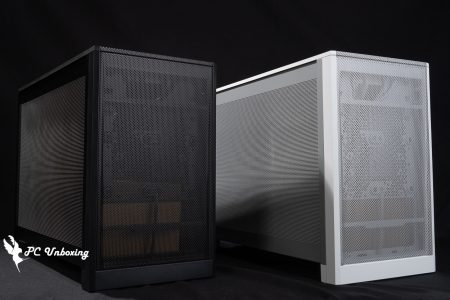
∆ LIAN LI LANCOOL 207 in white.

∆ The front of the chassis is equipped with a full-area mesh panel for the two 14 cm intake fans on the front.

∆ There is a front filter under the front panel to reduce the amount of dust from the power supply, but I found it a bit difficult to pull it out, and I had to lift up the whole chassis a bit to pull it out.

∆ By default, there is no dust filter in the front panel.
The two included 14 cm ARGB fans have a maximum speed of 1900 RPM, a maximum airflow of 109.3 CFM, and a maximum air pressure of 3.3 mmH20. There is an infinity mirror lighting effect on the fan axis, but you can't see the details when the front panel is covered, and this location only supports the 14 cm fan locking holes, so there is no way to change it to a 12 cm fan by yourself.

∆ Two 14 cm ARGB fans are included on the front.

∆ Front fan lighting effect.
The white version is configured with full-transparency tempered glass, which is fixed by a latch and opens the side panels through a groove at the back, with a steel structure underneath the side panels for direct support. Although you don't have to worry about dropping it directly, you still need to be careful.

∆ Full translucency glass sidelights.

∆ Side plate open groove.

The mesh side panels on the bottom of the ∆ are for air intake for the power compartment fan.

The ∆ is held in place by a rear hand screw, but there is still no dust filter inside.
The rear of the chassis supports a 12 cm fan and seven PCIE slots, and in particular, this side uses a full-area hexagonal mesh arrangement, which is ideal for airflow with an air-cooled setup, where air is drawn in from the front to remove heat from the graphics card and processor from the rear of the chassis.

∆ A view of the rear of the chassis.

∆ Side panel on the other side of the motherboard.

∆ The air intake grille on the other side.
The I/O interface of the chassis itself is located at the front of the top cover, providing 2x USB 3.0, USB 3.1 Type-C, HD AUDIO & Mic. Considering the convenience of the slots, this chassis seems to be more suitable for use under the desktop. The official website states USB 3.1 bandwidth, but in the paper manual it is labeled USB 3.2, so I am not sure which side should be the most important, but I personally will go with the official website first.
The top of the case supports 360 mm fans or water cooling, or you can choose to install the two larger 14 cm fans but not the 280 mm water cooling.

∆ 2x USB 3.0, USB 3.1 Type-C, HD AUDIO & Mic.

∆ Full mesh cover.

The top of the ∆ supports 360 mm water cooler and fan mounts, or two 14 cm fan mounts.
LIAN LI LANCOOL 207 Chassis Core Hardware Installation Space Showcase
The LANCOOL 207 supports ATX motherboards up to 244 mm in width (basically ATX is this size, don't worry about it), and by sinking down to get more height for the air cooler towers and space for the graphics card cables to bend, the air cooler can be installed up to 180 mm in size, and the length of the graphics card is 375 mm, although it doesn't have as much space as other dual-cabin chassis, it's still enough for most flagship graphics cards. The length of the graphics card is 375 mm, which is not as much space as other dual-compartment chassis, but is still enough for most of the flagship graphics cards.
The graphics card support bracket is included in the chassis, which can be used to accommodate graphics cards with lengths ranging from 285~375 mm through three locking holes, and the bracket can be removed by using the hand screws at the rear.

∆ Overview of the chassis mounting structure.

∆ Supports up to ATX motherboards, 180 mm air cooling, and 375 mm graphics card mounting.

∆ Motherboard sinking design is presented, some motherboards may have 90 degree expansion slots that may conflict with the built-in graphics card support bracket that is compatible with 285~375 mm graphics cards.

∆ Upper water-cooling installation space height, but looked at other people's unboxing have reacted to this height to install the upper water-cooling is on the compact side, to East Joe Joe West Joe Joe.
Directly above the power supply compartment, two 12 cm lightless fans with a maximum speed of 1900 RPM, a maximum airflow of 71.1 CFM, and a maximum air pressure of 1.99 mmH20 are pre-installed to blow directly on the graphics card, providing an additional air intake from the sides and rear of the chassis to help improve the cooling performance of the graphics card.
The author is most interested in the LIAN LI LANCOOL 207 is actually the power supply installation location, this chassis supports up to 220 mm power installation, but the conventional full-module power supply is recommended to be installed with a 14 cm power supply will be the most desirable, this chassis in the mainstream of the concept of downward-mounted power supply installation as the principle of the side of the way, the entire line for the module cable is more in line with the installation of the logic, but the relative AC cable has to be used with an extension cord to transfer the use. However, the AC cable has to be connected with an extension cable.

∆ Two fans are pre-installed on the power compartment to blow directly on the graphics card, with intake holes reserved on the top and bottom of the power mounting location next to it, but this platform is also great for holding models.

∆Power supply installation space display, to be used with AC extension cord installation.

Underneath the ∆ fan are two 2.5 / 3.5" hard drive mounting trays.

∆ If the hard disk mounting tray and the bottom of the disk are made with holes, would it be possible to have one more direction of air intake, which is a pity.
The entire cable space of the chassis has been designed according to the side-turned-down power supply installation, to adjust the cable management planning.

∆ A spatial overview of the entire line.

∆ CPU power supply cable fixing groove, but why is it hooked from the top to the bottom, the cable will keep slipping off due to gravity when actually installing.

∆ Some of the cables are pre-routed throughout the chassis, such as the audio cables and the power supply cables for the power compartment fan, which requires only a PWM 4-Pin power supply.

∆ Front I/O cable overview, front fan only requires one PWM 4-Pin power supply and one 5V 3-Pin ARGB lighting control.

∆ Accessories box at a glance.
LIAN LI LANCOOL 207 Practical Installation Demonstration

After reading the unboxing article of others, I think this chassis is more suitable to be installed with an air-cooled tower, considering the design and the price positioning of this chassis, which is more suitable for installation and also more in line with the logic of the installation order.
For the power supply, the author matched it with the one that he wanted to match at the very beginning. LIAN LI EDGE 1000W I came here to install the machine, purely out of curiosity as to whether it would be easier to do so.
I didn't have to adjust the graphics card holder, after all, the Starter Graphics card doesn't weigh much and doesn't need a holder at all.
Installation Platform
Processor: AMD Ryzen 7 9700X (PBO AUTO)
Cooler: Valkyrie DL125 (full speed)
Motherboard: ASRock X870 Steel Legend WiFi (BIOS version: 3.15)
Memory:Kingston FURY Renegade DDR5 RGB 7200 MT/s 16GBx2
Graphics: NVIDIA GeForce RTX 4060 Ti Founders Edition 8GB
Operating System: Windows 11 Professional 24H2
System Disc: MP33
Power supply:LIAN LI EDGE 1000W
Case: LIAN LI LANCOOL 207
Graphics driver: GeForce Game Ready 565.9

∆ Actual installation demonstration.

∆ Power installation display.

∆With EDGE power supply, the length of the processor power supply cable (550mm) is not long enough, so it has to be directly crossed over. For a better routing experience, it is recommended that the processor power supply cable should be 600~650 mm for a better alignment.

The ∆ is mostly fine with EDGE power, it's just a shame that the processor power supply cable isn't long enough.

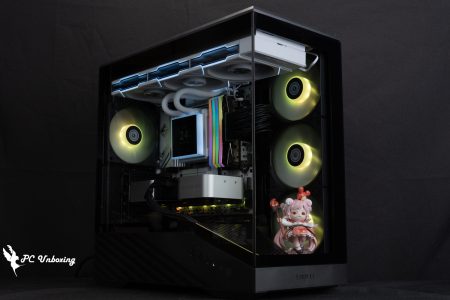
∆ Actual energized display.

∆ Glass Side-by-Side Display.

∆ Front panel lighting display.
Conclusion

After the actual installation of LIAN LI LANCOOL 207, there are a few points, I think this chassis is more suitable for air-cooled installation, the first is the most important is in line with the logic of the budget list, will choose the price of the chassis is usually with the air-cooled to the assembly of cost-effective computers, it is unlikely to choose water-cooled to pull up the overall cost of water, the chassis on the water-cooled installation of the space of the compact limitations also let a lot of people feel less convenient when installing water-cooled, these two reasons are why the author this time with air-cooled tower cooler to install. The compactness of the installation space of water cooling on the chassis also makes many people feel inconvenient when installing water cooling, these two reasons are why the author used an air-cooled tower to install this time.
This time, two pre-installed fans are included to help cool the graphics card, which is more cost-effective and convenient than the 216, but if there are penetrating holes in the bottom of the chassis for the drive bays underneath the power compartment, these two fans can provide an additional direction of airflow for the graphics card to dissipate the heat.
The front of the chassis provides two unlimited mirrors ARGB 14CM fan sincerity is considered to have given, but can only be purchased as an optional accessory dedicated dust filter set installed in a rather awkward position, if the dust requirements of the players recommended to install their own magnetic filters or air-conditioning filters in front of the fan, but the relative fan light presentation effect will be significantly reduced points.
In terms of actual installation, I feel that this chassis is ready in many small places, and the core hardware installation process is very fast and efficient. I think that for a computer store that installs a lot of machines in the sales channel, it should be very happy to install this chassis often? The only thing is that this chassis requires a little bit of attention before installing the 90-degree expansion slot configuration on the right side of the motherboard, as well as the length of the power supply body and the length of the CPU cables, and other details.
Who should I choose between LIAN LI LANCOOL 207 and my brother LANCOOL 216? After reviewing the previous reviews of the LANCOOL 216, I concluded that if you have enough budget, then the LANCOOL 216 will have a better water cooling installation process and more modular features to play with. However, if you are on a budget and want to invest in other hardware, then the LANCOOL 207 is actually quite good enough, and the LANCOOL 216 is even better in terms of functionality; But if you are on a budget and want to invest in other hardware, then LANCOOL 207 is actually quite good enough, and LANCOOL 216 is better in terms of functionality. However, LANCOOL 207 is more comfortable in terms of price and cable planning, but if you have a used LANCOOL 216 for cheap, then it's another story.

Yun
Drinks with less than full sugar are colored water. Crossing Turbid Creek, full sugar is not a crime!

 繁體中文
繁體中文  English