
AVerMedia XPG VALOR AIR PRO Unboxing Review

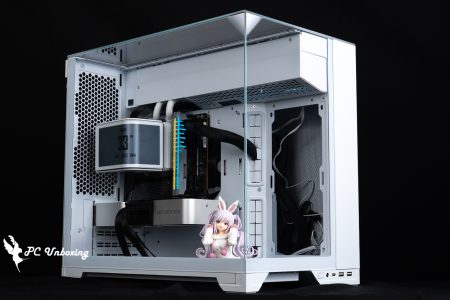
AVerMedia XPG VALOR AIR PRO chassis supports E-ATX motherboards, 400 mm graphics cards, and up to nine 120 mm fans, and the front and top of the chassis support up to 360 / 280 mm water cooler exhausts, and it comes with a total of four ARGB 120 mm fans in the front and back of the chassis, and it has a full range of dust filters to minimize the amount of dust in the chassis, and it can be expanded. Four hard drives and an ATX 200 mm power supply can be used, and the top chassis I/O ports are equipped with 2x USB-A 5Gbps and USB Type-C 10Gbps for connecting external devices!
XPG VALOR AIR PRO Chassis Specifications:
Body size: 490(L) x 215(W) x 467(H) mm
Available colors: black, white
Chassis Material: Steel, Tempered Glass
Supported motherboard sizes: E-ATX, ATX, Micro-ATX, Mini-ITX
CPU Cooling Support Height: Up to 167 mm
Graphics card support length: 400 mm
Power supply support length: Standard rear exit mode ATX 200 mm
Fan Mounting Positions (Front+Top+Rear+Side): 140 mm 3+2+0+0 pcs, 120 mm 3+3+1+2 pcs
Water-cooled drain support: 360 / 280 mm above, 360 / 280 mm in front, 120 mm behind
Chassis I/O Ports: 2x USB-A 5Gbps, USB Type-C 10Gbps, TRRS Composite Headphone Microphone Hole
Maximum hard drive mounts: two 3.5-inch, two 2.5- or 3.5-inch combo mounts
AVerMedia XPG VALOR AIR PRO Unboxing|Mid-tower Gaming Chassis Overview and Features
VALOR AIR PRO is AVerMedia XPG's flagship chassis model in the VALOR series, focusing on high expansion and compatibility, featuring free play for novice and experienced gamers, the chassis is available in black and white, with a two-year warranty, and priced at NT$2,190 in Taiwan by the product channel agent of Vibertone, the official shrimp look at the same price for the two colors, with no There is no additional whitening tax.
The chassis measures 490 x 215 x 467 mm in length, width and height, and is officially positioned as a mid-tower gaming chassis. The front panel has the AIR series' signature mesh twill design holes, and the front panel is fixed using hand-operated screws and magnets underneath, so you have to remove the bottom screws before you can lift up the front panel, which is not so intuitive the first time you use it, and you shouldn't try to work miracles! Don't try to make a miracle out of it.
The front panel is designed with openings to allow sufficient air intake for the front fan, and a magnetic dust filter underneath the front panel to keep out dust and small objects as much as possible, which can be removed and fixed for cleaning after a period of time.

△ Chassis dimensions are 490 x 215 x 467 mm.

△ Beveled mesh front panel.

△ The front panel is secured with hand screws underneath.

After removing the front panel, there is a magnetic dust filter underneath.
The glass side panels are held in place by two hand screws at the rear, which are removed by extracting the entire piece of glass backward after removing the screws. The front of the structure has a latch groove so that it can't be lifted out directly, but has to be extracted backward.

△ The black model has a slightly matte black visual effect on the glass.

The 4 mm thick tempered glass is secured by two hand screws at the rear.

△ The front of the glass side lens has a slot and groove to assist in fixing.
The rear of the chassis supports a 120 mm fan and water cooling exhaust, but a 120 mm ARGB fan is pre-installed at the factory to remove waste heat. The AVerMedia XPG VALOR AIR PRO is configured with seven PCIE device mounting positions and comes with reusable boards, but because of the horizontal bar structure, you should pay attention to the compatibility of some graphics cards when you use the vertical racks. However, because of the crossbar architecture, it is important to be aware of the compatibility of some graphics cards when using vertical racks, and whether the crossbar will prevent installation problems.
This chassis uses the common downward mounting power supply structure, where the power supply is placed from the side of the chassis (the side of the cable space), and the bottom of the chassis is equipped with a basic dust filter to keep dust and small organisms out of the power supply, and also has a pedestal height to provide enough height to allow for smooth air intake and cooling of the power supply.
On the bottom front are two mounting holes for the composite drive cage, which can be adjusted according to the power supply or front water-cooling space, and if you don't want to use the 2.5/3.5" HDD expansion, you can also consider removing it directly to maximize the space utilization.

△ The rear view of the chassis.

△ PCIE device and lower power supply mounting position.

The bottom of the chassis is equipped with a dust-proof net for the power supply, and the front is equipped with a locking hole for the hard disk drive cage.
The back side of the motherboard provides two fan mounting locations for intake or exhaust airflow, and a magnetic filter underneath keeps dust out of the chassis as well.

The steel side panels of the entire line space are equipped with ventilation grills and have the same theme as the front panel.

△ Magnetic dust filter for side fan.
The upper part of the chassis supports 360 / 280 mm fan and water-cooling exhaust, and also has a magnetic dust filter to minimize dust from falling into the chassis, but it's a pity that the upper part of the fan bracket is fixed and can't be disassembled for the installation process, which is a little bit weaker in terms of the convenience of the chassis.

△ Magnetic dust filter on the top of the case.

△ Maximum 360 / 280 mm fan and water cooler installation on top of the chassis.
The chassis I/O slots are located at the top of the chassis, so this chassis is more suitable for use below desktop height (e.g. on the floor), and provides: Restart button, 2x USB-A 5Gbps, USB Type-C 10Gbps, TRRS composite headphone mic jack, and triangular boot button.

△ List of chassis I/O ports.

△ I/O cable list.
XPG VALOR AIR PRO Chassis Hardware Compatibility|E-ATX Motherboard, Graphics Card, Fan Mounting Space Analysis
XPG VALOR AIR PRO supports E-ATX, ATX, Micro-ATX, Mini-ITX sized motherboards. However, if you want to install an E-ATX motherboard, the pre-designed cable routing holes on the side and the fan mounting position on the side will be covered, so the cable routing must be done through the fan mounting area, and then the fan can not be mounted on the side, and the back-plugged boards cannot be supported. This means that the fan can't be installed on the side, and the back-plug motherboard can't be installed, so you need to pay attention to this part.
The air-cooled cooler is compatible with heights up to 167 mm and lengths up to 400 mm for graphics card mounting, leaving plenty of room for high-end air-cooled models and flagship graphics cards.
The 120 mm ARGB fans are pre-installed in the front and back of the chassis to complete the cooling airflow plan, and there are two 120 mm fan mounting positions on the right side of the motherboard. Although there is no official indication that water cooling can be mounted, the author has looked at the space and found that it is possible to install a 240 mm water cooler, but only the cable alignment may need to be adjusted.
The four pre-installed fans are pre-wired, so all you need to do is to connect a 3-Pin DC power supply and a 5V 3-Pin ARGB connector to the motherboard slot, and there is also a male ARGB connector for connecting other fans to complete the lighting synchronization effect.

△ Pre-install the front three rear fans.

The maximum speed of the ARGB fan is around 1200 RPM.

△ List of pre-installed fan cables in the chassis.

△ Compatible with 167 mm high air-cooled towers and 400 mm long graphics cards.

The official website indicates that two 120 mm fans can be installed, but if you don't want to install the front water-cooling, there seems to be room for a 240 mm water-cooling exhaust.
The entire chassis supports up to nine 120 mm fans, three in the front, three in the top, two in the sides, and one in the rear, and while the front of the chassis is already preinstalled with three 120 mm fans, it can be upgraded to a maximum of 360 / 280 mm water cooler or up to three 140 mm fans if needed.

△ Front water-cooling exhaust installation space, but after installing front water-cooling, the side fan installation may be a bit congested.

△ Main board lower alignment hole.

△ There is a hole on the power compartment, the locking hole seems to be able to install two 120 mm fans, and there is also a locking hole for the display card to be mounted upright, with the long brass post in the accessory, you may be able to display the card upright.

△ Top-mounted water cooling installation space display.
The cable space on the back of the motherboard is slightly more compact, and it is recommended to install the power supply with a flat cable module model for a better overall cable experience.
On the back of the motherboard are two 2.5-inch HDD mounting plates secured by hand screws, and inside the power compartment is a set of HDD racks that can be fitted with two 2.5- or 3.5-inch composite mounts, allowing the entire chassis to be expanded by up to two 3.5-inch, two 2.5- or 3.5-inch HDDs, for a total of four HDDs.

△ The entire space of the chassis is shown.

△ Two 2.5-inch mounting hard disk trays on the rear of the motherboard.

△ Composite hard disk drive cage, there is also a hand screw mounting bracket on the bottom of the hard disk drive cage body.

△ Press and pull out, the tray can install two 2.5 or 3.5 inch hard disks.
The power supply is compatible with ATX specification lengths of 200 mm for installation, but more space can be gained by removing the composite drive cage in front of the power supply.

△ Downward-mounted power installation space.

Disposable straps and screws are provided.
XPG VALOR AIR PRO Assembly Demonstration|Chassis Installation, Routing Space and Expandability Demonstration
Let's show you the actual installation of the AVerMedia XPG VALOR AIR PRO chassis.

△ Installation with ATX motherboard.

△ Graphics card alignment demonstration.

△ Motherboard installation cable routing demonstration.

△ There is enough space for the graphics card to be installed.

△ Matching XPG MAESTRO PLUS 62DA Dual Tower Air-cooledInstallation.

△ The chassis comes with a fan to demonstrate its operation.

△ When the glass is covered, it will have a matte black effect.

△ The chassis ARGB effect.
XPG VALOR AIR PRO Cooling Test|Fan Configuration and CPU/GPU Temperature Measurement

Then we also tested the cooling performance of the chassis, with the Intel Core Ultra 9 285K processor and ASRock Z890 Taichi OCF During the test, the fan slot was set to run at full speed in the motherboard BIOS, and the actual test was conducted in a closed room at 23°C. This is for reference only, as it is difficult to control the ambient temperature in a normal room.
The software uses AIDA64 CPU and Furmark 2 burn-in tests to simulate the temperature data of the processor and graphics card under high load stress, and Black Myth: Wukong 1080P to run the test scenarios, while the data collection uses HWiNFO64 to collect and record the maximum temperature and power consumption.
Testing Platform
Processor:Intel Core Ultra 9 285K QS
Radiator:XPG MAESTRO PLUS 62DA(full speed)
Thermal paste: coolermaster Ice Fusion V2 (thermal conductivity 5W/m-k)
Motherboard:ASRock Z890 Taichi OCF ( BIOS version: 3.07 )
Memory:XPG LANCER BLADE DDR5 6000 MT/s 16GB x2 CL30-40-40-76 1.4V
Graphics: NVIDIA GeForce RTX 4060 Ti Founders Edition 8GB
Operating System: Windows 11 Professional 24H2
System Drive: Plextor PCIe Gen3 x4 M.2 2280 SSD 512GB
Game Dish:XPG GAMMIX S70 PRO PCIe Gen4 x4 M.2 SSD 4TB
Chassis: XPG VALOR AIR PRO
I would like to add a few things to you, the first one is that the author will be ASRock Z890 Taichi OCF The BIOS version is updated to 3.07 with the remaining settings: XMP_on, all fan slots set to full speed.
In the double-bake test program AIDA64 CPU, the processor package temperature peaked at 98°C, and the RTX 4060 Ti FE graphics card peaked at 69.8°C in the Furmark 2 test.
The maximum processor and graphics card temperatures during Black Myth: Wukong games are 81 °C and 62 °C. The maximum temperature for the processor and graphics card during Black Myth: Wukong games are 81 °C and 62 °C.
- Black Myth: Wukong_Black Myth: Wukong_Performance Test Tool 1920 x 1080(FHD)_1 round
- Graphics Test Furmark 2_30 Minute
- Processor Test AIDA64 CPU_30 Minute
- CPU Package temperature is recorded by all Digital Temperature Sensors (DTS) in the package as the average of the maximum temperature over 256 milliseconds, and is the HWiNFO64 recommended CPU temperature observation value, which is also used as a benchmark for overheating and downclocking of the processor.

△ Chassis thermal performance chart.
XPG VALOR AIR PRO Evaluation Summary|Strengths and Weaknesses Analysis

AVerMedia's new XPG VALOR AIR PRO chassis is quite expandable, supporting E-ATX motherboards, 400mm graphics card mounting space, up to 9 120 mm fans, 360 / 280 mm water cooler exhausts on the front and the top of the chassis, and a total of four ARGB 120 mm fans in the front and the back of the chassis, which provide sufficient cooling performance. The front, power, side, and top of the chassis are fully dust-proofed.
The price of the case itself is not too expensive, and the whole case seems to have all the basic requirements, but if you want to get more features such as a native graphics card holder or a detachable fan holder, you might want to consider a higher priced case.
It's a shame that the four fans included with the case are 3-Pin DC powered, some people may care about the fan power supply, it's up to the individual. If you want to further enhance the cooling effect of the case, you can purchase additional fans on the side or the top, and it's really a bit of a struggle to suppress the 285K with the six heatpipes of the dual towers, so it's recommended to refer to the temperature of the graphics card.
The special thing is that this chassis seems to have a little bit of extra expansion function, but the official did not say, it depends on the user to install their own earth cannon to see if it.

Yun
Drinks with less than full sugar are colored water. Crossing Turbid Creek, full sugar is not a crime!


 繁體中文
繁體中文  English